Inspiring
January 3, 2024
Answered

Rulers disappear while cropping in PhotoShop

  • January 3, 2024
  • 10 replies
  • 442 views

Rulers disappear while cropping in PhotoShop  


Creative Cloud 2024

Photoshop Version 25.3.1 


Apple::  Mac Studio 

Sonoma 14.2.1 


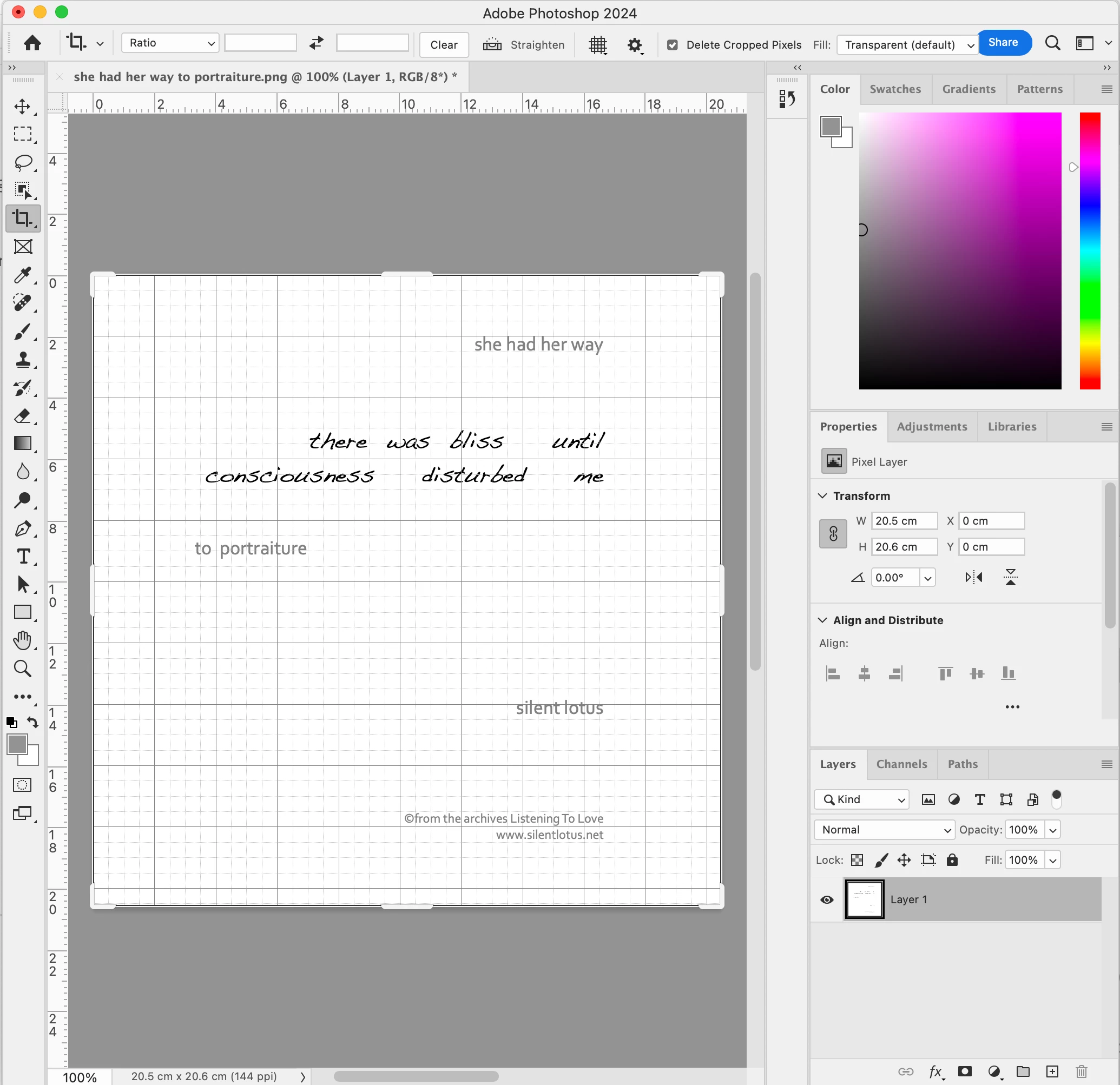
i can see the rulers and the grid 


yet when i go to drag  a tab either from the sides or top or bottom to crop an image

the ruler dissappears while i am cropping ,,,,which keeps me from being able to do a precision crop 


if i change to Classic Mode the ruler remains but there are no tabs to drag ,, only from a corner which is definitely not optimal 


until a week ago i had  been using a 2014 iMac 27 with High Sierra 

and i didn't have this issue 


~~~~~~~~~~~~~~~~~


hopefull someone can tell me there is an easy fix

and that this is not a bug in the adobe system 


many thankyuuus


This topic has been closed for replies.
Correct answer Nermin Kura

unfortunately i was unable to to get back to cheking on this issue until today

i decided to set up the identical situation on my computer screen and try one more time on my own

before once again contacting an Adobe Technician to ask for assistance to repair the situation 

....and  the problem of the ruler dissappearing while cropping was still present


SO ....i tried a few times to click on SHOW CROPPED AREA 

and after about 6 times it finally corrected itself

and the ruler is no longer disappearing 


Photoshop Version 25.3.1  has remained the same 

But 

Sonoma 14.2.1  has been  upgraded to  14.3


~~~~~~~~~~~~~~~~~~


10 replies

Nermin KuraAuthorCorrect answer
Inspiring
January 28, 2024

unfortunately i was unable to to get back to cheking on this issue until today

i decided to set up the identical situation on my computer screen and try one more time on my own

before once again contacting an Adobe Technician to ask for assistance to repair the situation 

....and  the problem of the ruler dissappearing while cropping was still present


SO ....i tried a few times to click on SHOW CROPPED AREA 

and after about 6 times it finally corrected itself

and the ruler is no longer disappearing 


Photoshop Version 25.3.1  has remained the same 

But 

Sonoma 14.2.1  has been  upgraded to  14.3


~~~~~~~~~~~~~~~~~~


Ares Hovhannesyan
Community Expert
Community Expert
January 14, 2024

Thank for note. 

Inspiring
January 13, 2024

i recieved an email from Adobe offering me a new phone appointment 

to look again at my cropping issue with Adobe Photo Shop  2024 ,,Version 25.3.1 

i will contact them next week 


in the meantime i rechecked my cropping issue on a Macbook Air using 

Adobe Photo Shop 2023  version 24.6.0

and it functioned properly


Ares Hovhannesyan
Community Expert
Community Expert
January 8, 2024

What can I suggest you is resetting preferences or reinstalling application.

Inspiring
January 8, 2024

Saturday Jan 7th 


i called Adobe Tech Support and spoke with Vishesh for an hour

he said he would do his best to get the disappearing ruler issue resolved

i allowed him to do a screen share , he tried a number of things including a change to plist  in Preference Settings 

with no luck 


and then all of sudden he cut off the screen share and disappeared 


he never tried to establish a new contact did not call back nor emailed


Inspiring
January 5, 2024

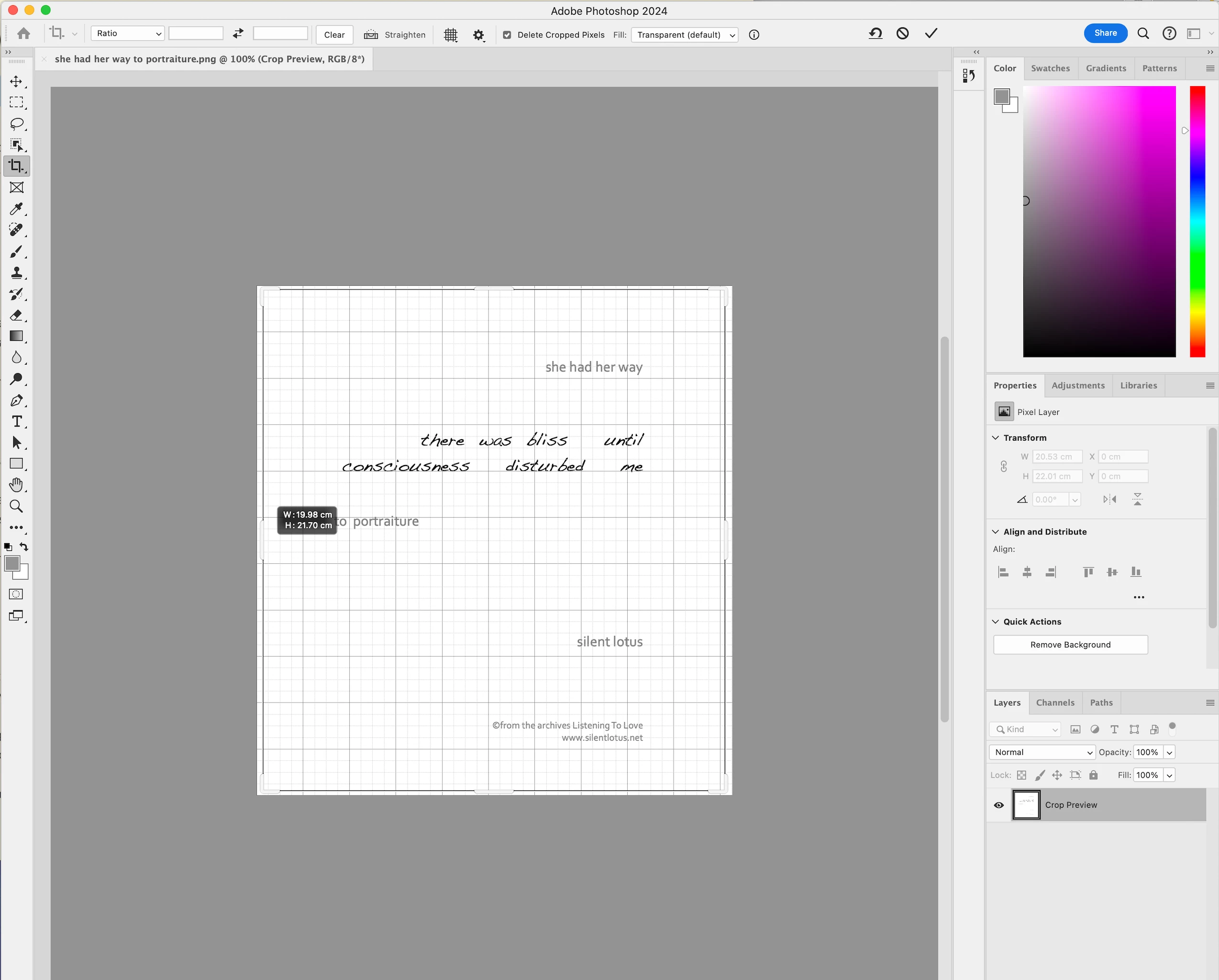
my problem is that the ruler disappears with shifting the position of a tab during cropping 


i have added a second image to show that the ruler becomes a gray area 


i need the ruler to remain visible while cropping so i can choose the exact size to crop 

as i mentioned before this had been working properly before i upgraded to Sonoma 


IF i switch to classic mode...the ruler remains while cropping But i do not have the tabs to grab 

that will allow me to crop just one side


i don't have any problem with the grid 

Ares Hovhannesyan
Community Expert
Community Expert
January 4, 2024

You can use Overlay Option from this menu to keep it "Always On". Also if you want to keep Grid just activate Grid (View->Show -> Grid) or from Properties Panel.

Inspiring
January 3, 2024

just standard cropping


i just added an image to my original post

Inspiring
January 3, 2024

Ares Hovhannesyan
Community Expert
Community Expert
January 3, 2024

Do you mean Overlay Option fro Crop Tool? I am on Win.