joanb56585160
Participating Frequently
April 25, 2019
Answered

Runaway brush stroke

  • April 25, 2019
  • 2 replies
  • 575 views

Especially with the mixer brushes, I get what seems to be the opposite of brush lag. I'll stop painting but the stroke will continue painting.

Has anybody experienced this, and how can I fix it?

Appreciate any help you can give me

Joan
This topic has been closed for replies.
Correct answer Trevor.Dennis

joanb56585160  wrote

Thanks for you help, Ged!

I'm actually beginning to wonder if it's lag. Do you know how to correct that issue?

Again, thanks!

Joan

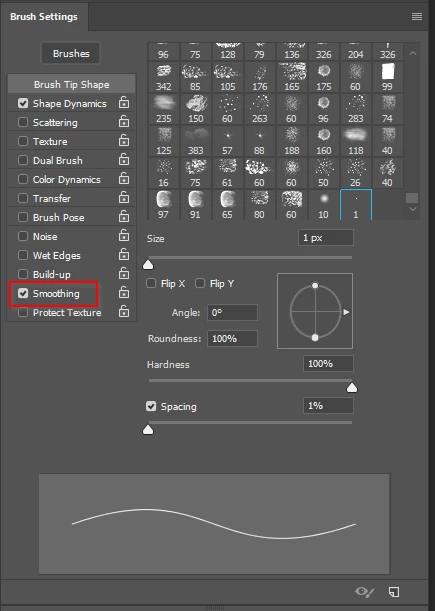
Turn off Smoothing in Brush Settings.  This will at least let you confirm or eliminate that as the issue.

2 replies

davescm
Community Expert
Community Expert
April 25, 2019

Do you have brush smoothing set to a high value and "Catch up on stroke end" set in the options?

Dave

joanb56585160
Participating Frequently
April 26, 2019

Thank you for your help, Dave. 

I don't know, but maybe it was lag. Do you know how to correct that?

Thanks again!

April 25, 2019

Hi

What exact version of Photoshop and OS are you using, have you tried resetting the Tools

If that doesn't help try resetting Photoshop preferences

joanb56585160
Participating Frequently
April 26, 2019

Thanks for you help, Ged!

I'm actually beginning to wonder if it's lag. Do you know how to correct that issue?

Again, thanks!

Joan

Trevor.Dennis
Community Expert
Trevor.DennisCommunity ExpertCorrect answer
Community Expert
April 26, 2019

joanb56585160  wrote

Thanks for you help, Ged!

I'm actually beginning to wonder if it's lag. Do you know how to correct that issue?

Again, thanks!

Joan

Turn off Smoothing in Brush Settings.  This will at least let you confirm or eliminate that as the issue.