Answered
Salvataggio file
Buongiorno,
ho istallalto gli aggiornamenti 2023.
Quando apro il file da camera ROW, Photoshop lo apre in CMYK.
Cosa si deve fare perché si apra in RGB? Grazie
Buongiorno,
ho istallalto gli aggiornamenti 2023.
Quando apro il file da camera ROW, Photoshop lo apre in CMYK.
Cosa si deve fare perché si apra in RGB? Grazie
Good morning
I installed the 2023 updates.
When I open the ROW camera file, Photoshop opens it in CMYK.
What needs to be done to make it open in RGB? Thank you
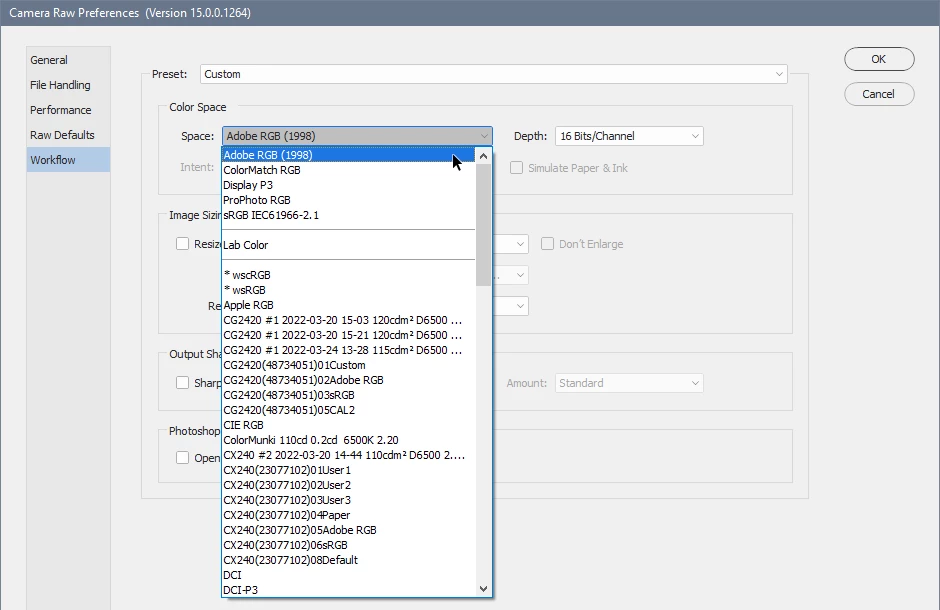
In the Camera Raw preferences > Workflow, choose an RGB color space.
I believe that on a Mac, preferences are found in the Photoshop menu > Preferences > Camera Raw.
You can also open preferences from the Camera Raw window by clicking the Workflow options (blue text at the bottom of the screen), or by pressing Cmd+K.
Already have an account? Login
Enter your E-mail address. We'll send you an e-mail with instructions to reset your password.

 AdChoices