Participating Frequently
November 3, 2024
Answered

Save As Color option?

  • November 3, 2024
  • 2 replies
  • 363 views

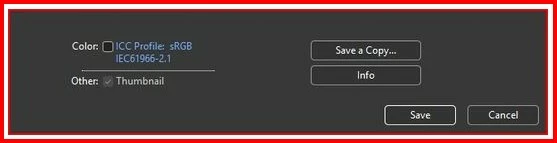
2) Every time I choose "Save As" to save a file appears a menu (see the photo below).
Sometimes the box it's already checked and sometimes isn't.
What excactly this option is for?

 

This topic has been closed for replies.
Correct answer D Fosse

This embeds the color profile, and generally should always be checked. Every file should always have an embedded color profile, and the box will then be checked by default.


The color profile is what defines the colors.

2 replies

Conrad_C
Community Expert
Community Expert
November 3, 2024
quote

Sometimes the box it's already checked and sometimes isn't.

By @Dimitris7


When it’s checked, it means the document you’re saving has an ICC profile embedded in it.

When it’s not checked, it means the document you’re does not have an ICC profile embedded in it.

In other words, Save As is simply carrying forward the current color profile state of the document.


If you want to know about that before saving, set the Status Bar at the bottom of the window to Document Profile. For example, in the picture below of two documents, when you choose Save As for the top document the Color box will be unchecked, because the status bar says it’s Untagged (it has no embedded profile describing its color space). It is not using color management. For the bottom document, the Save As dialog box will have the Color box checked, because it does have an embedded color profile and it is sRGB.


D Fosse
Community Expert
D FosseCommunity ExpertCorrect answer
Community Expert
November 3, 2024

This embeds the color profile, and generally should always be checked. Every file should always have an embedded color profile, and the box will then be checked by default.


The color profile is what defines the colors.

Dimitris7Author
Participating Frequently
November 3, 2024

Dear D. Fosse,
Thank you very very much for your answer.
I, really didn't knew it!
Thank you very much!