
Question
Save as copy in Automate - Batch still with file name copy
Hi
I just jumped from CS4 to CC2021 a month ago.
So far PS and Illustrator runs goods.
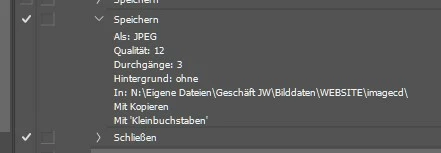
But now I added my old actions to PS for automate - batch and if I use actions with Layers I get prompts to save as copy instead if save as.
I already activated the 2 checkboxes in the settings of file handling for the old save as behaviour.
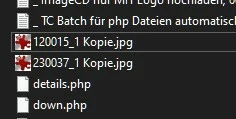
If I change the save action in the old imported actions from CS4 to save as copy I still get the file names with the copy addition although I activate "no added copy in the file name" in the settings.
Any idea?
Thx
 AdChoices