
eugenez79468640
Participating Frequently
October 24, 2021
Resuelto

Save as formats have disappeared Photoshop

  • October 24, 2021
  • 4 respuestas
  • 1227 visualizaciones

I'm using Photoshop many year and never had problem in Save As command. Beging with version 21 I have very restricted set of file format. When I modified image and trying to Save As project with only one layer I have such limit set of formats:
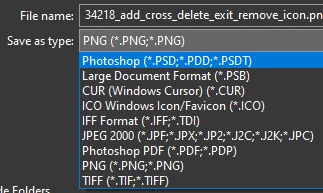
But when project has more then one layer the limit of set formats in the command Save As following
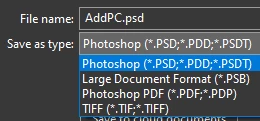
I upgraded Photoshop to version 22.5.1 and expected that the bug will fixed but it didn't hapence.

How to fix problem with formats in Save As command? 

Thanks

Este tema ha sido cerrado para respuestas.
Mejor respuesta de Ged_Traynor

Hi

Take look here

https://helpx.adobe.com/photoshop/using/saving-images.html

Scroll down to this bit "Revert to legacy Save As options"

4 respuestas

Participating Frequently
June 29, 2022

Adobe ruined photoshop by trying to do stuff nobody asked them for. Can you believe it that this disease is still in the latest up to date version of photoshop? Pathetic... Plus their official support is hidden, theyre hiding behind volunteers lol

NB, colourmanagement
Community Expert
Community Expert
October 25, 2021

Try saving as a copy


I hope this helps
neil barstow, colourmanagement net :: adobe forum volunteer
google me "neil barstow colourmanagement" for lots of free articles on colour management
[please only use the blue reply button at the top of the page, this maintains the original thread title and chronological order of posts]


D Fosse
Community Expert
Community Expert
October 24, 2021

File formats that don't support all the current properties of the file are now moved to Save A Copy.


There is a preference setting to revert to the old save behavior.


Ged_Traynor
Community Expert
Ged_TraynorCommunity ExpertRespuesta
Community Expert
October 24, 2021

Hi

Take look here

https://helpx.adobe.com/photoshop/using/saving-images.html

Scroll down to this bit "Revert to legacy Save As options"