

JFlemingFBCZ
Inspiring
December 11, 2023
Answered

Save as glitch in PS 25.2.0

  • December 11, 2023
  • 5 replies
  • 269 views

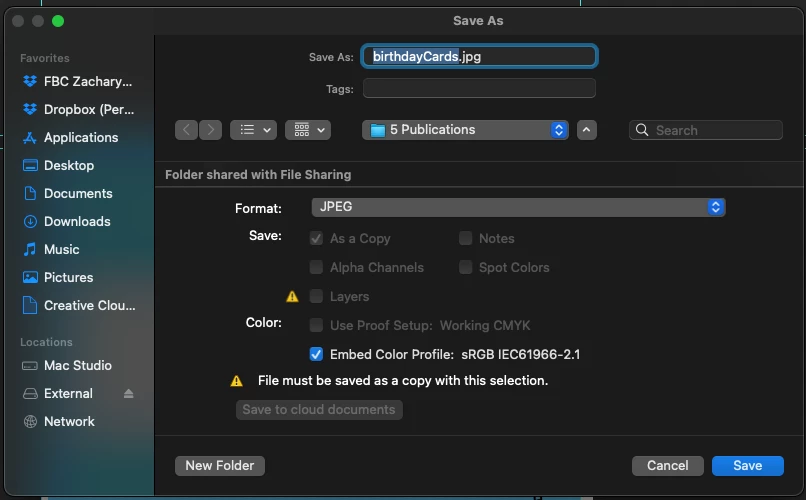
Just got a new Mac Studio, have loaded all my goodies on there and am starting to work, but the save as and save a copy function in Photoshop won't allow me to see the folder contents where I'm saving. I can create a new folder, but not choose a different folder because they're now invisible.


Here's what I'm seeing - When I click the up/down arrow beside the folder name dropdown, it only shrinks the save window instead of revealing the contents of the folder I've got selected. I'm finding that lack of functionality a problem.


I'm on a Mac Studio running a Ventura 13.4.1 OS


This topic has been closed for replies.
Correct answer Jeff Arola

Here is another thread with the same issue:

https://community.adobe.com/t5/photoshop-ecosystem-discussions/latest-photoshop-save-as-dialogue-window-will-not-allow-me-to-save-to-local-hard-disk/m-p/13137252


The poster wrote that after updating macOS Ventura that fixed the issue.


Apple>System Settings>General>Software Update


5 replies

Jeff Arola
Community Expert
Jeff ArolaCommunity ExpertCorrect answer
Community Expert
December 11, 2023

Here is another thread with the same issue:

https://community.adobe.com/t5/photoshop-ecosystem-discussions/latest-photoshop-save-as-dialogue-window-will-not-allow-me-to-save-to-local-hard-disk/m-p/13137252


The poster wrote that after updating macOS Ventura that fixed the issue.


Apple>System Settings>General>Software Update


JFlemingFBCZ
Inspiring
December 11, 2023

Another great idea - Toggled the 'full disk access' button there, restarted the application and still no change.

JFlemingFBCZ
Inspiring
December 11, 2023

Great idea but no change to the save window. The original file is on an external.

Jeff Arola
Community Expert
Community Expert
December 11, 2023

If you go to Apple>System Settings>Privacy & Security>Full Disk Access, is Adobe Photoshop 2024 listed?

Jeff Arola
Community Expert
Community Expert
December 11, 2023

What about if try your Desktop or Documents?


Is the folder you want to save to on an external drive?