This topic has been closed for replies.
Correct answer davescm

Please search before posting.

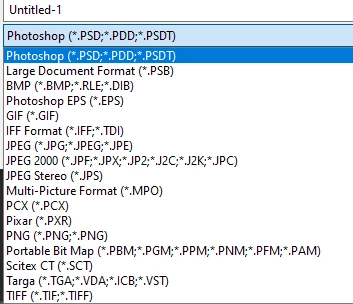
From v22.4, if your file contains items that are not supported in your required format (e.g. layers or 16 bits/channel) then the file format is moved to the Save a Copy command. This was driven by changes in the Mac Operating System, although the changes are applied to both Mac and Windows versions to keep them aligned.
In the case of PDF, the dialogues that follow can result in file elements being lost (e.g. editability, downsampling) so it appears in Save a Copy.

https://helpx.adobe.com/photoshop/using/whats-new.html


Dave

3 replies

JJMack
Community Expert
Community Expert
May 18, 2021

You could  Programs a script that basically works like Photoshop 'Savs As" worked in the past. The script would have a different UI than  good old "Save AS"a Photoshop which used a system dialog.  The script would have a ScripUI interface quite like Adobe Script "Export Layers to Files. Save the Document in the image file format you want to save. In fact I use  code from Adobe  'Export Layer to Files' creating the script for my personal use.


Change the title in the dialog  to Save As and process the document. It will be a Plug-in Script.


JJMack
davescm
Community Expert
davescmCommunity ExpertCorrect answer
Community Expert
May 18, 2021

Please search before posting.

From v22.4, if your file contains items that are not supported in your required format (e.g. layers or 16 bits/channel) then the file format is moved to the Save a Copy command. This was driven by changes in the Mac Operating System, although the changes are applied to both Mac and Windows versions to keep them aligned.
In the case of PDF, the dialogues that follow can result in file elements being lost (e.g. editability, downsampling) so it appears in Save a Copy.

https://helpx.adobe.com/photoshop/using/whats-new.html


Dave

Participant
May 21, 2021

Well I'm glad to have found it but placing the text "copy" in all my pdf files is going to be a pain in the %&^^#.

Participant
May 18, 2021

it doesnt matter the size/dimensions or how many bits/channel   I just cant get teh PDF option