Participant
January 12, 2022
Answered

Save as Pdf is no longer possible

  • January 12, 2022
  • 6 replies
  • 449 views

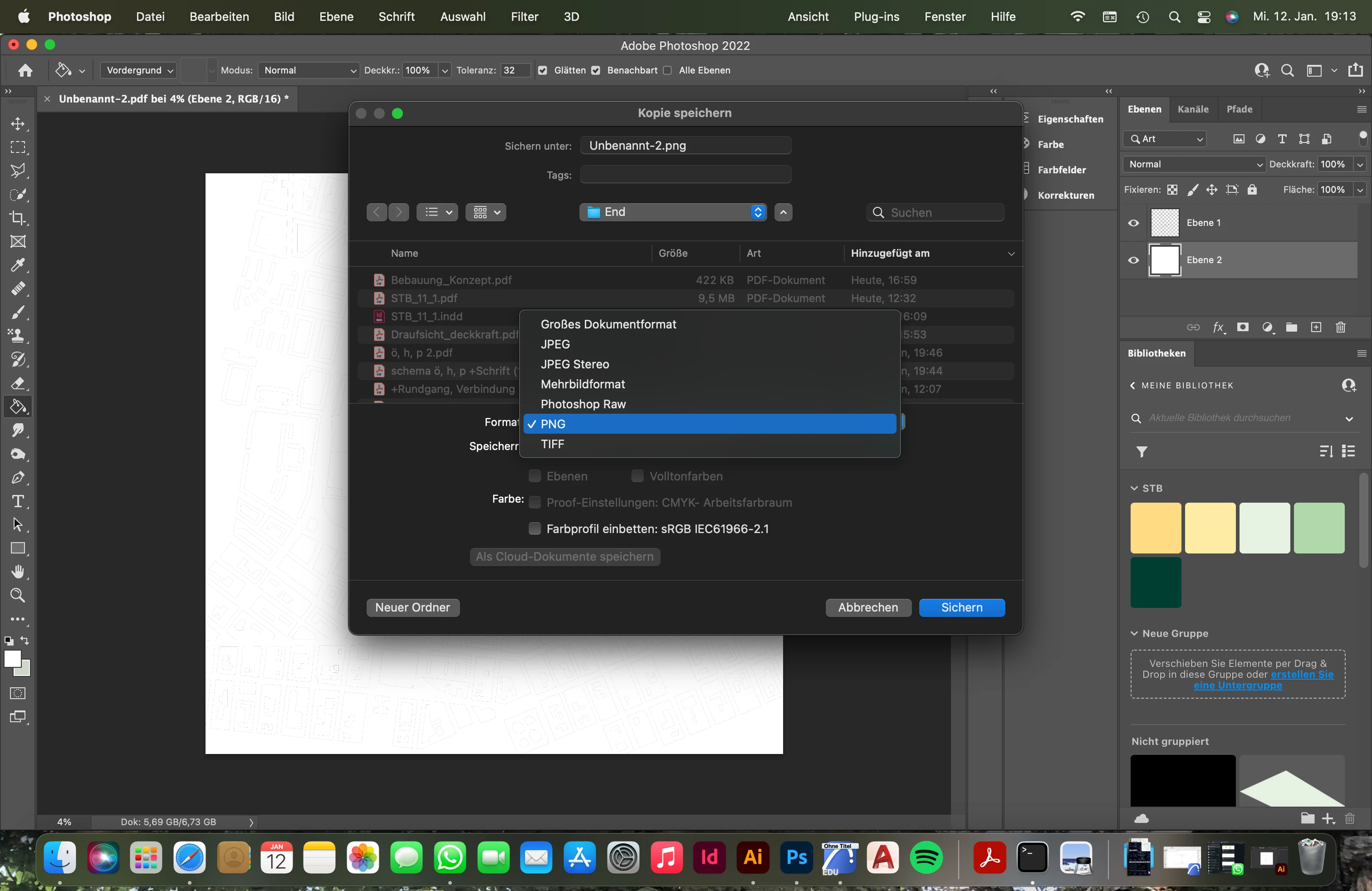
So since I last updated Photoshop, I can't export as Pdf anymore. The button for Pdf is just nowhere to be found. Not in the 'save as' as well as 'save copy'. I know about the changes Adobe did in the Summer, that you can't save it with 'save as', but it still worked till yesterday..The thing is with some files it still works with others it doesn't. Expecially when the file was used in Illustrator before, it's not showing up 

what can I do? 
This topic has been closed for replies.
Correct answer J453

The size of the document is the problem. It exceeds 2GB in file size.

6 replies

J453Correct answer
Legend
January 12, 2022

The size of the document is the problem. It exceeds 2GB in file size.

J E L
Community Expert
Community Expert
January 12, 2022

Good catch, @Test Screen Name, but that shouldn't matter as I can "save as" any RGB 16-bit files to PDF. However, I notice that the file open in @Chrisi0809 screenshot IS a PDF to begin with. I can still save a 16-bit PDF to a PDF again with "save as." I don't think I've ever been able to choose PDF using Export As or Save for Web in any version. Unless this has to do with exporting art boards or layer comps to PDF?

Participant
January 12, 2022

I tried this too, it's not working as well. It's still not showing up in the drop down. 

Participant
January 12, 2022

yes that's what I meant. I checked the settings now and everything is the same as in your screenshots, but it's still not working. 

Legend
January 12, 2022

That's a 16 bit per channel image. You need to turn it to an 8 bit per channel image to save a PDF, I suspect.

J E L
Community Expert
Community Expert
January 12, 2022

Hi @Chrisi0809 Are you saying that with "Save As" you don't see Photoshop PDF in the Type dropdown list? How are your File Saving Options checked in your Preferences under File Handling?