
Answered
Save as type
I use Ps latest version. I know in new version Save as type option is limited. In the tutorial save as type is JPEG is used. How can I do this in latest version? I use Windows 11.
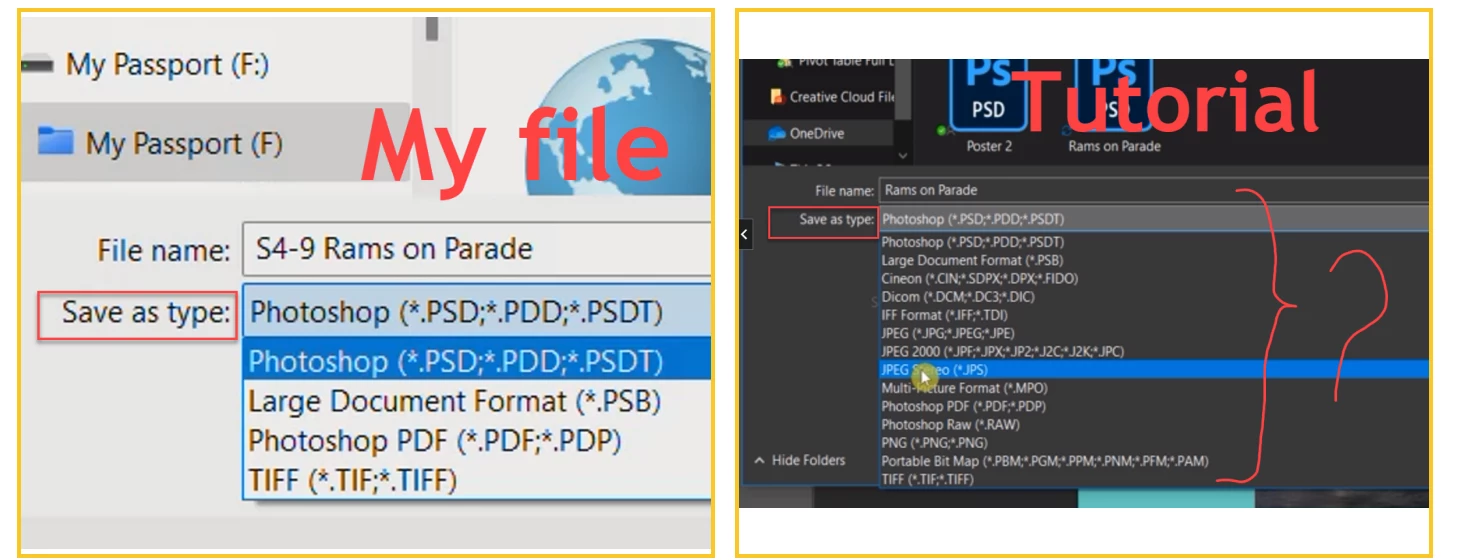

I use Ps latest version. I know in new version Save as type option is limited. In the tutorial save as type is JPEG is used. How can I do this in latest version? I use Windows 11.
The Photoshop format supports saving your document with layers. Other formats that don't support layers, such as a JPEG, flatten all of the layers into one layer.
You can see what flattening would look like on a sample document by going to the Layers panel menu (the hamburger menu in the upper right of the Layers panel) and selecting Flatten Image (you can undo or revert, just don't save if you want to preserve your layers).
Already have an account? Login
Enter your E-mail address. We'll send you an e-mail with instructions to reset your password.
 AdChoices