
Participant
January 20, 2023
Answered

Save Error/Corrupted File

  • January 20, 2023
  • 4 replies
  • 832 views

Saved as document as .psd only to find it saved as a "file."  In doing so, I have lost the ability to open the document, and lost a ridiculous amount of work.  Nothing is saved in my recovery files, recent, or appdata.  The only possible explanation I have is that the file title included a period in it, but regardless the file was showing a .psd extention when open in Photoshop.


Has anyone every had this happen and/or do you know of any way to recover/convert the file? 
Correct answer D Fosse

Two good working rules for file management in Windows:

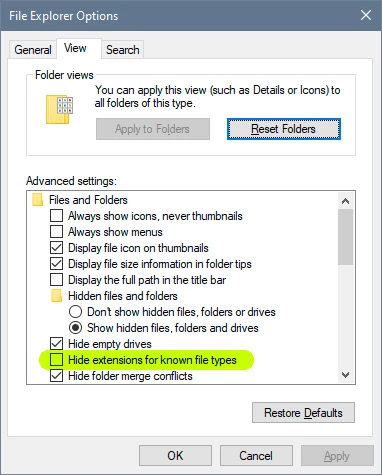
  • set Windows to show file extensions.
  • never use periods in file names. In Windows, everything after the last period character is a file extension! But with no extensions showing, the next-to-last period can be interpreted as the last.


In other words, this has nothing to do with Photoshop. This is just Windows file management. Your file is easily fixed by giving it the correct .psd extension.


Replace all periods in file names with an under_score. That's always safe. And uncheck this:

4 replies

Mohammad.Harb
Community Expert
Community Expert
January 20, 2023

Search your computer by size from Huge sizes to small. you may find some huge file missing the extesion,

one more point , saving files as a cloud document "sometimies" will SAVE  time & effort.

CShubert
Community Manager
Community Manager
January 20, 2023

Hi @goodgriefexp sorry to hear this, have you updated to the latest Ps, 24.1.1?


As @D Fosse pointed out, make sure your settings are correct to help avoid this.


It may help if we could see your Photoshop System Info. Launch Photoshop, and select Help >System Info...and copy/paste the text in a reply.  


Thank you,

Cory

D Fosse
Community Expert
D FosseCommunity ExpertCorrect answer
Community Expert
January 20, 2023

Two good working rules for file management in Windows:

  • set Windows to show file extensions.
  • never use periods in file names. In Windows, everything after the last period character is a file extension! But with no extensions showing, the next-to-last period can be interpreted as the last.


In other words, this has nothing to do with Photoshop. This is just Windows file management. Your file is easily fixed by giving it the correct .psd extension.


Replace all periods in file names with an under_score. That's always safe. And uncheck this:

Participant
January 20, 2023

You, Sir D Fosse, have just saved my life and taught me something I didn't know existed.

Bojan Živković11378569
Community Expert
Community Expert
January 20, 2023

Your file is saved as flat file instead of layered, is that your problem? You have one layer in the document instead of many?

I am testing with this file name Beba close.up 2 copy.psd and everything works fine. Even this name works fine Beba close.up 2 copy.jpg.psd. File opens with layers. What is exactly your file name?