
Participant
December 26, 2017
Answered

Save for web error

  • December 26, 2017
  • 1 reply
  • 7382 views

As of yesterday, when I try to save for web, I get an error message "Photoshop could not complete this operation. The specified volume could not be found". Photoshop CC 2017. I have used this function for thousands of images, but suddenly the error has appeared. My images are jpegs 510 x 510 @ 72ppi. I've tried closing and reopening Photoshop, but the error message persists.
    This topic has been closed for replies.
    Correct answer gener7

    I'm sorry, but I don't have a directory or file by that name. The only files I have in the Users/[Username]/Library/Preferences/ directory that relates to Adobe Creative Cloud are...

    com.adobe.acc.AdobeCreativeCloud.plist

    com.adobe.acc.AdobeDesktopService.plist

    Also, I did not add to the old forum thread, as that discussion is marked as solved.

    thanks


    Some MacOS directories are hidden by default. I've permanently unhidden mine by default and don't always remember others don't.

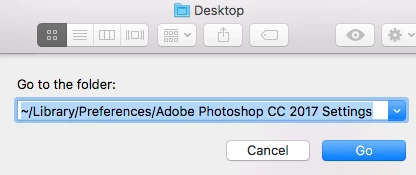
    Open a Finder window and in the Finder menu at the top of your screen, select Go > Go to Folder

    Copy and Paste this path in dialog below:  ~/Library/Preferences/Adobe Photoshop CC 2017 Settings   (~/ is your Home directory.)

    Click "Go" and you should see the files. I'm using MacOS 10.12.6

    1 reply

    gener7
    Community Expert
    Community Expert
    December 26, 2017

    This answer is a bit old, (CS5) but I'm sure it will help:

    Photoshop: Selecting Save for Web gives error: "Could not complete this operation. An unknown operating system error has…

    If the first answer does not help, look into the followup replies to this topic and if necessary add your situation.

    Gene

    Participant
    December 26, 2017

    Thank you, but I have no such file or anything like it in Mac: Users/[Username]/Library/Preferences/

    gener7
    Community Expert
    Community Expert
    December 26, 2017

    Try: Users/[Username]/Library/Preferences/Adobe Photoshop CC 2017 Settings/

    Save for Web Prefs.psp should be there.