Participant
December 20, 2021
Answered

Save for web (legacy) limits to 1094px wide

  • December 20, 2021
  • 3 replies
  • 1192 views

I'm trying to save out slices using Save for Web, document is 1440px wide... Photoshop is changing the width to 1094px? Get an error pop up when I try to change back to 1440. Strange as I always do this way but suddenly having this issue, please help! 

This topic has been closed for replies.
Correct answer jane-e

@Jade219671497c57 

  • The size limit for Save for Web (legacy) is 8192 px
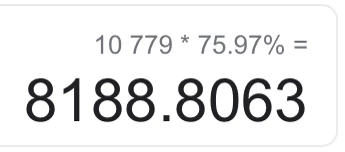
  • Your file is being reduced by 75.97%
  • Your height is 10779 px
  • 10,779 * 75.97% is 8188.8063
  • Your new height is 8189
  • Photoshop has kept your image proportional
  • Therefore your new width is 1094 pixels


Jane


3 replies

jane-e
Community Expert
jane-eCommunity ExpertCorrect answer
Community Expert
December 20, 2021

@Jade219671497c57 

  • The size limit for Save for Web (legacy) is 8192 px
  • Your file is being reduced by 75.97%
  • Your height is 10779 px
  • 10,779 * 75.97% is 8188.8063
  • Your new height is 8189
  • Photoshop has kept your image proportional
  • Therefore your new width is 1094 pixels


Jane


Participant
December 20, 2021

Thanks so much!

jane-e
Community Expert
Community Expert
December 20, 2021

You're welcome, @Jade219671497c57 !


~ Jane


Participant
December 20, 2021

No, image is 1440px... thanks 

Legend
December 20, 2021

I'm guessing the image is only 1094 pixels wide. You can't make it bigger, only smaller.