Participant
November 10, 2019
Question

save for web not working

  • November 10, 2019
  • 3 replies
  • 5333 views

I've been trying to use the save for web option to save a GIF, but I get the message "Could not complete this operation. An unknown error has occurred.":
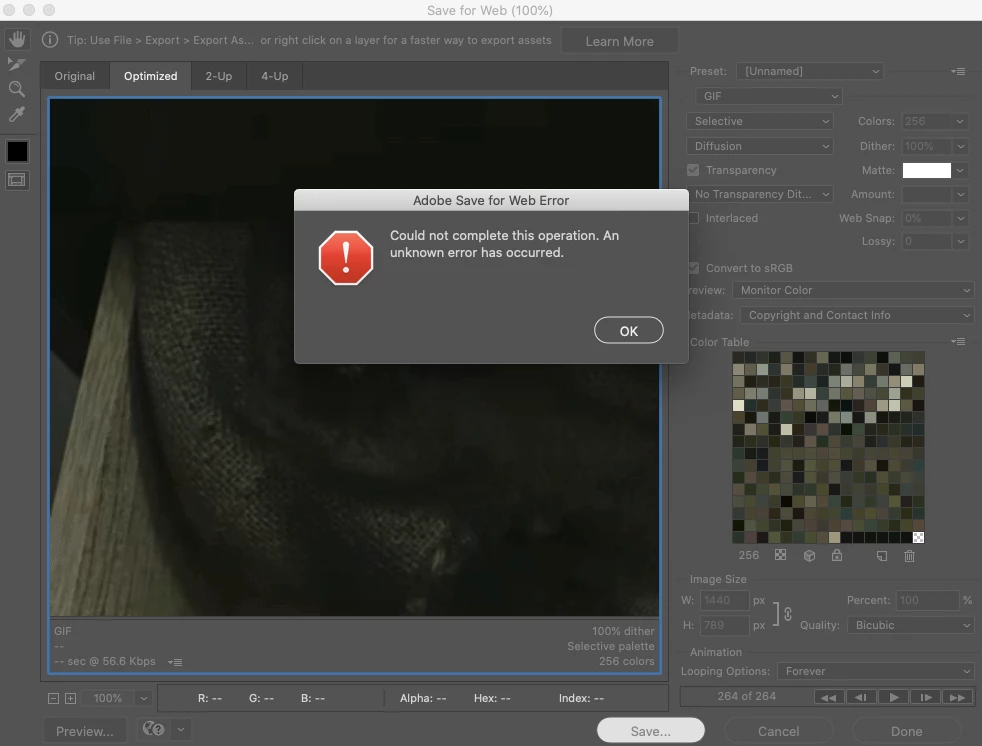
 Before this, I was working on a GIF and saved for web without any issues. I didn't change any of the settings after saving that GIF, and I didn't change any of the settings while editing this one.
I tried to see if it was this particular project that was giving me issues, but now the save for web option doesn't work when I try to export any GIF, JPEG, PNG-8, PNG-24, or WBMP.
I've spent hours looking through forums and I've tried all the options (decreased image size, reduced resolution, ect.) but none have worked. I also deleted the program and reinstalled it, but that didn't change anything either. Both my Mac and Photoshop are up to date, but I still get this error notificaiton whenever I try to save for web. 

This topic has been closed for replies.

3 replies

Nancy OShea
Community Expert
Community Expert
November 10, 2019

I never use GIF  except for animated ones and then only rarely.  That message usually indicates a memory problem.  Try reducing the image height, width and number of animation frames which also reduces file size

Nancy O'Shea— Product User & Community Expert
Participating Frequently
September 23, 2020

I have the same issue. reducing size and lenght of the video doesn't change the situation. I have the most updated version of Photoshop and Mac Mojave. If saving for the web is outdated, how can you create an ANIMATED GIF from a quick time video then? I don't know of any other way of doing it. Thanks for the help 

PECourtejoie
Community Expert
Community Expert
September 23, 2020

Hello, is it only quicktime videos that cause the issue? smaller physical dimensions?

Does any other type of video work?

gener7
Community Expert
Community Expert
November 10, 2019

Go into Preferences > Performance and checkmark Legacy Compositing. Restart Photoshop and see if that helps.


This may help: https://feedback.photoshop.com/photoshop_family/topics/photoshop_selecting_save_for_web_gives_error_could_not_complete_this_operation_an_unknown_operating_system_error_has_occurred?topic-reply-list%5Bsettings%5D%5Bfilter_by%5D=all


There's a number of reasons addressed including oversized files.


Legacy Save for Web is a bit outdated and will soon be removed.

Try File > Export > Export As... for jpeg and png

grstAuthor
Participant
November 10, 2019

I just tried the first thing you said and no luck.

I've tried everything in the thread as well.

   Is there an alternative to Save for Web?? 

Participant
May 13, 2020

You need updating to Photoshop 2020.

silk-m
Community Expert
Community Expert
November 10, 2019

Hi

Adobe Save for Web 13.0 Prefs may have been damaged. Please throw it away in the trash.

/Users/User Name/Library/Preferences/Adobe Save for Web 13.0 Prefs


Adobe Save for Web 13.0 Prefs is not updated when Photoshop is reinstalled.


Best,


--Susumu Iwasaki
grstAuthor
Participant
November 10, 2019

I just deleted the Save for Web 13.0 Preferences file but I'm still getting the same error message.