
Inspiring
July 27, 2018
Question

Saving a live type layer as a PDF for Embossing/Stamping Vector Plate

  • July 27, 2018
  • 4 replies
  • 3036 views

Saving a PS (psd) (CC2015) live type layer as a  PDF for Embossing/Stamping Vector Plate

When I save the PSD file as a Photoshop PDF the "script font " the words "Our Little Secret" font  Madelyn (licensed) the a "cross stroke" loses the tail end...  see file screenshot and PDF in "wireframe mode in pitstop"

san serif fonts seem to work fine.. other script fonts are behaving the same way on the last letter... Insights?
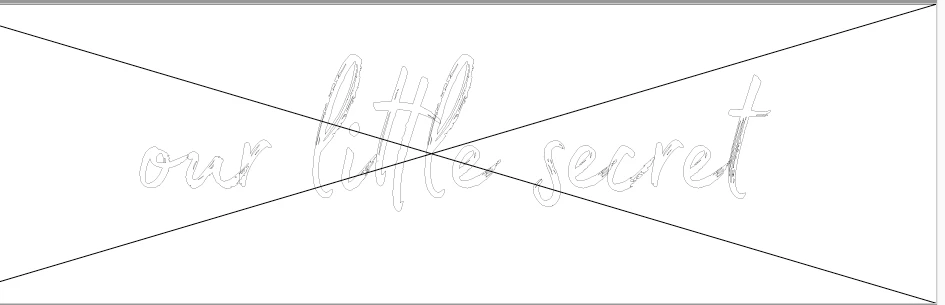

Dropbox - font test.pdf

These are the settings im saving with in PS CC2015

PDF Preset: Vector

Photoshop editing capabilities on

Compatibility: Acrobat 7 (PDF 1.6)

Standards Compliance: None

General

    Pages: All

    Spreads: Off

    View: Default

    Layout: Default

    Full Screen: Off

    Generate Thumbnails: Off

    Optimize PDF: Off

    Create Acrobat Layers: Off

    Export Layers: Visible and Printable Layers

    Include Bookmarks: Off

    Include Hyperlinks: Off

    Export Nonprinting Objects: Off

    Export Visible Guides and Baseline Grids: Off

    Create Tagged PDF: Off

    Interactive Elements: Do Not Include

Compression

    Color Images

        No Sampling Change

        for images above: 600 ppi

        Compression: None

        Tile Size: N/A

        Quality: None

    Grayscale Images

        Bicubic Downsample at: 300 ppi

        for images above: 450 ppi

        Compression: Automatic

        Tile Size: N/A

        Quality: Maximum

    Monochrome Images

        Bicubic Downsample at: 1200 ppi

        for images above: 1800 ppi

        Compression: CCITT Group 4

    Compress Text and Line Art: On

    Crop Image Data to Frames: On

Marks and Bleeds

    Crop Marks: On

    Bleed Marks: Off

    Registration Marks: Off

    Color Bars: Off

    Page Information: Off

    Page Mark Type: Default

    Weight: 0.50 pt

    Offset: 0.125 in

    Use Document Bleed Settings: On

    Bleed Top: 0.125 in

    Bleed Bottom: 0.125 in

    Bleed Left: 0.125 in

    Bleed Right: 0.125 in

    Include Slug Area: On

Output

    Color Conversion: No Color Conversion

    Destination: N/A

    Profile Inclusion Policy: Include RGB And Tagged Source CMYK Profiles

    Simulate Overprint: N/A

    Output Intent Profile Name: N/A

    Output Condition: N/A

    Output Condition Identifier: N/A

    Registry Name: N/A

Advanced

    Subset Fonts Below: 100%

    Omit PDF: Off

    Omit EPS: Off

    Omit Bitmap Images: Off

    Transparency Flattener Preset: N/A

    Ignore Spread Overrides: N/A

    Display Title: File Name

    Language: English: USA

This topic has been closed for replies.

4 replies

barbara_a7746676
Community Expert
Community Expert
July 30, 2018

I was able to install the font.

When I save as PDF from Photoshop and the type is black, the "t" is cut off.

PHOTOSHOP:

PDF:

If I save when the type is white (which it is in the your original file that I downloaded), it is not cut off.

PHOTOSHOP (I added black layer underneath the type layer to make it easier to see.)

PDF

This doesn't solve the mystery, but I hope it may help.

Inspiring
July 30, 2018

thanks .. like you said a mystery.. hmm i wonder if i add a white layer under it!

barbara_a7746676
Community Expert
Community Expert
July 30, 2018

This time, I tried your workflow. I saved your original file that has white type as a PSD file. Then I placed the PSD into InDesign with a colored rectangle behind the type. Exported to PDF from InDesign using PDFX-4 preset.

The "t" looks fine in the PDF:

When creating the PDF from InDesign, I changed Advanced font subset to zero for one PDF and left it at 100% for a second one. It didn't make any difference in the PDF output. In both PDFs, the "t" was just fine.

So, I'm not able to replicate the issue.

I'm using the most current versions of Adobe software, and it sounds like you are too. Is that correct?

Sebastian Bleak
Community Expert
Community Expert
July 30, 2018

Hi Amy,

Thanks for sending over the file and the font.

When I tried your workflow, the live type consistently changed once I exported as a PDF.

** I was getting better results when I would create the Live Type in Adobe Illustrator and exported it as SVG. Would this be a workflow you can try? I'm not sure if you have access to Ai.

When I created the Live Type in Ai and exported as PDF, I would run into issues. My guess is PDF isn't understanding all those cool adjustments you made in the Character Panel. It acts like it's having trouble handling all the edits.

Hope you find this helpful,

Sebastian

Inspiring
July 30, 2018

Hi Sebastian,

I have CC all apps. The workflow at the publisher that I work for is that most book jackets are designed in PS and then placed in INDD. Trying to use existing files.. and saving as a vector pdf . without recreating in INDD or Illustrator for registration purposes and a workflow with less steps. It only seems to be some fonts where this occurs..

Dropbox - titletest.2.pdf this font does the same thing. you can see that the pdf is a saved as a vector pdf from the paths

sharp_hands16B8
Community Expert
Community Expert
July 30, 2018

Sounds like a glitch in how the font options were built. I've seen this font on free download sites and I often run into similar problems.

Inspiring
July 30, 2018

This is a paid font using UTC...

sharp_hands16B8
Community Expert
Community Expert
July 30, 2018

Hi Amy,

this sounds like maybe an alternate glyphs issue with the Photoshop to PDF workflow. You may have discovered a bug! When using an alternate glyph version of a letter, and then exporting it seems like it's reverting back to the source glyph.

Check out this video from Jesus Ramirez that explains the glyphs and alternate glyphs panel in a font.

How To Use Alternate Glyphs In Photoshop - YouTube

barbara_a7746676
Community Expert
Community Expert
July 27, 2018

I may not be understanding about the cross-stroke. If you're referring to the horizontal stroke on the "t", I don't see any difference. Of course, I don't have Pitstop so that may be why.

I think I have the same font that you do, although for some reason the "s" is a different shape.

When saving to PDF from Photoshop with live text, the only difference I see is that the brush texture in the type is slightly more closed up.

If I convert the text to a shape in Photoshop and save as PDF, the texture is a little more accurate, not quite as closed up.

I tried using InDesign and exporting to PDF with live type. The result was more accurate than Photoshop saving to Photoshop PDF.

In all cases, I used the PDF/X-4:2010 preset.

Does this help at all?

Inspiring
July 30, 2018

i need to be able to save the psd. file as a pdf ( for foil stamping- embossing) when you save with perserve editing capabilities, it is vector and not raster.) yes the -- on the t is missing the right side "extension"

Inspiring
July 30, 2018

the objective is to keep the font editable and not convert to shape.