Jp_508
Inspiring
January 25, 2017
Answered

Saving a Photoshop Image, Jpeg Options

  • January 25, 2017
  • 2 replies
  • 5918 views

I imported this Jpeg image to PS to add text, when I go to save the image it prompts a text dialog box that says Jpeg Options. I want to save the highest quality possible but do not understand what this box is informing me or what I should do. I've been saving as it's shown, looks ok but maybe I' doing it wrong. Can anyone explain how to understand this dialog box? It would be greatly appreciated.....Jerry

This topic has been closed for replies.
Correct answer davescm

Hi

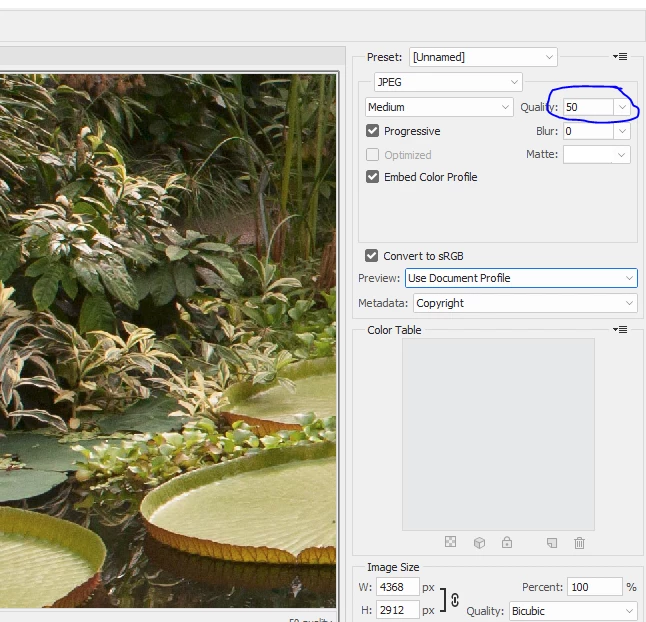
If you use File - Export - Save for Web (Legacy) you will be able to adjust the quality and see a preview of the impact on your image and also the resulting file size. The lower the number - the more compression will be used which results in a smaller file but impacts picture quality.

I would always recommend saving a PSD master - complete with layers, and Exporting a compressed jpeg copy if you need one.

Dave

2 replies

D Fosse
Community Expert
Community Expert
January 25, 2017

The quality slider sets the compression level. 8 is usually a comfortable level - not too much compression, but still a significant reduction in file size.

However. And this is a big one.

Jpeg compression is destructive, irreversible and cumulative. A jpeg deteriorates every single time it is resaved. So good practice here is to not resave jpegs if you can avoid it - save as TIFF or PSD instead. These are both non-destructive formats that preserve all image data.

The purpose of the jpeg format is mainly to save bandwidth over slow internet connections. It should be treated as a final delivery format for finished files, where you save out a jpeg copy at the very end.

edit - cross post

second edit - a single resave won't hurt. Just try not to unless necessary.

Jp_508
Jp_508Author
Inspiring
January 25, 2017

Thanks for the info, I always shoot raw & save my final as Jpeg using Lr. Just recently subscribed to CC with Lr & Ps. Always wanted to learn Ps & knew it would be a serious learning curve, slow & steady. I'm just scratching the surface & didn't know that saving as a TIFF or PSD would save all image data, good to know & thanks again for the help.

gener7
Community Expert
Community Expert
January 25, 2017

I also want to add that jpeg saves space by throwing out image detail. At high settings, it's not noticeable, but push the slider too far down and you will understand.  It is called "lossy compression".

davescm
Community Expert
davescmCommunity ExpertCorrect answer
Community Expert
January 25, 2017

Hi

If you use File - Export - Save for Web (Legacy) you will be able to adjust the quality and see a preview of the impact on your image and also the resulting file size. The lower the number - the more compression will be used which results in a smaller file but impacts picture quality.

I would always recommend saving a PSD master - complete with layers, and Exporting a compressed jpeg copy if you need one.

Dave

Jp_508
Jp_508Author
Inspiring
January 25, 2017

Thanks for your insight, will do.

gener7
Community Expert
Community Expert
January 25, 2017

If you are going to use File > Save as... Jpeg  These are good settings. 10-12 Quality.