sonicjaguar
Participant
May 31, 2017
Answered

Saving As Jpeg Brightens Shadows

  • May 31, 2017
  • 2 replies
  • 914 views

Hi all,

First time posting so excuse me if this is not in the correct format or spot.

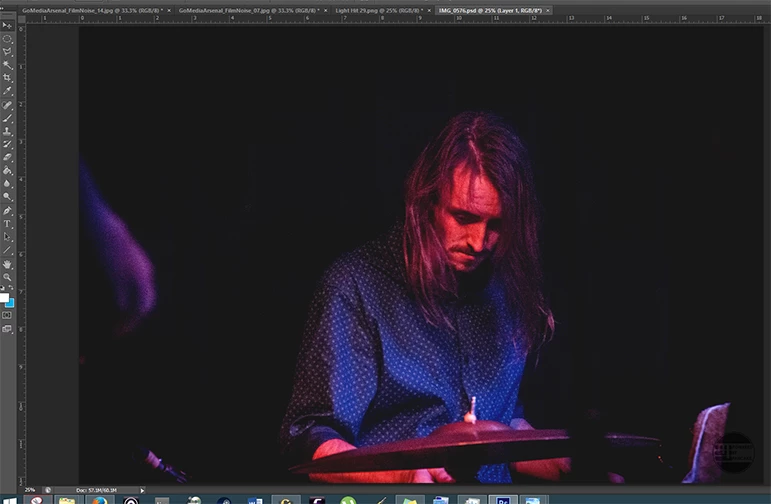
I'm having an issue where I am editing a RAW photo in PS, create a new Levels adjustment layer, and fade the shadows. However, when I try and save the completed work as a Jpeg file, it brings the shadows right up and reintroduces noise that occurs when brightening the shadows.

Original File inside PS
Jpeg preview (the final Jpeg file also looks like this)
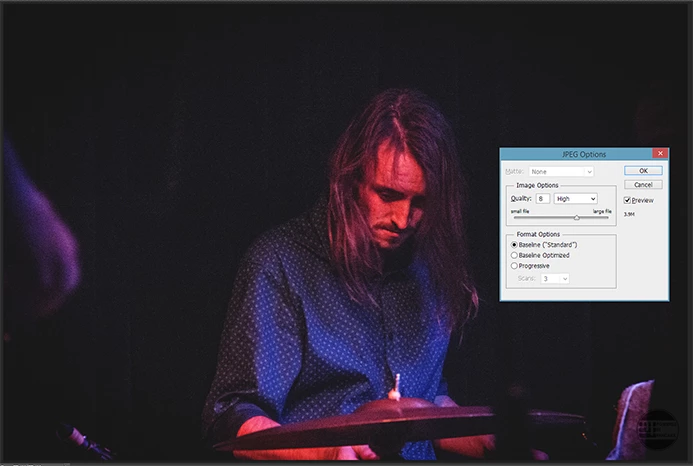
I tried merging all the layers, I've tried bumping it from 8bit to 16bit. Not sure why this is happening as I like what I see on the project file, but the Jpeg result is not so pleasing!

I am running Windows 8.1.  Photoshop CS6, on a 64bit system. Perhaps I need to empty my scratch disks (though im not sure why this would be the issue as the scratch disks are set to drives with at least 200gb of free space).

If you need any more info that I haven't provided, let me know.

Kind regards,

Max

    This topic has been closed for replies.
    Correct answer c.pfaffenbichler

    So is there any way to stop PS from doing this? Would increasing the cache size do it? Or is working with noisy images just not recommended? I enjoy a bit of grain and noise but if I can't have what I'm seeing inside the PS file be outputted correctly to a Jpeg then I guess I might steer clear of it.

    Thanks for the info! Much appreciated. Always nice to know new things.


    Would increasing the cache size do it?

    You’d have to reduce the Cache Levels to 1, I think.

    But this may affect performance, so you will have to weigh the pros and cons.

    As you noticed the effect just recently but have probably been working with Photoshop for a while you could draw the conclusion that it »usually« simply does not become noticeable …

    2 replies

    c.pfaffenbichler
    Community Expert
    Community Expert
    May 31, 2017

    Is the difference noticeable at View > 100%?

    If you overlay the jpg on the psd in Photoshop is there a noticeable difference?

    sonicjaguar
    Participant
    May 31, 2017

    Interesting! Thanks for your quick replies. Zooming in to 100% and then hiding and showing the jpeg overlayed on the original PSD doesn't look any different. Barely anyway. But viewing it at anything less than 66% shows the brightened shadows.

    Why is this happening?

    c.pfaffenbichler
    Community Expert
    Community Expert
    May 31, 2017

    Occasionally the issue can arise that the effect of Adjustment Layers or combinations of Layers with certain Blend Modes seems to disappear or weaken on flattening an image or saving a copy in a format that does not support Layers (which pretty much amounts to the same thing).

    This can be owed to the fact that Photoshop (depending on the Cache Levels Preferences setting and the on-screen magnification) uses downsampled stand-ins to preview the Layers and their interactions faster. (see "Chache Levels" at Optimize performance | Photoshop )

    These cached lores versions can contain pixels that assume values that are absent in the actual layer for example.

    This would be most acute in an image that has only black and white pixels but with particularly noisy/grainy photographs it may also become noticeable.

    K´mo
    Participating Frequently
    May 31, 2017

    Does it make difference if you set the view to 100%? Is the image then similar in PS as in the jpg?