Participant
April 6, 2019
Answered

Saving Layers as separate files with one fixed layer

  • April 6, 2019
  • 2 replies
  • 1467 views

Hello,


I expect that this is something that has been covered but I have not been able to find a solution.

Basically, I have a PSB file with about 90 layers that I want to save as separate PSD files. I know that I can do this with Export Layers To Files but that will save each layer individually and I need to include the top layer with each saved PSD.

In the end I need 90 PSDs each with two layers.  The name of the exported layer needs to be its filename with the top layer included in each PSD.

Does this make sense? How can I go about doing this?

Many thanks.
This topic has been closed for replies.
Correct answer JJMack

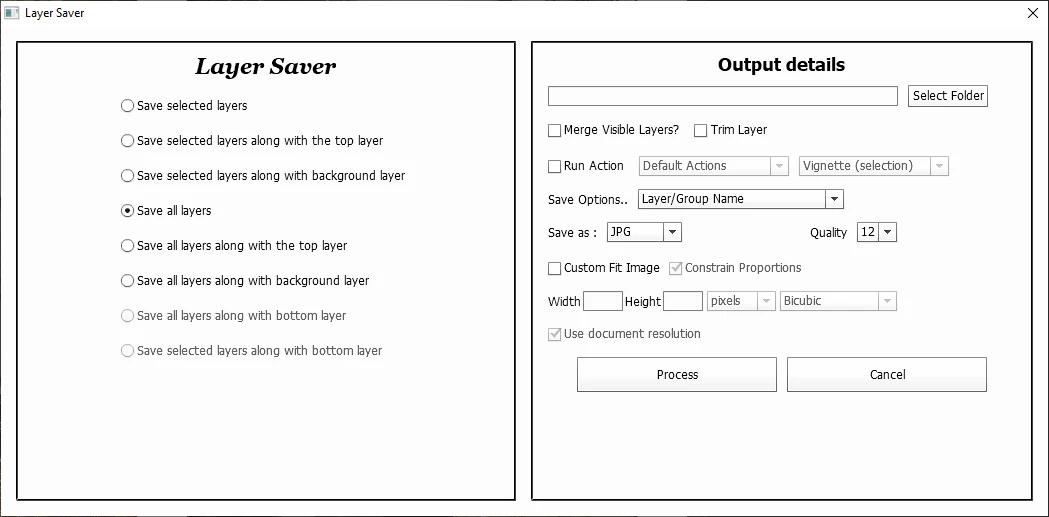
Have you looked at any of Paul Riggott scripts that can be downloaded from the web? Like his Layer Saver script may be able to do what you want to do.  You may need to use an old version for Adobe replaced ScriptUI in CC 2015 and did not maintain complete compatibility with its old implementation.

2 replies

Stephen Marsh
Community Expert
Community Expert
January 27, 2021
JJMack
Community Expert
JJMackCommunity ExpertCorrect answer
Community Expert
April 6, 2019

Have you looked at any of Paul Riggott scripts that can be downloaded from the web? Like his Layer Saver script may be able to do what you want to do.  You may need to use an old version for Adobe replaced ScriptUI in CC 2015 and did not maintain complete compatibility with its old implementation.

JJMack
jsmacAuthor
Participant
April 6, 2019

Thanks, JJ. This looks like exactly the functionality that I'm looking for.

I'll test it with CC 2019, however can you explain to me what I am supposed to do with the code on GitHub? I know how to load the .jsx executable files into Photoshop but I'm unsure of what to do with the code (ie. create the exec file).

Thanks, again.

JJMack
Community Expert
Community Expert
April 6, 2019

I downloaded them years ago and put then in a folder in my Photoshop Scripts tree the I link Photoshop \presets\scripts\ to.   Most copy scripts int to that folder I don't  I link that folder to my file system scripts tree.  The dialog may be hard to use in CC 2019 because of Adobe's new ScriptUI implementation

JJMack