hcbphoto
Known Participant
September 10, 2021
Answered

Saving Patterns and Brushes

  • September 10, 2021
  • 1 reply
  • 475 views

Hello:

I'm running Windows 10 and using Photoshop 2021.

I just created three patterns.  I saved each pattern by using Edit > Define Pattern.

I would now like to place all three of these patterns into a set.  I went to Edit > Presets > Preset Manager.

I only show Contours and Tools as Preset Types.

Can someone walk me through how to create a Pattern Set?

I'm also running into the same problem with Brushes.  

Thank you!
This topic has been closed for replies.
Correct answer J453

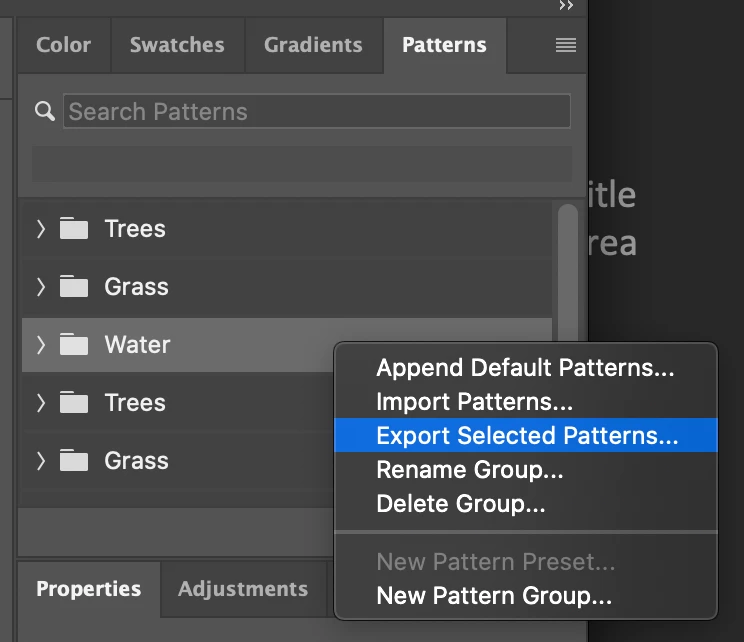
Try right-clicking on the folder of presets you want to share and choose Export Selected Patterns


1 reply

Legend
September 10, 2021

Go to Window > Patterns 

You can organize your patterns there. 

Most presets use their own panels and now can sync between systems and devices.

hcbphoto
hcbphotoAuthor
Known Participant
September 10, 2021

Hi,

 I did try your suggestion. I selected the three patterns and created a new pattern group.  However, when I went to my Photoshop\Presets\Patterns directory, the group nor the individual .PAT files were in the directory.  I was hoping to email this set to someone. 
So, I'm not sure if I even saved the pattern correctly. I ran a search on my entire hard drive and nothing was found. 

J453Correct answer
Legend
September 10, 2021

Try right-clicking on the folder of presets you want to share and choose Export Selected Patterns