
Redest
Participating Frequently
November 25, 2020
Answered

Saving Photoshop files in PDF so that text can be selected

  • November 25, 2020
  • 4 replies
  • 34205 views

We have received Photoshop files from a client that wants us to make copy changes to artwork and then save them as a PDF.  This PDF needs to have the selectable text so that we can upload the PDF to their content approval system, annotate and highlight and link it to other PDFs uploaded to their system.


Saving as "Photoshop PDF's" flattens the artwork and doesn't allow us to select the text. This is an 80-page, layered document and we don't have time or budget to recreate it in InDesign. 


Can anyone suggest how we save PDF's with selectable text?
Correct answer c.pfaffenbichler

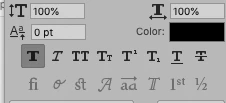
Faux styles? Please clarify.


The faux bold for example: 

4 replies

Participant
September 5, 2023

Hi! I just spent about an hour figuring this out! I only have a photography plan with Adobe and didn't want to have to get illustrator or indesign to create my resume so I used photoshop. But, when submitting to job applications, you need to have a searchable one. SO, here is the solution. 


1. Export your photoshop file as a .JPG. Flattening or rasterizing doesn't matter. 

2. Download Adobe Scan from the app store on your phone. 

3. Airdrop/email the .jpg files to your phone.

4. You can then upload those image file(s) to Adobe Scan and convert them to searchable PDF's!! For free!!


It's a little tedious. However, this works everytime! And makes it so I don't have to add InDesign to my subscription 🙂

Hope this helps!

Participant
September 28, 2023

hi! this actually helped me a lot, thank you very much! But I read through some other threads regarding this and someone suggested to use photopea to export pdf and it works! Hope you can try it out too sometime!

Derek Cross
Community Expert
Community Expert
November 26, 2020

This job needs creating in InDesign using Layers for the different languages. Maybe you could do a proposal for the company explaining how it might work – you might get the contract!

Redest
RedestAuthor
Participating Frequently
November 26, 2020

Unfortunately re-creating is not an option.

jane-e
Community Expert
Community Expert
May 12, 2022

It seems as if we are at a bit of a loss in trying to assist you so far, although c_p has had success. I did notice in your screenshot that all the layers are in folders and all the folders are collapsed.


  • Can you expand one folder that has text layers so we can see what they look like?
    and
  • Select some of the live text with the Type tool and show a screen shot of the selected text with the Character panel (Window menu)?


If you can do this with several sections that have different formatting, that could be useful.


Jane


D Fosse
Community Expert
Community Expert
November 25, 2020

Do it from InDesign. Photoshop is the wrong tool for this, totally unsuitable.

Redest
RedestAuthor
Participating Frequently
November 26, 2020

We were supplied with the Photoshop files.


I know it's the wrong tool, (would never design this kind of document in PSD)but somehow there are international designers who work in Photoshop to develop layered PSD files that they then convert to HTML. We need a step in between, for approvals.

c.pfaffenbichler
Community Expert
Community Expert
November 25, 2020

»Saving as "Photoshop PDF's" flattens the artwork and doesn't allow us to select the text.«

When saving a pdf copy I get searchable text; how are you creating the pdfs exactly? 

Do the type layers employ faux styles? 


»This is an 80-page, layered document«

Photoshop has no pages, what do you mean exactly? 


And I wonder why your client gave you this job … trying to create an 80-page publication with text in Photoshop sounds like someone did not think something through. 

Redest
RedestAuthor
Participating Frequently
November 26, 2020

We received Photoshop files for an interactive document - I know this is not the correct programme for what we need to achieve, but here we are... looking for a solution, without having to recreate the 80 "pages/slides".


I have attached a screenshot (information deleted/blocked out). There are +-10 PSD files, each with about 10 different layer groups that represent separate " Pages/slides", or pop ups for interactivity. We need to edit the copy on each of these, then re-assemble into a PDF (with the single files form each layered group) that has searchable/editable text so that we can link the copy in their approval system. 


Please can you explain how to save the PDF copy with searchable text. I can only get a Photoshop PDF, that doesn't allow text searching, or only converts some of the text to be searchable.


Redest
RedestAuthor
Participating Frequently
November 26, 2020

We do local work for a large international Pharma company that develops international material and then we localize it per country, by adding relevant information to a specific country to the artwork.


So the artwork that we receive varies in origination software. If we were to recreate these files it would defy the objective of them having a single document to have localised in different countries, so we have to try to figure ut how to do it. Not the best solution, but this is what we have.