
Inspiring
January 6, 2023
Answered

SCALE TO FIT MEDIA-Not available in PS2023

  • January 6, 2023
  • 5 replies
  • 1009 views

I have a Epson SX435W printer Win11 OS

With Photoshop CS3 I am able to select the print options –

Landscape and then “Scale To Fit Media” under the option “Page Layout” and my photo in this case a picture of a keyboard would be resized and fit fully across the page.


With my upgrade/purchase to “Photoshop 2023” the option “Scale To Fit Media” is not available and “Reduce/Enlarge Document” by “Output Paper Size” A4 210x297mm fails to fit photo across the full width of page.

If I try to Enlarge say to 140% using “By Percentage” the photo exceeds the paper size and is positioned off center.


How can I get “Photoshop 2023” to achieve same as CS3 ?
This topic has been closed for replies.
Correct answer paulh2915

I reckon I resolved this myself.

At least this is how I finished up achieving what I wanted.

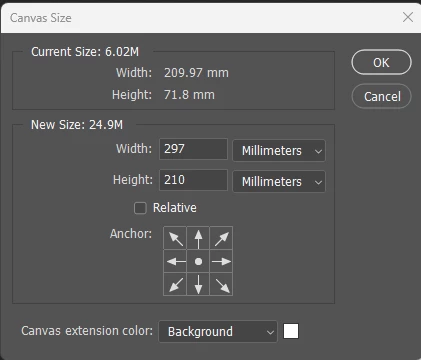
Before printing. If you want the Image to fit on A4 Landscape (or whatever size you require) make sure the Canvas Size is as shown below (A4 Landscape Paper Dimensions). Adjust as required.

Then use Rectangular or whatever Marquee (M) required to selct image. Then use Move (V) to adjust Image to suit your requirement.

Then use Print.


5 replies

paulh2915AuthorCorrect answer
Inspiring
January 15, 2023

I reckon I resolved this myself.

At least this is how I finished up achieving what I wanted.

Before printing. If you want the Image to fit on A4 Landscape (or whatever size you require) make sure the Canvas Size is as shown below (A4 Landscape Paper Dimensions). Adjust as required.

Then use Rectangular or whatever Marquee (M) required to selct image. Then use Move (V) to adjust Image to suit your requirement.

Then use Print.


NB, colourmanagement
Community Expert
Community Expert
January 7, 2023

Setting the print driver to fill the media will not print edge to edge unless you select that option in the printer driver.


I hope this helps
neil barstow, colourmanagement net - adobe forum volunteer - co-author: 'getting colour right'
google me "neil barstow colourmanagement" for lots of free articles on colour management

Kevin Stohlmeyer
Community Expert
Community Expert
January 6, 2023

Scale to Fit Media should show under Position and Size submenu.

If not, try holding the space bar when selecting File>Print to reset the print dialog box. If that doesn't work make sure your print drivers are updated.


kglad
Community Expert
Community Expert
January 6, 2023

in the future, to find the best place to post your message, use the list here, https://community.adobe.com/


p.s. i don't think the adobe website, and forums in particular, are easy to navigate, so don't spend a lot of time searching that forum list. do your best and we'll move the post if it helps you get responses.


<moved from using the community>

paulh2915Author
Inspiring
January 6, 2023

Thank you for your advice.

Before I posted I had allready looked through the list as per your suggested link.

I could not find a relevant place to post.

I would welcome your advise as to a more suitable place to post to get the required response.

paulh2915Author
Inspiring
January 6, 2023

Note - image size info