
April 4, 2018
Question

Scratch Disk - Full

  • April 4, 2018
  • 6 replies
  • 2313 views

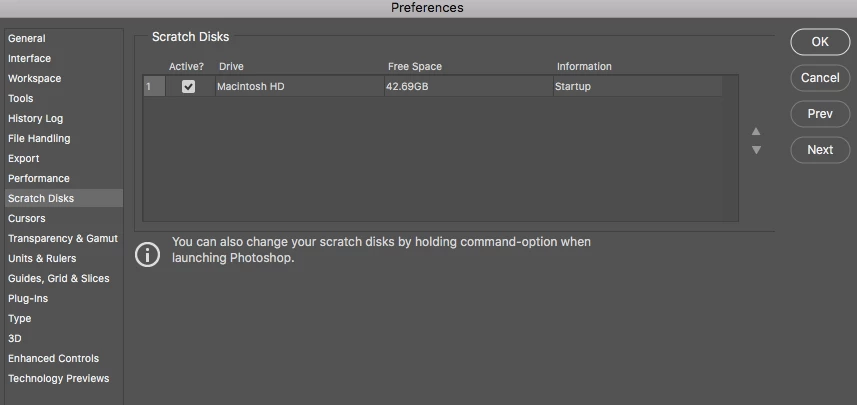
I have Photoshop CC 2018 on my Imac. I do many projects but recently I try to open Photoshop I get an error that the scratch disks are full. My backup is with the "Imac Macintosh HD" How do I correct this, if I need an external hard drive, will this fix the problem? By the way, I also don't understand what it does, would someone be able to explain it? Thanks in advance.
This topic has been closed for replies.

6 replies

Participant
November 14, 2020

When making a NEW image, check the resolution. Mine was kicked up to 300 which is absurd. This should fix the problem.

PECourtejoie
Community Expert
Community Expert
December 1, 2020

Hi!

Do also check the unit for the height and width, pixels is not the same as CM or IN, especially at 300 ppi!

OdinFord
Participant
July 10, 2020

Its a turd of an issue that persists and will dog you for ever. Try a difrent program.


D Fosse
Community Expert
Community Expert
July 10, 2020

Photoshop is a professional application. It is the user's responsibility to make sure it has enough resources to run. Disk space is critical. That's nothing special for Photoshop, but would apply to any high-end pixel-based image editor.

PECourtejoie
Community Expert
Community Expert
May 16, 2018

Hello, I'd like to know which dot version of Photoshop you are running?

Try to update to 19.1.4 to see if it fixes the issue.

timb81955820
Participant
May 16, 2018

I'm having this issue too - whenever I open photoshop or try and do even a little work on a file I get the dreaded 'scratch disks are full' response. Can someone please help??

Thanks,

M

May 16, 2018

Exactly how much space do you have for the scratch disk, can you please provide as much information as possible, saying "I'm having this issue too" without giving any details is not going to help us to help you.

If you're on a MAC take a look here

Scratch Disks are Full. How to Clear Your Scratch Disk in 3 Steps

Participating Frequently
May 2, 2018

Hello! I have the same problem. But as you can see, 281 GB is also not enough. I have 10k image open, one layer, no blend modes just retouching with stamp tool. It's a bot ridiculous situation, when "only" 42GB is not enough for your photo editor. Not 42 MB, but 42 gigs! 42 000 MB!!! My original jpg is 21MB only?!

But when it comes to 281 GB, i don't know what to think anymore. Is it.. normal? Any help would be nice.

Thanks!

D Fosse
Community Expert
Community Expert
April 4, 2018

You only have 42GB free space left on your system drive. That's not much. You really should free up some space - not just for Photoshop, but for your entire system's present and future performance. A system drive should never be allowed to fill up beyond 60% or so.

April 4, 2018

Thanks for the advice, i've been through my Imac storage yesterday and everything I need is on. Should I look into getting a external hard drive, Do you have any in mind if so?