
Participating Frequently
November 12, 2019
Answered

Scratch disk full - need new harddrive?

  • November 12, 2019
  • 4 replies
  • 1516 views

Frequently a message pops up saying Scratch Disk is full and after some research on the internet it appears I need at least 20gb free but I only have 14.94gb, and that is after a file purge. I am using Adobe CC 2019 and my Macbook Pro specs are below:


Version 10.14.6

MacBook Pro (13-inch, 2018, Four Thunderbolt 3 Ports)

Processor: 2.7 GHz Intel Core i7

Memory: 16 GB 2133 MHz LPDDR3

Graphics: Intel Iris Plus Graphics 655 1536 MB


Would buying an external harddrive and setting that as the scratch disk resolve the issue? I was thinking of buying  https://www.apple.com/uk/shop/product/HMTZ2/lacie-2tb-mobile-drive-external-hard-drive-usb-c-usb-30?fnode=4c


Many thanks for your help.


This topic has been closed for replies.
Correct answer silk-m

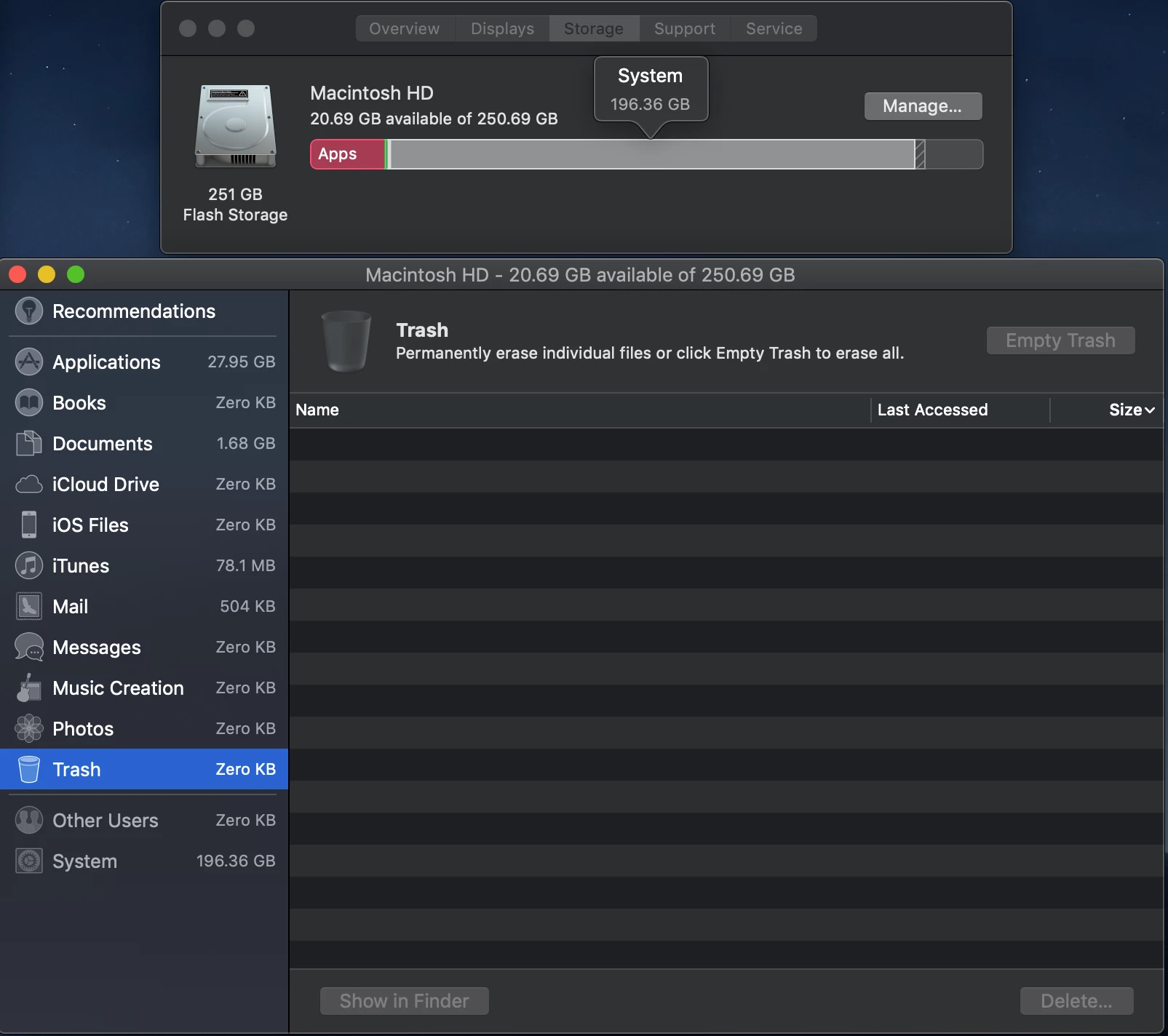
The storage is confusing me, this is what my system shows: 

197GB seems crazy high for system storage. I have tried clearing it using a few tutorials, and the biggest files sizes that come up are applications - usually premier which is 6GBish.


Looking through the folders, it does appear my 'Users' folder uses up a lot the most amount of room - 170GB, do you know what would typically go into this?


Hi, That's certainly strange.

If you have an Apple Store nearby, why not consult?

You may be able to delete unnecessary caches by starting in safe mode.

https://support.apple.com/en-us/HT201262


The surest way would be to start over with a new OS installation. The extra files will be deleted, but will take a lot of time to set up. I recommend that you make a backup.


4 replies

rob day
Community Expert
Community Expert
November 13, 2019

Would buying an external harddrive and setting that as the scratch disk resolve the issue?


Yes, I use an empty partitioned volume on a 2TB Porche LaCie SSD ($70) as my first scratch disk and never get scratch disk full warnings. Where you store your files might have some affect on the open and save speeds, but that volume doesn't need to be used as a scratch disk. Here my first 2 scratch volumes are SSDs. The Startup is #2, but I doubt it is ever used:


D Fosse
Community Expert
Community Expert
November 12, 2019

"Looking through the folders, it does appear my 'Users' folder uses up a lot the most amount of room - 170GB, do you know what would typically go into this?"


Yes, that's what I've been saying for years. The user account is where all the junk accumulates. This is where all your applications dump everything you do. And when you uninstall the application, or install a new version, it stays behind. It just goes in but never out. It's a black hole.


Most of what you find here can be deleted without causing any permanent harm (although I'd be careful with files that directly belong to the OS). At worst you may need to reconfigure your settings. But what tends to take up the most space are caches. The preview cache for an old version of Bridge may be 20GB alone. Premiere Pro even more. And you may have had three or four versions installed...


I don't do Mac, but on the Windows side there is an excellent little app called WinDirStat, which shows you in a graphical interface exactly what is filling up your drive, break-downable to file extensions and individual folders.


It should also be pointed out that the OS itself has disk cleaning tools to remove unused leftover files. Again on Windows, but this is very effective and could get you 30-40GB.

Legend
November 12, 2019

Yes buy an external drive for backup and to keep from losing data. You can move things like pictures and music to the external. If there is an Apple Store close to you, I'd make an appointment and have them look things over and advise you.

rob day
Community Expert
Community Expert
November 13, 2019

If you shoot with a digital camera, by default iPhoto is particularly aggressive. I unistall it and use Bridge, but you can also set the iPhoto library to another drive.

silk-m
Community Expert
Community Expert
November 12, 2019

Hi

I think that it is better to stop using HDD for scratch disk because it slows down the operation of Photoshop.
It is better to move the data stored in the internal storage to an external HDD and use the internal storage for scratch disks.

Or if you have a Thunderbolt-connected SSD, you can use it for scratch disks, but it's better to free up more internal storage.

--Susumu Iwasaki
Participating Frequently
November 12, 2019

Hello Silk-m


Really apprecaite the comments.


This may sound like a silly question but would it be possible for me to install the Adobe programs onto the external HDD and then use them when every I have it plugged in and use the internal HDD as a scratch disk?

silk-m
Community Expert
Community Expert
November 12, 2019

Hi

Installing the application externally will cause trouble, so you should stop it. Is it possible to move the data stored in the internal storage to the external storage?

Is the internal storage HDD? Isn't it SSD?


--Susumu Iwasaki