Participant
August 15, 2020
Question

SCRATCH DISKS FULL SOS

  • August 15, 2020
  • 2 replies
  • 157 views

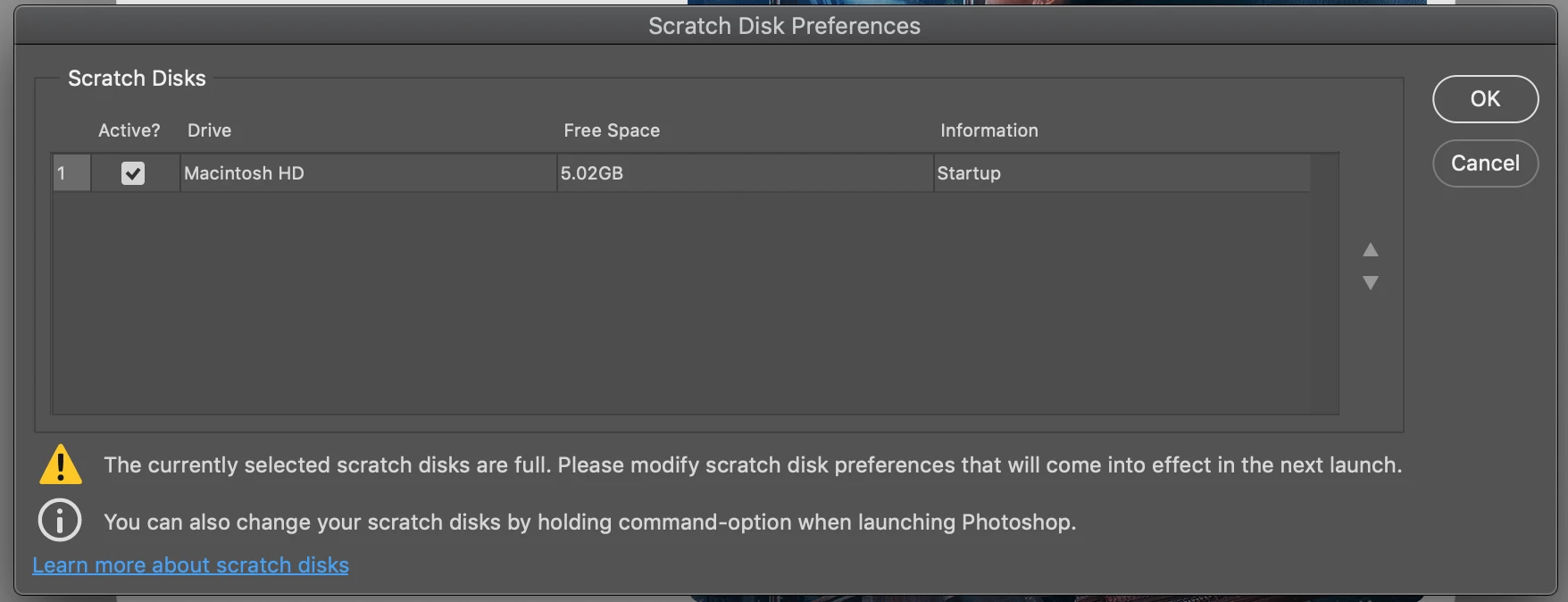
I am unable to open Photoshop when I want to, "Edit in Photoshop" from my Lightroom. The screenshot I took below is what pops up. I have already cleared as much cache data as I could (which should have freed enough space to be able to open Photoshop) but I am still unable to continue editing. Please, does someone know what else to do??? 
This topic has been closed for replies.

2 replies

D Fosse
Community Expert
Community Expert
August 15, 2020

The really incredible thing is that this isn't even mentioned in the system requirements. As seen here, Photoshop simply won't open without sufficient scratch disk space, and if that isn't a system requirement I don't know what is.


You could argue that it's the user's responsibility to make sure professional grade software runs in an environment with enough resources. But why then publish requirements at all. It lists 3.2 GB free disk space, which would give anyone the impression that this runs well on anything vaguely resembling a computer.


All that said, Melodey M, you're looking at a disaster waiting to happen, and you may not even have to wait very long. That machine is about to choke for good, unless you free up a lot of space ASAP. Then Photoshop will be the least of your worries. Take this as an early warning. I can fill up 5GB in about twenty seconds.

davescm
Community Expert
Community Expert
August 15, 2020

5GB free is nowhere near enough space for scratch disk. Worse than that, if that is also your system disk, you are close to hitting operating system issues. You need to free up much more space or add a second disk.

Dave