

Umair Jutt
Participant
February 1, 2023
Answered

Scrath Disk Changed but still full while creating first post using Adobe photoshop 2021

  • February 1, 2023
  • 1 reply
  • 871 views

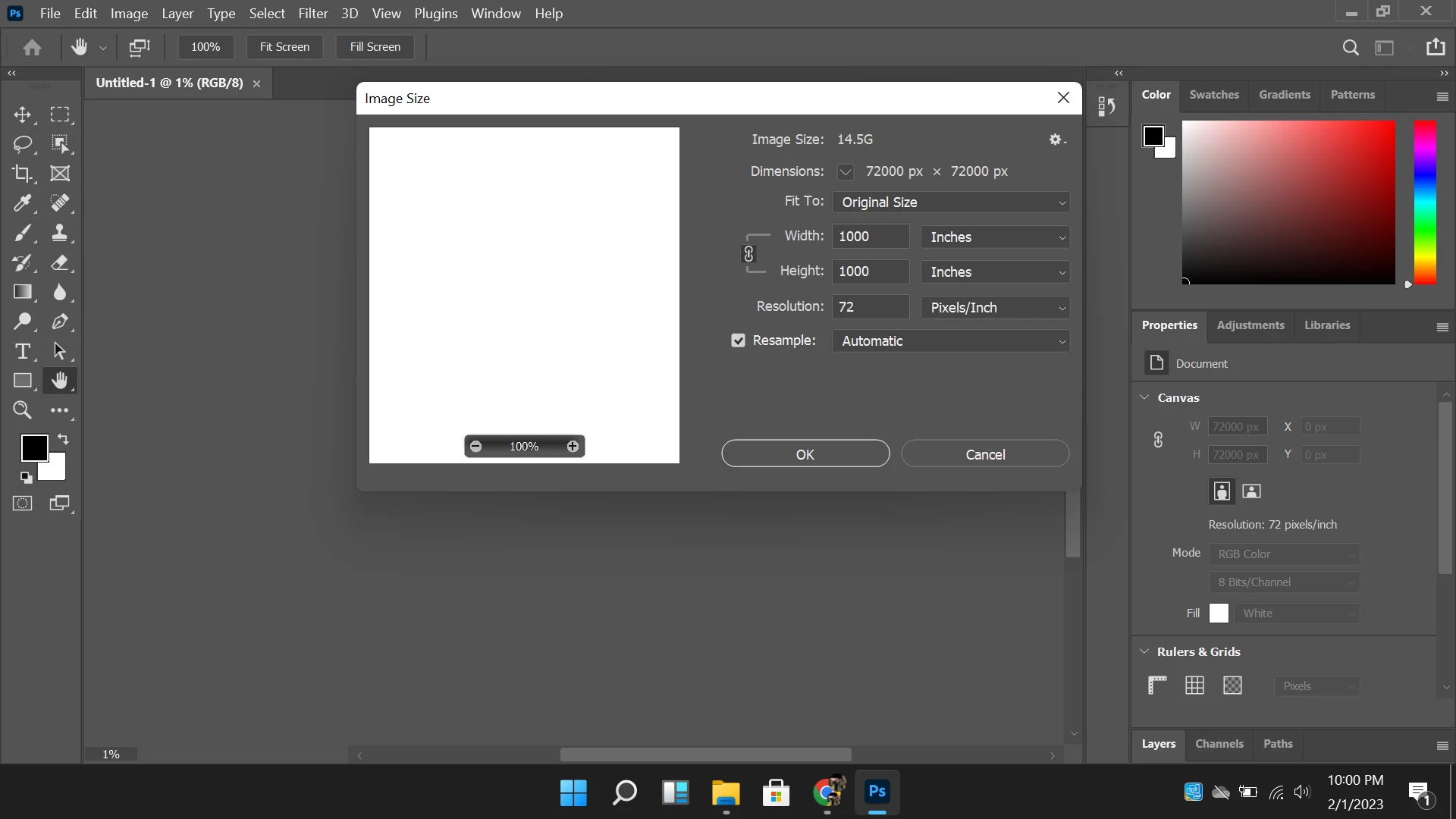
Hi There, i'm trying to work on adopbe photoshop from past 28 days but found the different issues even now i changed the laptop and window as well. But don't know why it's with me. I'm new on photoshop and trying to create posts for my personal website [website link removed by moderator as per forum guidelines] .


Here's the list of issues i'm facing :


1- Scrath Disk Changed but still full while creating first post using Adobe photoshop 2021
2- Any process in photoshop taking time even for color fill in any shape (avg 2 to 5 minutes)

Now window on my laptop window Edition: Windows 11 Pro.

Laptop specification: Dell 
Processor: Intel(R) Core(TM) i7-6820HQ CPU @ 2.70GHz 2.70 GHz
RAM: 8.00 GB (7.66 GB usable)
System Type: 64-bit operating system, x64-based processor

Please help me how can i get rid of these issues.
This topic has been closed for replies.
Correct answer Kevin Stohlmeyer


Check your units of measure you are using Inches instead of Pixels.

1 reply

jane-e
Community Expert
Community Expert
February 1, 2023

@Umair Jutt wrote:

1- Scrath Disk Changed but still full while creating first post using Adobe photoshop 2021


I think (but am not sure) that you are saying your scratch disk is full. Photoshop requires a large amount of free space. The amount depends on the size of your images, so let's start here.

  • How big is your hard drive? 
  • How much free space is on it?
  • How big are the files you are working with?


Also, 8gb is the absolute minimum to run Photoshop. 16gb is recommended by Adobe, but most of us have more. This could account for the slowness that you are experiencing.


Jane


Umair Jutt
Participant
February 1, 2023

Hard drive is 250 GB (SSD) and 235GB is free

8GB Ram is present

I am working on simple facebook,pintrest and other socialaccounts posts