tokuredit
Inspiring
November 7, 2021
Answered

Script doesn't work in Photoshop CS3

  • November 7, 2021
  • 2 replies
  • 2489 views

Hello everyone!
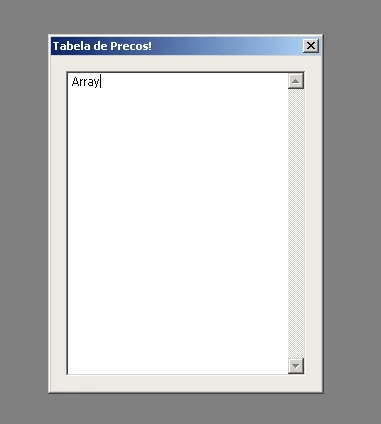
Guys is there any possibility of a script working correctly in Photoshop CS3.
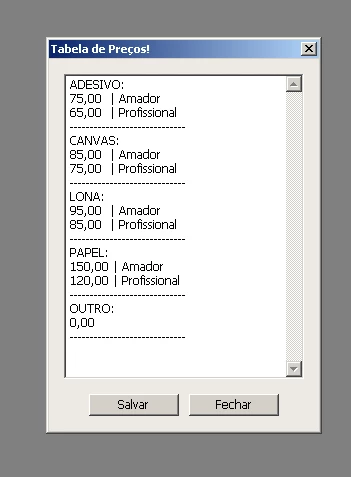
It serves to import a price table via a text.text file into a dialog window, once the text is loaded, I will have to make some changes to the text after saving.
At the company I work for, it works perfectly on the latest versions, however, in my house my computer is very limited and I can only work with the CS3 version of Photoshop
and this script I will need to use more often in my house.
All help is valid!
Here the script and the price list:


    dle = new Window("dialog"); dle.text = "Tabela de Preços!"; 
    dle.orientation = "column"; 
    fFile = File ( "~/desktop/Preços.txt" );
    fFile.open("r");  stringFromTextFile = fFile.read();  valores =  stringFromTextFile.split();
    edittext1 = dle.add('edittext {size: [240.59,305.556], properties: {name: "edittext1", multiline: true}}'); 
    edittext1.text = valores
    gp1 = dle.add("group", undefined, {name: "gp1"}); 
    bt2 = gp1.add("button", undefined, undefined, {name: "bt2"}); 
    bt2.text = "Salvar";  bt2.preferredSize.width = 90; 
    bt1 = gp1.add("button", undefined, undefined, {name: "bt1"}); 
    bt1.text = "Fechar";  bt1.preferredSize.width = 90; 

    bt2.onClick = function (){
        dle.close(); var URL = new File("~/desktop/Preços.txt");  URL.open("w"); URL.writeln(edittext1.text); 
    }
    dle.show();


Preços.txt

ADESIVO: 
75,00  | Amador
65,00  | Profissional
-----------------------------
CANVAS:
85,00  | Amador
75,00  | Profissional
-----------------------------
LONA:
95,00  | Amador
85,00  | Profissional
-----------------------------
PAPEL:
150,00 | Amador
120,00 | Profissional
-----------------------------
OUTRO:
0,00
-----------------------------    
This topic has been closed for replies.
Correct answer jazz-y

I added and it still doesn't work


I found a user with windows XP and Photoshop CS3 installed 😄😄😄
In general, it looks like this is a feature of a particular version - it really cannot display an array as a string. There is no such problem in CS2, but multiline is not supported there. 

The solution is to remove the .split ()


dle = new Window("dialog"); dle.text = "Tabela de Preços!"; 
    dle.orientation = "column"; 
    fFile = File ( "~/desktop/Preços.txt" );
    fFile.open("r");  stringFromTextFile = fFile.read();  valores =  stringFromTextFile;
    edittext1 = dle.add('edittext {size: [240.59,305.556], properties: {name: "edittext1", multiline: true}}'); 
    edittext1.text = valores
    gp1 = dle.add("group", undefined, {name: "gp1"}); 
    bt2 = gp1.add("button", undefined, undefined, {name: "bt2"}); 
    bt2.text = "Salvar";  bt2.preferredSize.width = 90; 
    bt1 = gp1.add("button", undefined, undefined, {name: "bt1"}); 
    bt1.text = "Fechar";  bt1.preferredSize.width = 90; 

    bt2.onClick = function (){
        dle.close(); var URL = new File("~/desktop/Preços.txt");  URL.open("w"); URL.writeln(edittext1.text); 
    }
    dle.show();


P.S.

@Kukurykus wrote:

Try without: , properties: {name: "edittext1", multiline: true}


Does what you would expect from removing the multiline, but does not solve the problem (the array still cannot be displayed).


But another obvious option works: 🙂


  edittext1.text = valores[0]


2 replies

Legend
November 7, 2021

why is split () here? The string will simply turn into an array with one element, which is what your edittext1 shows

valores =  stringFromTextFile.split();


tokuredit
tokureditAuthor
Inspiring
November 7, 2021

Oi @jazz-y ! Este script não é meu, não tenho conhecimento de fazer scripts, encontrei em outro fórum há muito tempo. Não tenho ideia de como fazer isso. Sua ajuda é muito valiosa. Ele funciona bem em versões recentes, mas não funciona no meu Photoshop CS3.

Legend
November 7, 2021

Just remove .split() from this line

stringFromTextFile.split()


Kukurykus
Legend
November 7, 2021

What you mean it does not work for you correctly?

tokuredit
tokureditAuthor
Inspiring
November 7, 2021

Hi @Kukurykus , for you it worked on the CS3 version??
In mine here it doesn't work.

Kukurykus
Legend
November 7, 2021

Loll you talk like I have pretty old one realese 😉


In ESTK CC there's no problem as well as Ps & Br CS6.


Try without: , properties: {name: "edittext1", multiline: true}


If you'll see .txt content in one row, use more edittexts to display them separatly.


The last chance is to try this workaround: edittext1.text = eval(valores.toSource())