florentl87699272
Known Participant
October 18, 2019
Answered

Script for selecting layers with the same name

  • October 18, 2019
  • 4 replies
  • 5058 views

Hello!


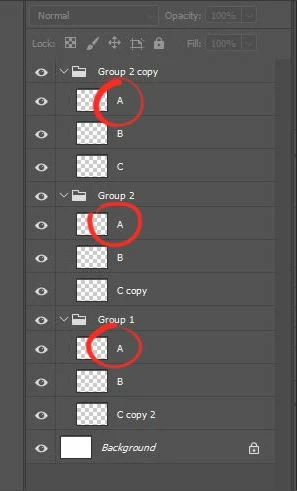
Here is my situation, I'd like to be able to launch a script for selecting all the layers with the name A

within my layer stack:


I've already seen several posts speaking about the same question, but for some reason I'm not able to use the scripts who have been shared.  I'm using ExtendScript Toolkit CS5 with Photoshop CC 2019, could it be the reason?


Thanks!

This topic has been closed for replies.
Correct answer c.pfaffenbichler
This would work also on with multiple selected layers: 
 
// select layers of same name as active layers’;
// 2019, use it at your own risk;
#target photoshop-130.064
if (app.documents.length > 0) {
app.activeDocument.suspendHistory("selectSameNames", "main ()");
};
////////////////////////////////////
function main () {
var myDocument = app.activeDocument;
// the file;
var theSelectedLayers = getSelectedLayersIdxAndName ();
//var theLayerName = myDocument.activeLayer.name;
// get number of layers;
var ref = new ActionReference();
ref.putEnumerated( charIDToTypeID("Dcmn"), charIDToTypeID("Ordn"), charIDToTypeID("Trgt") ); 
var applicationDesc = executeActionGet(ref);
var theNumber = applicationDesc.getInteger(stringIDToTypeID("numberOfLayers"));
// process the layers;
var theLayers = new Array;
for (var m = 0; m <= theNumber; m++) {
try {
var ref = new ActionReference();
ref.putIndex( charIDToTypeID( "Lyr " ), m);
var layerDesc = executeActionGet(ref);
var layerSet = typeIDToStringID(layerDesc.getEnumerationValue(stringIDToTypeID("layerSection")));
var isBackground = layerDesc.getBoolean(stringIDToTypeID("background"));
// if not layer group collect values;
if (layerSet != "layerSectionEnd" && layerSet != "layerSectionStart" && isBackground != true) {
var theName = layerDesc.getString(stringIDToTypeID('name'));
var theID = layerDesc.getInteger(stringIDToTypeID('layerID'));
theLayers.push([theName, theID])
};
}
catch (e) {};
};
////////////////////////////////////
for (var o = 0; o < theLayers.length; o++) {
var thisLayer = theLayers[o];
for (var p = 0; p < theSelectedLayers.length; p++) {
var theLayerName = theSelectedLayers[p][1];
// select layer is name matches;
if (thisLayer[0] == theLayerName) {
selectLayerByID(thisLayer[1], true)
}
}
};
};
// based on code by mike hale, via paul riggott;
function selectLayerByID(id,add){ 
add = undefined ? add = false:add 
var ref = new ActionReference();
    ref.putIdentifier(charIDToTypeID("Lyr "), id);
    var desc = new ActionDescriptor();
    desc.putReference(charIDToTypeID("null"), ref );
       if(add) desc.putEnumerated( stringIDToTypeID( "selectionModifier" ), stringIDToTypeID( "selectionModifierType" ), stringIDToTypeID( "addToSelection" ) ); 
      desc.putBoolean( charIDToTypeID( "MkVs" ), false ); 
   try{
    executeAction(charIDToTypeID("slct"), desc, DialogModes.NO );
}catch(e){
alert(e.message); 
}
};
 
////// get array of arrays of smart objects witrh index, center and half-dimensions //////
function getSelectedLayersIdxAndName(){
var selectedLayers = new Array;
var ref = new ActionReference();
ref.putEnumerated( charIDToTypeID("Dcmn"), charIDToTypeID("Ordn"), charIDToTypeID("Trgt") );
var desc = executeActionGet(ref);
if( desc.hasKey( stringIDToTypeID( 'targetLayers' ) ) ){
desc = desc.getList( stringIDToTypeID( 'targetLayers' ));
var c = desc.count;
var selectedLayers = new Array();
for(var i=0;i<c;i++){
try{ 
activeDocument.backgroundLayer;
selectedLayers.push(  desc.getReference( i ).getIndex() );
}catch(e){
selectedLayers.push(  desc.getReference( i ).getIndex()+1 );
};
}
 }else{
var ref = new ActionReference();
ref.putProperty( charIDToTypeID("Prpr") , charIDToTypeID( "ItmI" )); 
ref.putEnumerated( charIDToTypeID("Lyr "), charIDToTypeID("Ordn"), charIDToTypeID("Trgt") );
try{ 
activeDocument.backgroundLayer;
selectedLayers.push( executeActionGet(ref).getInteger(charIDToTypeID( "ItmI" ))-1);
}catch(e){
selectedLayers.push( executeActionGet(ref).getInteger(charIDToTypeID( "ItmI" )));
};
};
////////////////////////////////////
var theArray = new Array;
var theIDs = new Array;
for (var m = 0; m < selectedLayers.length; m++) {
var thisIndex = selectedLayers[m];
var ref = new ActionReference();
ref.putIndex( charIDToTypeID("Lyr "), thisIndex); 
var layerDesc = executeActionGet(ref);
var thisID = layerDesc.getInteger(stringIDToTypeID("layerID"));
var theName = layerDesc.getString(stringIDToTypeID("name"));
var theVisibility = layerDesc.getInteger(stringIDToTypeID("visible"));
// is visible;
if (theVisibility == true) {
theIDs.push ([thisID, theName])
}
};
////////////////////////////////////
//return;
return theIDs
////////////////////////////////////
};

 

4 replies

c.pfaffenbichler
Community Expert
c.pfaffenbichlerCommunity ExpertCorrect answer
Community Expert
October 19, 2019
This would work also on with multiple selected layers: 
 
// select layers of same name as active layers’;
// 2019, use it at your own risk;
#target photoshop-130.064
if (app.documents.length > 0) {
app.activeDocument.suspendHistory("selectSameNames", "main ()");
};
////////////////////////////////////
function main () {
var myDocument = app.activeDocument;
// the file;
var theSelectedLayers = getSelectedLayersIdxAndName ();
//var theLayerName = myDocument.activeLayer.name;
// get number of layers;
var ref = new ActionReference();
ref.putEnumerated( charIDToTypeID("Dcmn"), charIDToTypeID("Ordn"), charIDToTypeID("Trgt") ); 
var applicationDesc = executeActionGet(ref);
var theNumber = applicationDesc.getInteger(stringIDToTypeID("numberOfLayers"));
// process the layers;
var theLayers = new Array;
for (var m = 0; m <= theNumber; m++) {
try {
var ref = new ActionReference();
ref.putIndex( charIDToTypeID( "Lyr " ), m);
var layerDesc = executeActionGet(ref);
var layerSet = typeIDToStringID(layerDesc.getEnumerationValue(stringIDToTypeID("layerSection")));
var isBackground = layerDesc.getBoolean(stringIDToTypeID("background"));
// if not layer group collect values;
if (layerSet != "layerSectionEnd" && layerSet != "layerSectionStart" && isBackground != true) {
var theName = layerDesc.getString(stringIDToTypeID('name'));
var theID = layerDesc.getInteger(stringIDToTypeID('layerID'));
theLayers.push([theName, theID])
};
}
catch (e) {};
};
////////////////////////////////////
for (var o = 0; o < theLayers.length; o++) {
var thisLayer = theLayers[o];
for (var p = 0; p < theSelectedLayers.length; p++) {
var theLayerName = theSelectedLayers[p][1];
// select layer is name matches;
if (thisLayer[0] == theLayerName) {
selectLayerByID(thisLayer[1], true)
}
}
};
};
// based on code by mike hale, via paul riggott;
function selectLayerByID(id,add){ 
add = undefined ? add = false:add 
var ref = new ActionReference();
    ref.putIdentifier(charIDToTypeID("Lyr "), id);
    var desc = new ActionDescriptor();
    desc.putReference(charIDToTypeID("null"), ref );
       if(add) desc.putEnumerated( stringIDToTypeID( "selectionModifier" ), stringIDToTypeID( "selectionModifierType" ), stringIDToTypeID( "addToSelection" ) ); 
      desc.putBoolean( charIDToTypeID( "MkVs" ), false ); 
   try{
    executeAction(charIDToTypeID("slct"), desc, DialogModes.NO );
}catch(e){
alert(e.message); 
}
};
 
////// get array of arrays of smart objects witrh index, center and half-dimensions //////
function getSelectedLayersIdxAndName(){
var selectedLayers = new Array;
var ref = new ActionReference();
ref.putEnumerated( charIDToTypeID("Dcmn"), charIDToTypeID("Ordn"), charIDToTypeID("Trgt") );
var desc = executeActionGet(ref);
if( desc.hasKey( stringIDToTypeID( 'targetLayers' ) ) ){
desc = desc.getList( stringIDToTypeID( 'targetLayers' ));
var c = desc.count;
var selectedLayers = new Array();
for(var i=0;i<c;i++){
try{ 
activeDocument.backgroundLayer;
selectedLayers.push(  desc.getReference( i ).getIndex() );
}catch(e){
selectedLayers.push(  desc.getReference( i ).getIndex()+1 );
};
}
 }else{
var ref = new ActionReference();
ref.putProperty( charIDToTypeID("Prpr") , charIDToTypeID( "ItmI" )); 
ref.putEnumerated( charIDToTypeID("Lyr "), charIDToTypeID("Ordn"), charIDToTypeID("Trgt") );
try{ 
activeDocument.backgroundLayer;
selectedLayers.push( executeActionGet(ref).getInteger(charIDToTypeID( "ItmI" ))-1);
}catch(e){
selectedLayers.push( executeActionGet(ref).getInteger(charIDToTypeID( "ItmI" )));
};
};
////////////////////////////////////
var theArray = new Array;
var theIDs = new Array;
for (var m = 0; m < selectedLayers.length; m++) {
var thisIndex = selectedLayers[m];
var ref = new ActionReference();
ref.putIndex( charIDToTypeID("Lyr "), thisIndex); 
var layerDesc = executeActionGet(ref);
var thisID = layerDesc.getInteger(stringIDToTypeID("layerID"));
var theName = layerDesc.getString(stringIDToTypeID("name"));
var theVisibility = layerDesc.getInteger(stringIDToTypeID("visible"));
// is visible;
if (theVisibility == true) {
theIDs.push ([thisID, theName])
}
};
////////////////////////////////////
//return;
return theIDs
////////////////////////////////////
};
 

florentl87699272
Known Participant
October 19, 2019

Hi Pfaffenbichler! 


Your script also worked super well, thanks!!

It upgrades the Chuck's one, that's great!                   

Chuck Uebele
Community Expert
Community Expert
October 18, 2019

Try this:

#target photoshop
var doc = activeDocument;
var curLayer = doc.activeLayer;
var layName = curLayer.name;
var selcList = new Array();

var layerSets = 0
try{doc.backgroundLayer}
catch(e){layerSets=1}

var fullList = getLayerSetsData ();

for(var i=0;i<fullList.length;i++){
    if(fullList[i].name.toLowerCase() == layName.toLowerCase()){
        selcList.push(fullList[i].id)
        }
    }

if(selcList.length>1){multiSelectByIDs (selcList)}
else{alert('There are no duplicate layer names')};

function doesIdExists( id ){// function to check if the id exists
   var res = true;
   var ref = new ActionReference();
   ref.putIdentifier(charIDToTypeID('Lyr '), id);
    try{var desc = executeActionGet(ref)}catch(err){res = false};
    return res;
}

function multiSelectByIDs(ids) {
  if( ids.constructor != Array ) ids = [ ids ];
    var layers = new Array();
    var id54 = charIDToTypeID( "slct" );
    var desc12 = new ActionDescriptor();
    var id55 = charIDToTypeID( "null" );
    var ref9 = new ActionReference();
    for (var i = 0; i < ids.length; i++) {
       if(doesIdExists(ids[i]) == true){// a check to see if the id stil exists
           layers[i] = charIDToTypeID( "Lyr " );
           ref9.putIdentifier(layers[i], ids[i]);
       }
    }
    desc12.putReference( id55, ref9 );
    var id58 = charIDToTypeID( "MkVs" );
    desc12.putBoolean( id58, false );
    executeAction( id54, desc12, DialogModes.NO );
}

function getLayerSetsData()
{
    //var count = 0;//set counter for multi-dimensional array
    var lyrSets = [];

    while (true)
    {
        ref = new ActionReference();
        ref.putIndex(charIDToTypeID('Lyr '), layerSets);
        try
            {var d1 = executeActionGet(ref)}
        catch (err){
            break;
            };

        var c2t = function (s){return app.charIDToTypeID(s);};
        var s2t = function (s){return app.stringIDToTypeID(s);};
        var lyrSet = {};

        lyrSet.type = d1.getInteger(s2t("layerKind"));
        lyrSet.name = d1.getString(c2t("Nm  "));
        lyrSet.id = d1.getInteger(s2t("layerID"));
        
        lyrSets.push(lyrSet);
        layerSets++;
    }; 
    return lyrSets;
};
florentl87699272
Known Participant
October 18, 2019

Thank you very much Chuck!


I just tried it and I get the message "there are no duplicate layer names"

Did I make something wrong?

florentl87699272
Known Participant
October 18, 2019

Oh, actually it works fine!!! I haven't selected any of the layers duplicated (like A or B) but

I was on C (which was the only layer with that name - the others were copy C, copy2 C, etc).


THANKS SO MUCH CHUCK!

Chuck Uebele
Community Expert
Community Expert
October 18, 2019

Okay, that's what I thought would make more sense than selecting any layers that have the same name, like all the A's and B's in your example. It would be easier for just one set at a time.

Chuck Uebele
Community Expert
Community Expert
October 18, 2019

Since it looks like your file has several different layer names that are duplicates, how to you want to select just one set of them - by using the current selected layer?

florentl87699272
Known Participant
October 18, 2019

Well, the idea would be to be able to select all the layers with the same name, so that I can move them into the same folder at the same time (the file I'm working on currently contains hundreds of layers, and it's impossible to select rapidly all the layers with the same name).


Are you saying it sounds impossible to do that script (sorry I'm not a programer)?

I tried to create a script manually on Photoshop but it selects systematically the layer A at the bottom of the stack and only this one.


Thanks for your help!


Chuck Uebele
Community Expert
Community Expert
October 18, 2019

No, it's possible to get all layers with duplicate name, just wondering what exactly you want.