Inspiring
March 12, 2024
Answered

Script to locate X & Y values of a layer

  • March 12, 2024
  • 3 replies
  • 594 views

Hi community.


is there a script or any other method which can specify the X & Y locations of the layers, but runs the script in text file? I'm using a script, and sometimes there a lot of layers, and becomes tedious task to write out the X & Y onto a text note pad. So I wish there was a way I could copy/paste all these numbers.


Thank you.


This topic has been closed for replies.
Correct answer Stephen Marsh

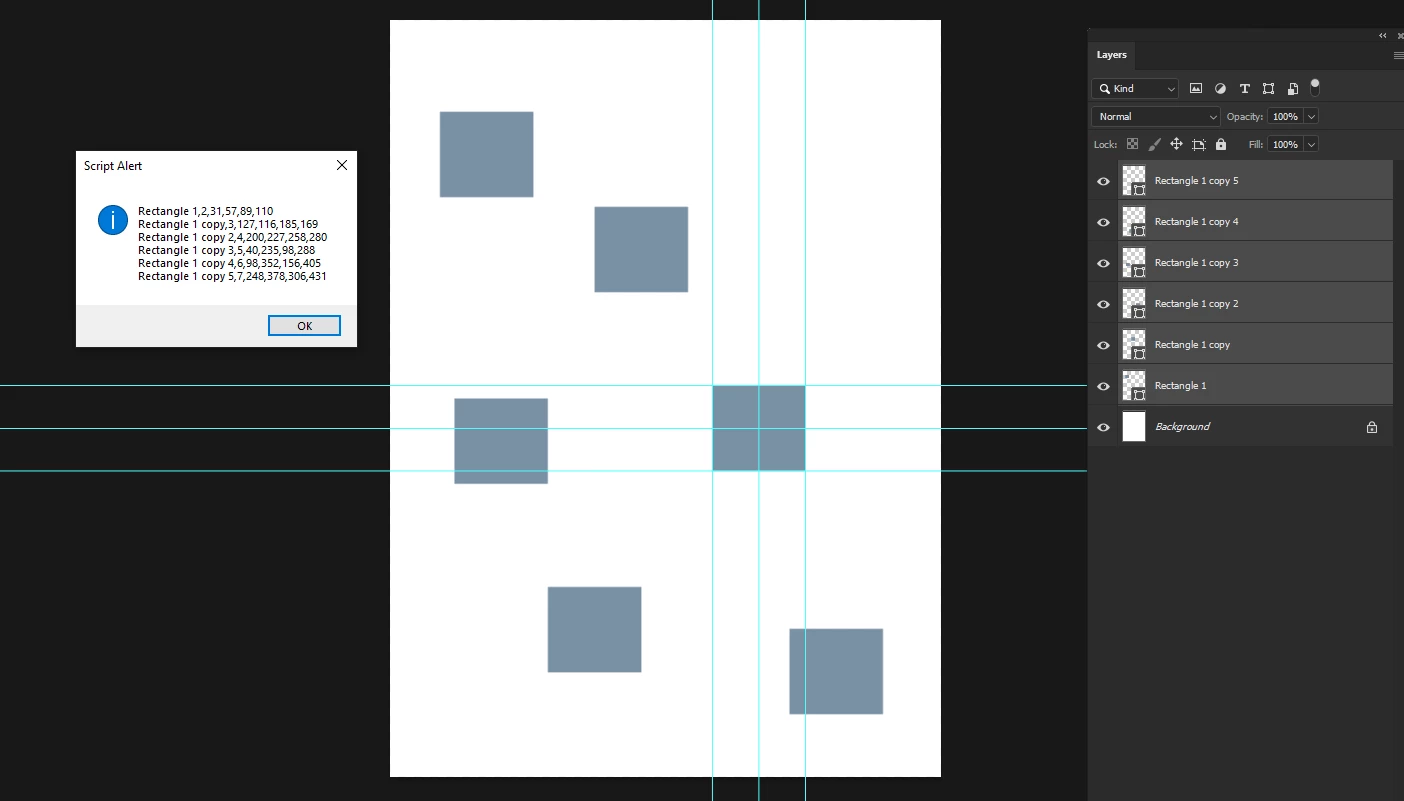
This code creates a text file on the desktop titled "layerList.txt" while also copying the text to the clipboard:


// 2020, use it at your own risk;
#target photoshop
if (app.documents.length > 0) {
    var theLayers = collectSelectedLayersBounds ();
    alert(theLayers.join("\n"));
    // copy text to clipboard
    var d = new ActionDescriptor();  
    d.putString(stringIDToTypeID("textData"), theLayers.join("\n"));  
    executeAction(stringIDToTypeID("textToClipboard"), d, DialogModes.NO);
    // write text to file
    var txt = theLayers.join("\n");
    var textFile = new File('~/Desktop' + '/' + 'layerList.txt');
    textFile.open('w');
    textFile.encoding = 'UTF-8';
    textFile.write(txt);
    textFile.close();
}
////// collect bounds of selected layers //////
function collectSelectedLayersBounds () {
// set to pixels;
    var originalRulerUnits = app.preferences.rulerUnits;
    app.preferences.rulerUnits = Units.PIXELS;
// get selected layers;
    var selectedLayers = [];
    var ref = new ActionReference();
    ref.putEnumerated( charIDToTypeID("Dcmn"), charIDToTypeID("Ordn"), charIDToTypeID("Trgt") );
    var desc = executeActionGet(ref);
    if( desc.hasKey( stringIDToTypeID( 'targetLayers' ) ) ){
    desc = desc.getList( stringIDToTypeID( 'targetLayers' ));
    var c = desc.count;
    // run through selected layers;
    for(var i=0;i<c;i++){
    try{activeDocument.backgroundLayer;
    var theIndex = desc.getReference( i ).getIndex();
    }catch(e){var theIndex = desc.getReference( i ).getIndex()+1 };
    // get id for solid color layers;
    try {
    var ref = new ActionReference();
    ref.putIndex( charIDToTypeID("Lyr "), theIndex ); 
    var layerDesc = executeActionGet(ref);
    var theName = layerDesc.getString(stringIDToTypeID('name'));
    var theIdentifier = layerDesc.getInteger(stringIDToTypeID ("layerID"));
    var theBounds = layerDesc.getObjectValue(stringIDToTypeID("bounds"));
    var theseBounds = [theBounds.getUnitDoubleValue(stringIDToTypeID("left")), theBounds.getUnitDoubleValue(stringIDToTypeID("top")), theBounds.getUnitDoubleValue(stringIDToTypeID("right")), theBounds.getUnitDoubleValue(stringIDToTypeID("bottom"))];
    selectedLayers.push([theName, theIdentifier, theseBounds]);
    } catch (e) {}
    }
    // if only one:
    }else{
    var ref = new ActionReference();
    ref.putEnumerated( charIDToTypeID("Lyr "), charIDToTypeID("Ordn"), charIDToTypeID("Trgt") );
    var layerDesc = executeActionGet(ref);
    try {
    var theName = layerDesc.getString(stringIDToTypeID('name'));
    var theIdentifier = layerDesc.getInteger(stringIDToTypeID ("layerID"));
    var theBounds = layerDesc.getObjectValue(stringIDToTypeID("bounds"));
    var theseBounds = [theBounds.getUnitDoubleValue(stringIDToTypeID("left")), theBounds.getUnitDoubleValue(stringIDToTypeID("top")), theBounds.getUnitDoubleValue(stringIDToTypeID("right")), theBounds.getUnitDoubleValue(stringIDToTypeID("bottom"))];
    selectedLayers = [[theName, theIdentifier, theseBounds]];
    } catch (e) {}
    }
// reset;
    app.preferences.rulerUnits = originalRulerUnits;
    return selectedLayers;
}

 

3 replies

Stephen Marsh
Community Expert
Stephen MarshCommunity ExpertCorrect answer
Community Expert
March 12, 2024

This code creates a text file on the desktop titled "layerList.txt" while also copying the text to the clipboard:


// 2020, use it at your own risk;
#target photoshop
if (app.documents.length > 0) {
    var theLayers = collectSelectedLayersBounds ();
    alert(theLayers.join("\n"));
    // copy text to clipboard
    var d = new ActionDescriptor();  
    d.putString(stringIDToTypeID("textData"), theLayers.join("\n"));  
    executeAction(stringIDToTypeID("textToClipboard"), d, DialogModes.NO);
    // write text to file
    var txt = theLayers.join("\n");
    var textFile = new File('~/Desktop' + '/' + 'layerList.txt');
    textFile.open('w');
    textFile.encoding = 'UTF-8';
    textFile.write(txt);
    textFile.close();
}
////// collect bounds of selected layers //////
function collectSelectedLayersBounds () {
// set to pixels;
    var originalRulerUnits = app.preferences.rulerUnits;
    app.preferences.rulerUnits = Units.PIXELS;
// get selected layers;
    var selectedLayers = [];
    var ref = new ActionReference();
    ref.putEnumerated( charIDToTypeID("Dcmn"), charIDToTypeID("Ordn"), charIDToTypeID("Trgt") );
    var desc = executeActionGet(ref);
    if( desc.hasKey( stringIDToTypeID( 'targetLayers' ) ) ){
    desc = desc.getList( stringIDToTypeID( 'targetLayers' ));
    var c = desc.count;
    // run through selected layers;
    for(var i=0;i<c;i++){
    try{activeDocument.backgroundLayer;
    var theIndex = desc.getReference( i ).getIndex();
    }catch(e){var theIndex = desc.getReference( i ).getIndex()+1 };
    // get id for solid color layers;
    try {
    var ref = new ActionReference();
    ref.putIndex( charIDToTypeID("Lyr "), theIndex ); 
    var layerDesc = executeActionGet(ref);
    var theName = layerDesc.getString(stringIDToTypeID('name'));
    var theIdentifier = layerDesc.getInteger(stringIDToTypeID ("layerID"));
    var theBounds = layerDesc.getObjectValue(stringIDToTypeID("bounds"));
    var theseBounds = [theBounds.getUnitDoubleValue(stringIDToTypeID("left")), theBounds.getUnitDoubleValue(stringIDToTypeID("top")), theBounds.getUnitDoubleValue(stringIDToTypeID("right")), theBounds.getUnitDoubleValue(stringIDToTypeID("bottom"))];
    selectedLayers.push([theName, theIdentifier, theseBounds]);
    } catch (e) {}
    }
    // if only one:
    }else{
    var ref = new ActionReference();
    ref.putEnumerated( charIDToTypeID("Lyr "), charIDToTypeID("Ordn"), charIDToTypeID("Trgt") );
    var layerDesc = executeActionGet(ref);
    try {
    var theName = layerDesc.getString(stringIDToTypeID('name'));
    var theIdentifier = layerDesc.getInteger(stringIDToTypeID ("layerID"));
    var theBounds = layerDesc.getObjectValue(stringIDToTypeID("bounds"));
    var theseBounds = [theBounds.getUnitDoubleValue(stringIDToTypeID("left")), theBounds.getUnitDoubleValue(stringIDToTypeID("top")), theBounds.getUnitDoubleValue(stringIDToTypeID("right")), theBounds.getUnitDoubleValue(stringIDToTypeID("bottom"))];
    selectedLayers = [[theName, theIdentifier, theseBounds]];
    } catch (e) {}
    }
// reset;
    app.preferences.rulerUnits = originalRulerUnits;
    return selectedLayers;
}


Inspiring
March 13, 2024

Thanks so much for your help.


Kind regards.

Stephen Marsh
Community Expert
Community Expert
March 12, 2024

The following edit will copy the alert text to the clipboard for the selected layers:


// 2020, use it at your own risk;
#target photoshop
if (app.documents.length > 0) {
    var theLayers = collectSelectedLayersBounds ();
    alert(theLayers.join("\n"));
    // copy text to clipboard
    var d = new ActionDescriptor();  
    d.putString(stringIDToTypeID("textData"), theLayers.join("\n"));  
    executeAction(stringIDToTypeID("textToClipboard"), d, DialogModes.NO);
}
////// collect bounds of selected layers //////
function collectSelectedLayersBounds () {
// set to pixels;
    var originalRulerUnits = app.preferences.rulerUnits;
    app.preferences.rulerUnits = Units.PIXELS;
// get selected layers;
    var selectedLayers = [];
    var ref = new ActionReference();
    ref.putEnumerated( charIDToTypeID("Dcmn"), charIDToTypeID("Ordn"), charIDToTypeID("Trgt") );
    var desc = executeActionGet(ref);
    if( desc.hasKey( stringIDToTypeID( 'targetLayers' ) ) ){
    desc = desc.getList( stringIDToTypeID( 'targetLayers' ));
    var c = desc.count;
    // run through selected layers;
    for(var i=0;i<c;i++){
    try{activeDocument.backgroundLayer;
    var theIndex = desc.getReference( i ).getIndex();
    }catch(e){var theIndex = desc.getReference( i ).getIndex()+1 };
    // get id for solid color layers;
    try {
    var ref = new ActionReference();
    ref.putIndex( charIDToTypeID("Lyr "), theIndex ); 
    var layerDesc = executeActionGet(ref);
    var theName = layerDesc.getString(stringIDToTypeID('name'));
    var theIdentifier = layerDesc.getInteger(stringIDToTypeID ("layerID"));
    var theBounds = layerDesc.getObjectValue(stringIDToTypeID("bounds"));
    var theseBounds = [theBounds.getUnitDoubleValue(stringIDToTypeID("left")), theBounds.getUnitDoubleValue(stringIDToTypeID("top")), theBounds.getUnitDoubleValue(stringIDToTypeID("right")), theBounds.getUnitDoubleValue(stringIDToTypeID("bottom"))];
    selectedLayers.push([theName, theIdentifier, theseBounds]);
    } catch (e) {}
    }
    // if only one:
    }else{
    var ref = new ActionReference();
    ref.putEnumerated( charIDToTypeID("Lyr "), charIDToTypeID("Ordn"), charIDToTypeID("Trgt") );
    var layerDesc = executeActionGet(ref);
    try {
    var theName = layerDesc.getString(stringIDToTypeID('name'));
    var theIdentifier = layerDesc.getInteger(stringIDToTypeID ("layerID"));
    var theBounds = layerDesc.getObjectValue(stringIDToTypeID("bounds"));
    var theseBounds = [theBounds.getUnitDoubleValue(stringIDToTypeID("left")), theBounds.getUnitDoubleValue(stringIDToTypeID("top")), theBounds.getUnitDoubleValue(stringIDToTypeID("right")), theBounds.getUnitDoubleValue(stringIDToTypeID("bottom"))];
    selectedLayers = [[theName, theIdentifier, theseBounds]];
    } catch (e) {}
    }
// reset;
    app.preferences.rulerUnits = originalRulerUnits;
    return selectedLayers;
}


Stephen Marsh
Community Expert
Community Expert
March 12, 2024

It is possible to send the text from the alert prompt to a text file and or the clipboard.


If you wish to make the changes yourself, I can just point you to some example code. Otherwise, please post the script code using the </> insert script button in the forum interface.


P.S. On a Mac it's possible to copy text from the alert window, but this isn't the case for Windows.

Inspiring
March 12, 2024

Here's the script Im running. But Im on a Windows machine. But if you could modify the code, so I can get the text, that would be very helpful.


// 2020, use it at your own risk;
#target photoshop
if (app.documents.length > 0) {
    var theLayers = collectSelectedLayersBounds ();
    alert (theLayers.join("\n"));
};
////// collect bounds of selected layers //////
function collectSelectedLayersBounds () {
// set to pixels;
    var originalRulerUnits = app.preferences.rulerUnits;
    app.preferences.rulerUnits = Units.PIXELS;
// get selected layers;
    var selectedLayers = new Array;
    var ref = new ActionReference();
    ref.putEnumerated( charIDToTypeID("Dcmn"), charIDToTypeID("Ordn"), charIDToTypeID("Trgt") );
    var desc = executeActionGet(ref);
    if( desc.hasKey( stringIDToTypeID( 'targetLayers' ) ) ){
    desc = desc.getList( stringIDToTypeID( 'targetLayers' ));
    var c = desc.count;
    var selectedLayers = new Array();
    // run through selected layers;
    for(var i=0;i<c;i++){
    try{activeDocument.backgroundLayer;
    var theIndex = desc.getReference( i ).getIndex();
    }catch(e){var theIndex = desc.getReference( i ).getIndex()+1 };
    // get id for solid color layers;
    try {
    var ref = new ActionReference();
    ref.putIndex( charIDToTypeID("Lyr "), theIndex ); 
    var layerDesc = executeActionGet(ref);
    var theName = layerDesc.getString(stringIDToTypeID('name'));
    var theIdentifier = layerDesc.getInteger(stringIDToTypeID ("layerID"));
    var theBounds = layerDesc.getObjectValue(stringIDToTypeID("bounds"));
    var theseBounds = [theBounds.getUnitDoubleValue(stringIDToTypeID("left")), theBounds.getUnitDoubleValue(stringIDToTypeID("top")), theBounds.getUnitDoubleValue(stringIDToTypeID("right")), theBounds.getUnitDoubleValue(stringIDToTypeID("bottom"))];
    selectedLayers.push([theName, theIdentifier, theseBounds]);
    } catch (e) {};
    };
    // if only one:
    }else{
    var ref = new ActionReference();
    ref.putEnumerated( charIDToTypeID("Lyr "), charIDToTypeID("Ordn"), charIDToTypeID("Trgt") );
    var layerDesc = executeActionGet(ref);
    try {
    var theName = layerDesc.getString(stringIDToTypeID('name'));
    var theIdentifier = layerDesc.getInteger(stringIDToTypeID ("layerID"));
    var theBounds = layerDesc.getObjectValue(stringIDToTypeID("bounds"));
    var theseBounds = [theBounds.getUnitDoubleValue(stringIDToTypeID("left")), theBounds.getUnitDoubleValue(stringIDToTypeID("top")), theBounds.getUnitDoubleValue(stringIDToTypeID("right")), theBounds.getUnitDoubleValue(stringIDToTypeID("bottom"))];
    selectedLayers = [[theName, theIdentifier, theseBounds]]
    } catch (e) {};
    };
// reset;
    app.preferences.rulerUnits = originalRulerUnits;
    return selectedLayers;
};