
DBarranca
Legend
September 8, 2016
Question

[ScriptUI] ALT keydown listener on the Window object

  • September 8, 2016
  • 1 reply
  • 1404 views

Hi,

I've a half baked demo dialog:

var res = """dialog {

  orientation: 'column',

  okButton: Button { text: 'OK' },

  cancelButton: Button { text: 'Cancel' },

         resetButton: Button { text: 'Reset the Cancel button'}

  }""";

var win = new Window(res);

win.resetButton.addEventListener('click', function(evt){

    win.cancelButton.text = 'Cancel';

})

win.addEventListener('keydown', function(evt) {

     if(true /* SUBSTITUTE HERE WORKING CONDITIONAL */) {

         win.cancelButton.text = "Reset";

    }

});

win.show()

Which looks like that:
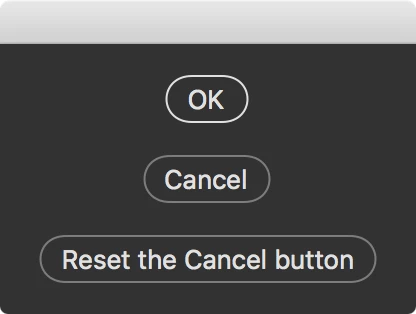
I'd like to listen, in the main Window, to the ALT keydown, so that the Cancel button text turns into "Reset", as it is with Adobe's dialogs.

Problems:

  1. the keypress is forbidden in PS (beeps – while it is actually listened in ESTK)
  2. I can't find the right conditional to stick in the if)

Apparently ALT, as well as other modifier keys, works (at least in ESTK) only in conjunction with other keys, e.g. I can detect ALT+something (say ALT+A), but not ALT alone.

So, are these two problems unavoidable? Is it possible to listen to keydown in Dialog Windows in Photoshop? Can I listen to a modifier key only? I can probably listen for the modifier key in the button's click handler, but I'd like to have a visual feedback as well.

Thank you in advance!

Davide

This topic has been closed for replies.

1 reply

Pedro Cortez Marques
Legend
September 8, 2016

Hi Davide!

It only works when the Window is under mouse focus.

Try this:

var res = """dialog { 

  orientation: 'column', 

  okButton: Button { text: 'OK' }, 

  cancelButton: Button { text: 'Cancel' }, 

         resetButton: Button { text: 'Reset the Cancel button'} 

  }"""; 

var win = new Window(res);

var mouseEventHandler = function(ev) {

    if (ScriptUI.environment.keyboardState.altKey) {

        win.resetButton.text = ev.type + ' || Reset'; // you can see the event type changing on the reset button text

    }

};

// Register the mouse event handler

win.addEventListener('mouseover', mouseEventHandler);

win.addEventListener('mouseout', mouseEventHandler);

win.addEventListener('mousemove', mouseEventHandler);

// these 2 are not so important: it only works 1 time and then always be mousemove when scrooling:

win.addEventListener('mousedown', mouseEventHandler);

win.addEventListener('mouseup', mouseEventHandler);

// there is no other option when loosing the Window focus

win.show()

Sorry, but it is an half-help...

DBarranca
DBarrancaAuthor
Legend
September 8, 2016

Hi Pedro,

that's very close, thanks! At least on CC2015.5 there is a drawback, see this one:

That is, the Listener doesn't seem to be attached to, or affect the, whole Window, but the Button only – i.e. if ALT is pressed when the mouse pointer is not on the Button, nothing happens (while it should)

Moreover, if you ALT then mouseOver (Cancel -> Reset), then while ALT is pressed you mouseOut, then release ALT, the text remains Reset (should become Cancel).

We all love ScriptUI ;-)

The code I've used:

var res = """dialog {   

  orientation: 'column',   

  okButton: Button { text: 'OK' },   

  cancelButton: Button { text: 'Cancel' },   

  }""";   


var win = new Window(res);  

var mouseEventHandler = function(ev) { 

    if (ScriptUI.environment.keyboardState.altKey) { 

        win.cancelButton.text = 'Reset'; // you can see the event type changing on the reset button text 

    }  else { win.cancelButton.text = 'Cancel' }

}; 


// Register the mouse event handler 

win.addEventListener('mouseover', mouseEventHandler); 

win.addEventListener('mouseout', mouseEventHandler); 

win.addEventListener('mousemove', mouseEventHandler); 

// these 2 are not so important: it only works 1 time and then always be mousemove when scrooling: 

win.addEventListener('mousedown', mouseEventHandler);  

win.addEventListener('mouseup', mouseEventHandler); 

// there is no other option when loosing the Window focus 


win.show()

Thanks again,

Pedro Cortez Marques
Legend
September 8, 2016

And this, may be anothe little step over. If the ivent is mouseout, the text will be always Cancel:

var res = """dialog {     

  orientation: 'column',     

  okButton: Button { text: 'OK' },     

  cancelButton: Button { text: 'Cancel' },     

  }""";     


var win = new Window(res);    

var mouseEventHandler = function(ev) {

    if (ev.type == 'mouseout') {

        win.cancelButton.text = 'Cancel';

    } else {

        if (ScriptUI.environment.keyboardState.altKey) {   

            win.cancelButton.text = 'Reset'; // you can see the event type changing on the reset button text   

        } else { win.cancelButton.text = 'Cancel' } 

    }

};   


// Register the mouse event handler   

win.addEventListener('mouseover', mouseEventHandler);   

win.addEventListener('mouseout', mouseEventHandler);   

win.addEventListener('mousemove', mouseEventHandler);   

// these 2 are not so important: it only works 1 time and then always be mousemove when scrooling:   

win.addEventListener('mousedown', mouseEventHandler);    

win.addEventListener('mouseup', mouseEventHandler);   

win.show()