
Legend
February 15, 2020
Answered

ScriptUI: delete listbox and create a new one in its place

  • February 15, 2020
  • 3 replies
  • 2860 views

Good day!
I have a script that does some work based on data from csv files. When working with a script, a user can upload several files sequentially (i.e., after finishing working with one file, I need to make it so that the user can load another without closing the script window). The csv files have a different structure and a different number of fields (this is controlled by the user) - it seemed to me convenient to show them using a listbox with headers.


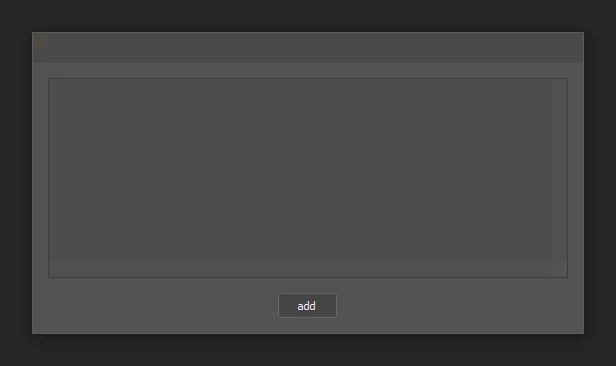
Before the user specifies the file, I open the form with an empty listbox object (just to reserve a place for it in the form):
After reading and processing the csv file, I create a new listbox object using the buildList() function. To do this, I delete the previously created testList object from the form, then load a new one in its place. And at this moment i have a problem with ScriptUI:
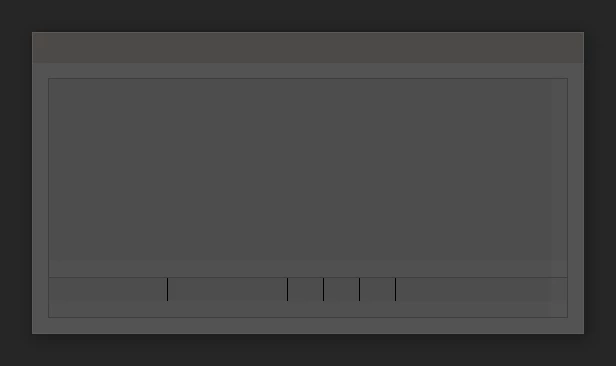
If I do not delete the object, then the listbox will display normally (but old instances will be preserved):
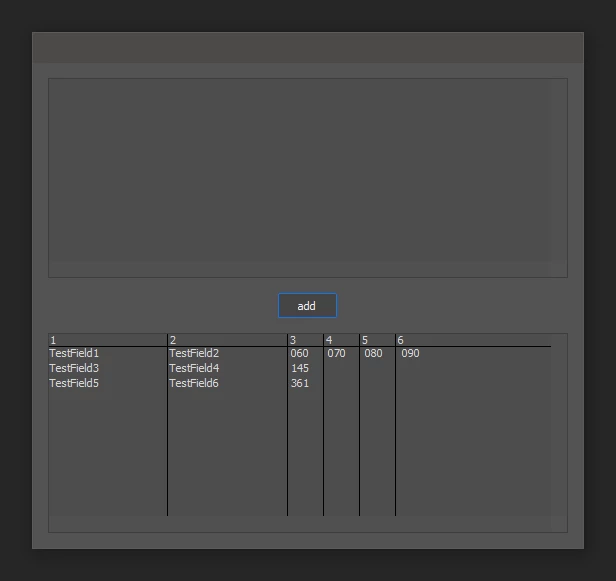
It is clear that i can rewrite the function so that for each csv file a new instance of the window is loaded in which a listbox with the necessary parameters will be immediately generated, but in my case this is inconvenient for the user.


I trying to understand - is this a bug of ScriptUI or am I doing something wrong?


(the example is simplified, just to demonstrate the problem)


#target photoshop

var parsedCSV = [["TestField1", "TestField2", "060", "070", "080", "090"], ["TestField3", "TestField4", "145"], ["TestField5", "TestField6", "361"]]

    var w = new Window("dialog"),
    oldList = w.add('listbox', [0,0,520,200]),
    bn = w.add("button", undefined, "test")
    
    bn.onClick = function () {
        w.remove (oldList) // problem here, i'm trying also w.remove (w.children[0])
        buildList(parsedCSV)
    }

    w.show ()

function buildList (list) {
    var columns=0, 
    wordLen={}

    for (var i=0; i<list.length; i++){
        if (list[i].length>columns) columns = list[i].length
        for (var n=0; n<list[i].length; n++){
            if (wordLen[n]=undefined) {
                wordLen[n] = list[i][n].length
            } else {
                if (list[i][n].length > wordLen[n]) wordLen[n] =list[i][n].length 
            }
        }
    }

    var props = { numberOfColumns: columns, showHeaders: true, columnTitles: [], columnWidths: [] }

    for (var i=0; i<columns; i++){
        props.columnTitles.push(String(i+1))
        props.columnWidths.push(wordLen[i]*12)
    }

    newList = w.add("listbox", [0, 0, 520, 200], undefined, props)
    
    for (var i = 0; i < list.length; i++) {
        var cur = list[i]
        newList.add("item", cur[0])
        for (var n = 1; n < cur.length; n++) {
            newList.items[i].subItems[n - 1].text = cur[n];
        }
    }
    
    w.layout.layout(true)
}


This topic has been closed for replies.
Correct answer r-bin
var parsedCSV = [["TestField1", "TestField2", "060", "070", "080", "090"], ["TestField3", "TestField4", "145"], ["TestField5", "TestField6", "361"]]

    var w = new Window("dialog")

    w.p1 = w.add("group");
    w.p1.margins = 0;

    w.p2 = w.p1.add("group");
    w.p2.margins = 0;
    
    oldList = w.p2.add('listbox', [0,0,520,200], [1,2,3]);

    bn = w.add("button", undefined, "test")

    bn.onClick = function () {
        w.p1.remove(w.p2);
        buildList(parsedCSV)
    }

    w.show ()

function buildList (list) {
    var columns=0, 
    wordLen={}

    for (var i=0; i<list.length; i++){
        if (list[i].length>columns) columns = list[i].length
        for (var n=0; n<list[i].length; n++){
            if (wordLen[n]=undefined) {
                wordLen[n] = list[i][n].length
            } else {
                if (list[i][n].length > wordLen[n]) wordLen[n] =list[i][n].length 
            }
        }
    }

    var props = { numberOfColumns: columns, showHeaders: true, columnTitles: [], columnWidths: [] }

    for (var i=0; i<columns; i++){
        props.columnTitles.push(String(i+1))
        props.columnWidths.push(wordLen[i]*12)
    }


    w.p2 = w.p1.add("group");

    newList = w.p2.add("listbox", [0, 0, 520, 200], undefined, props)
    
    for (var i = 0; i < list.length; i++) {
        var cur = list[i]
        newList.add("item", cur[0])
        for (var n = 1; n < cur.length; n++) {
            newList.items[i].subItems[n - 1].text = cur[n];
        }
    }
    
    w.layout.layout(true)
}

3 replies

r-binCorrect answer
Legend
February 16, 2020
var parsedCSV = [["TestField1", "TestField2", "060", "070", "080", "090"], ["TestField3", "TestField4", "145"], ["TestField5", "TestField6", "361"]]

    var w = new Window("dialog")

    w.p1 = w.add("group");
    w.p1.margins = 0;

    w.p2 = w.p1.add("group");
    w.p2.margins = 0;
    
    oldList = w.p2.add('listbox', [0,0,520,200], [1,2,3]);

    bn = w.add("button", undefined, "test")

    bn.onClick = function () {
        w.p1.remove(w.p2);
        buildList(parsedCSV)
    }

    w.show ()

function buildList (list) {
    var columns=0, 
    wordLen={}

    for (var i=0; i<list.length; i++){
        if (list[i].length>columns) columns = list[i].length
        for (var n=0; n<list[i].length; n++){
            if (wordLen[n]=undefined) {
                wordLen[n] = list[i][n].length
            } else {
                if (list[i][n].length > wordLen[n]) wordLen[n] =list[i][n].length 
            }
        }
    }

    var props = { numberOfColumns: columns, showHeaders: true, columnTitles: [], columnWidths: [] }

    for (var i=0; i<columns; i++){
        props.columnTitles.push(String(i+1))
        props.columnWidths.push(wordLen[i]*12)
    }


    w.p2 = w.p1.add("group");

    newList = w.p2.add("listbox", [0, 0, 520, 200], undefined, props)
    
    for (var i = 0; i < list.length; i++) {
        var cur = list[i]
        newList.add("item", cur[0])
        for (var n = 1; n < cur.length; n++) {
            newList.items[i].subItems[n - 1].text = cur[n];
        }
    }
    
    w.layout.layout(true)
}
jazz-yAuthor
Legend
February 16, 2020

Thanks. A few messages above i found some solution

Legend
February 15, 2020
Remark.

Interestingly, when did they manage to fix the multi-columned listboxes?
Nothing works in CC2018.

But there are problems in the CC2020 if you are trying to set a user font for such a listboxes.

In short, complete garbage.
 
Kukurykus
Legend
February 16, 2020

They encourage to use HTML and Javascript Extensions instead of ScriptUI.

Legend
February 16, 2020

Morons.


Kukurykus
Legend
February 15, 2020

Change this example (where innitially there's one set replaced by other when clicking button) to your needs:


lst = (win = new Window('dialog')).add('dropdownlist', [0, 0, 100, 20], [])
lst.add('item', [1, 2, 3]), btn = win.add('button', [0, 0, 60, 21], 'Replace')
btn.onClick = function() {lst.removeAll(), lst.add('item', [4, 5])} win.show()
jazz-yAuthor
Legend
February 15, 2020

The problem is that the set of headers in the listbox can be changed ONLY when it is created (i.e. numberOfColumns, showHeaders, columnTitles is a creation properties). It’s not enough for me to simply clear list, I need to recreate the object itself with a different set of fields

Kukurykus
Legend
February 15, 2020

Change appropriate lines of your script to these codes:

var w = new Window("dialog"), grp = w.add('group')
oldList = grp.add('listbox', [0,0,520,200])


grp.remove (grp.children[0]) // problem here, i'm trying also w.remove (w.children[0])


newList = grp.add("listbox", [0, 0, 520, 200], undefined, props)