Soleol
Participant
June 15, 2017
Answered

Searching the right preferences for a big Banner

  • June 15, 2017
  • 2 replies
  • 2346 views

Hello Community,

I have to design a Banner for my company and want to do so with help of Photoshop CC (2015.5)
However, I am not sure about which preferences I should use for this.

The banner gonna be 15m x 2m (bad size I know); and there gonna be a few logos on it.

So now 2 questions actually

1. What are the right preference settings for the banner --> I thought about using 15cm on 2cm by 750pixel per cm, using cmyk

2. What about the minimum size (resolution) of the Logos (png-files)

I am quite a PS Beginner, so forgive me if I'm totally wrong

Thanks for your help!!

Soleol
This topic has been closed for replies.
Correct answer Derek Cross

I would work in inches for this particular job, but you can, of course, work in mm if you prefer.

I suggest you have a word with your printer and check out my suggestions with them before you proceed.

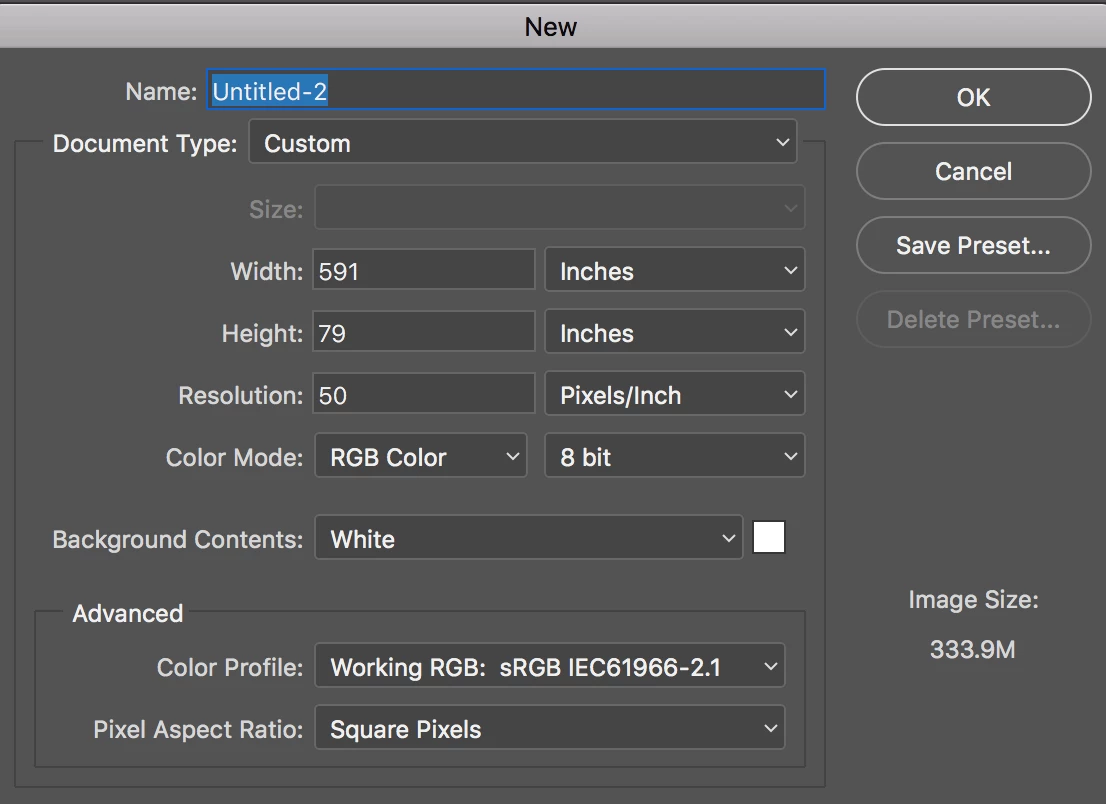
Re document dimensions – see my screen shot below (just an example).

2 replies

Nancy OShea
Community Expert
Community Expert
June 15, 2017

I'd like to know what this "banner" will be used for exactly.  

Desired output is what determines the settings you should use.

Nancy O'Shea— Product User & Community Expert
Soleol
SoleolAuthor
Participant
June 16, 2017

It will be used for commercial purpose for a car dealer
On the banner will be 2 logos (of the car dealer and one of one of the partners) and a Product will be advertised
Next to the product only 2 sentences.

Derek Cross
Community Expert
Community Expert
June 15, 2017

Set a new document to 15m x 2m at 50 PPI (pixels per inch), which will give you a document dimension of 29,550 x 3950px.  As your poster will be viewed from a distance – unlike for example a magazine image – you can use this lower resolution and it will give you manageable size document.

Place your images (logos) and your text on this canvas, keep your color mode in RGB. Export your final artwork to a PDF preset (unless your banner printer has given you a different spec) selecting High Quality Print (which is the best choice for inkjet printers, and which allows the printer's software to do the conversion from RGB to CMYK or even CMYK+.)

Keep a layered copy of your original Photoshop document so that you can return and make further changes to it if required.

And make external back-up copies!

Soleol
SoleolAuthor
Participant
June 16, 2017

Thank you very much but how can I set it to 15 m x 2 m
I only have the option of millimetre and centimetre and PS does not allow me to make it bigger then 400
Should I go over inches?

Derek Cross
Community Expert
Derek CrossCommunity ExpertCorrect answer
Community Expert
June 16, 2017

I would work in inches for this particular job, but you can, of course, work in mm if you prefer.

I suggest you have a word with your printer and check out my suggestions with them before you proceed.

Re document dimensions – see my screen shot below (just an example).