neonmamacita
Inspiring
February 28, 2018
Answered

Select and Mask has changed

  • February 28, 2018
  • 2 replies
  • 927 views

Something changed in the latest update, making selections when masking much more difficult.

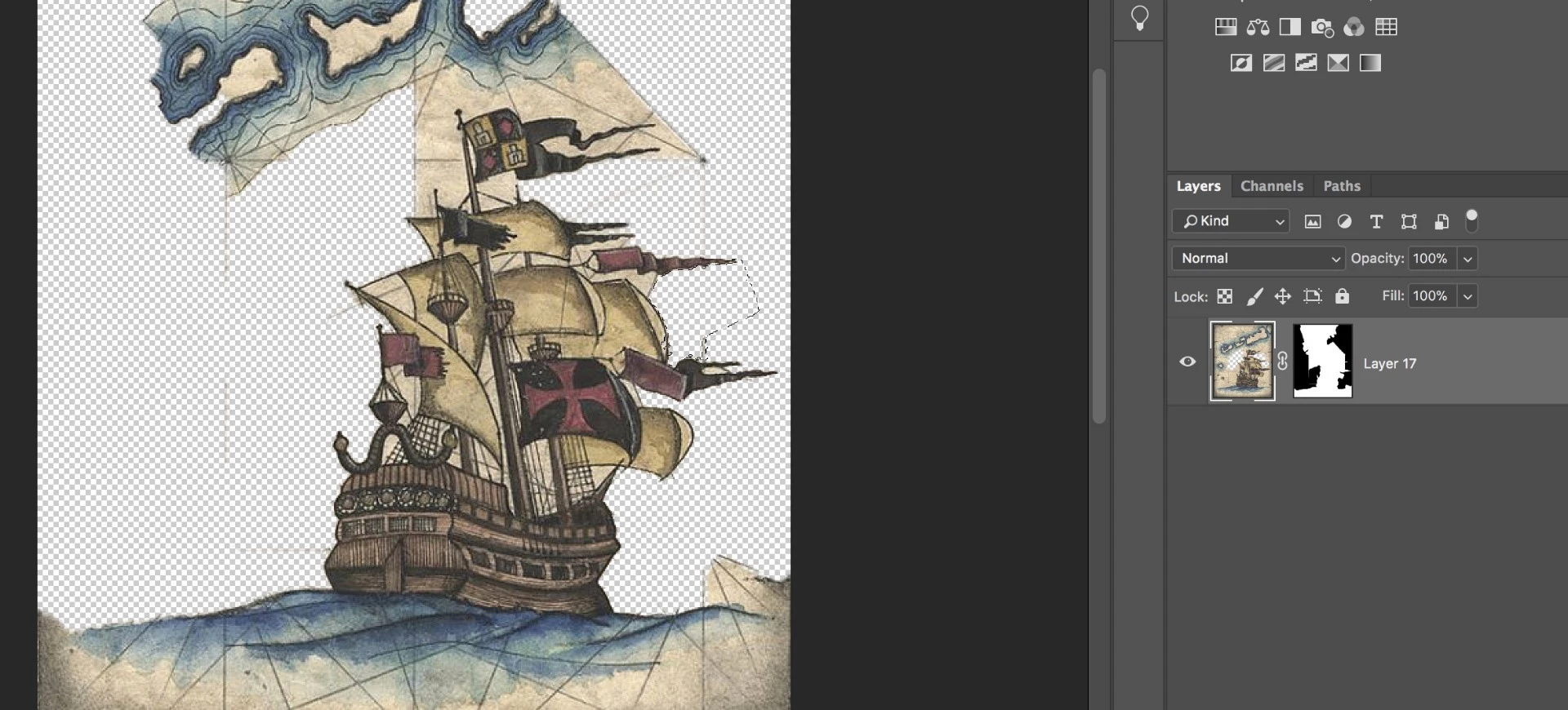
#1 I keep on accidently deleting the image instead of deleting parts of the mask (see thumbnails). Before the update, I couldn't edit the file I was masking.
#2 I now I have to make a deselection before making a selection. Before, I could just click and it would make a selection.

If anyone knows what settings to adjust to it goes back to it's previous function, please let me know

    This topic has been closed for replies.
    Correct answer D Fosse

    You see in your screenshot above the white borders around the image thumbnail? That means the image is targeted, and whatever you do works on the image pixels.

    Click the mask thumbnail to target the mask.

    2 replies

    neonmamacita
    Inspiring
    March 11, 2018

    Thanks! I hope they change it back, I keep on editing the image accidently instead of the mask.

    D Fosse
    Community Expert
    D FosseCommunity ExpertCorrect answer
    Community Expert
    March 11, 2018

    You see in your screenshot above the white borders around the image thumbnail? That means the image is targeted, and whatever you do works on the image pixels.

    Click the mask thumbnail to target the mask.

    neonmamacita
    Inspiring
    March 11, 2018

    Yup thanks, you didn't used to be able to edit the image so the change is throwing me off. Hope they change it back Cheers!

    chanaart
    Community Expert
    Community Expert
    February 28, 2018

    Now really understanding your question  .

    You can still add to selection while you are working.

    Can you show the steps with a screenshots?

    neonmamacita
    Inspiring
    March 1, 2018

    As you can see in the thumbnail on the left, the image has been erased at points. That was not intentional, I was trying to mask it. I was never able to delete portions of an image before the most recent photoshop update, so it seems like that behavior has changed. I'm trying to understand what changed, and how I can reset it to the previous settings.

    chanaart
    Community Expert
    Community Expert
    March 1, 2018

    They did change the view of the mask.

    If you want to work on the mask target it again :and go to the properties and anything you do will be part of the mask.

    Or go to the Mask without using select and mask and work directly on the mask.