Participant
October 29, 2023
Answered

Select and mask tools panel not working PS 25.1 and Sonoma Bug

  • October 29, 2023
  • 7 replies
  • 1904 views

When I make a selection and then enter the "Select and Mask"... area to refine it, I can no longer access the tools with my mouse. When I click on them (the brish, the refine edge tool etc) it acts like theres nothing there and I actually end up selecting the ruler underneath. I can cycle though the tools with hoykeys but cannot select with a mouse click. Any suggestions.  Running the latest PS, 25.1 on a Mac M1 Studio.


Thanks
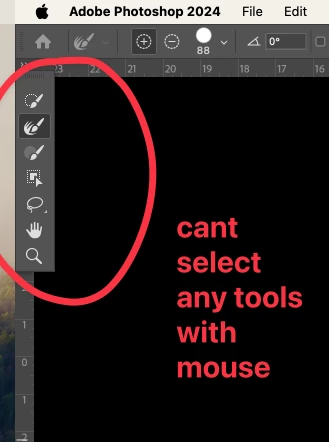


[versions added to subject]


This topic has been closed for replies.
Correct answer markbinksington

Apparently its a bug bewteen Adobe and Sonoma. The work around is turn on "Applciation Frame" in the Window menu and then you should be able to move the toolbar around and select all the tools. It worked for me.

7 replies

Participating Frequently
September 30, 2024

Same here, the Select and mask is always grey out, it can0t be selected.

Participating Frequently
September 30, 2024

My problem was maybe different, is that I had selected the Select > Edit in quick mask mode, so there is not possiblity to select the button Select and Mask... deselecting the Edit in quick mask mode, let's made use of the button again.

@mj
Community Expert
Community Expert
October 30, 2023

Oh good @markbinksington ,


Thanks for sharing.


Best

mj

iMSD

markbinksingtonAuthorCorrect answer
Participant
October 30, 2023

Apparently its a bug bewteen Adobe and Sonoma. The work around is turn on "Applciation Frame" in the Window menu and then you should be able to move the toolbar around and select all the tools. It worked for me.

Participant
May 16, 2024

I am unable to find the Applicaton Frame in the Window menu. My tools all of a sudden are not working in Select and Mask and received absolutely no help from the 800 number. They hung up on me twice. Please send some advice to me at: [email removed by moderator]


Legend
May 16, 2024

This bug has long since been fixed. It was Mac-only. Windows Photoshop does not allow turning off the Application Frame. Are you on Mac or Windows? Please post your system info (Help->System Info menu)

jt4pix
Participant
October 29, 2023

I have an issue like this as well when i click on the toolbar, any tool, it acts as if the toolbar is not there and selects the Finder. Even when i move my mouse over the tools the border around the tools does not enable. As if the mouse is not clicking on the tools at all!

Participant
October 29, 2023

Thanks yes I did say I could cycle through them with hotkeys, I meant keyboard shortcuts by that.

@mj
Community Expert
Community Expert
October 29, 2023

Hi @markbinksington ,


Are you able to select tools using keyboard shortcuts?


This will hopefully help us isolate your problem.


Best

mj

iMSD

Participant
October 29, 2023

Also, I did just update the OS and when this started happeneding I uninstalled PS and reinstalled it. I also have the same problem with older versions.