Inspiring
June 21, 2017
Answered

Select Data from File Info Page

  • June 21, 2017
  • 1 reply
  • 282 views

Re:  File > File Info...

The GPS information appears, however, I cannot select it.  (This also applies to other information such as Camera Data).

Is there some way to select the GPS co-ordinates?

In my dreams it would be great to be able to click on the co-ordinates and open a Google Map.
    This topic has been closed for replies.
    Correct answer gener7

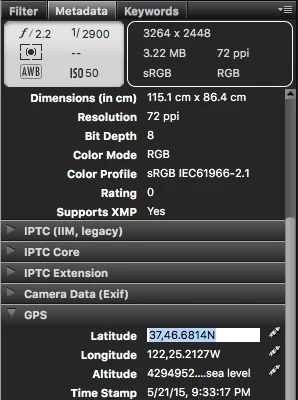
    Best way is to download and install Bridge CC 2017. It's a free download if you have Photoshop.

    Then in the Metadata Panel, open the GPS category. If your camera provides it, it will be there.

    1 reply

    gener7
    Community Expert
    gener7Community ExpertCorrect answer
    Community Expert
    June 21, 2017

    Best way is to download and install Bridge CC 2017. It's a free download if you have Photoshop.

    Then in the Metadata Panel, open the GPS category. If your camera provides it, it will be there.