Participant
June 21, 2021
Answered

Select/Move tool malfunction

  • June 21, 2021
  • 2 replies
  • 1295 views

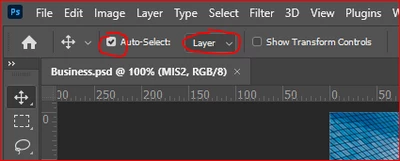
Ever since I updated to the most recent version (22.4.2), the Select/Move (arrow) tool does not appear to be working properly. Whenever I use it to click on a laver to select/move it, it has no effect, and remains on the layer that is currently selected in the LAYERS window, so I have to "manually" go to the LAYERS window and click on the layer I want to select/move, in order for the Select/Move tool to have any effect on the layer I wish to work in. I'm hoping this is just a simple fix that I should already know. Does anyone have any helpful advice or fix(es)?
This topic has been closed for replies.
Correct answer Mike_Gondek10189183

Check your settings here


2 replies

Participating Frequently
December 1, 2021

Oh, sheesh!  The move tool just started acting up yesterday.  Thank goodness for this forum.  Just resolved the problem.  Don't know why the settings changed from one image to the next but now I know.  Unchecked autoselect and Group.  Never noticed those before.

Thank you!

Mike_Gondek10189183
Community Expert
Mike_Gondek10189183Community ExpertCorrect answer
Community Expert
June 21, 2021

Check your settings here


Participant
June 21, 2021

Duh! It was just that easy, thanks!

Mike_Gondek10189183
Community Expert
Community Expert
June 22, 2021

For my part you are welcome