Participant
October 24, 2020
Answered

Select multiple faces in the neural function.

  • October 24, 2020
  • 2 replies
  • 7367 views

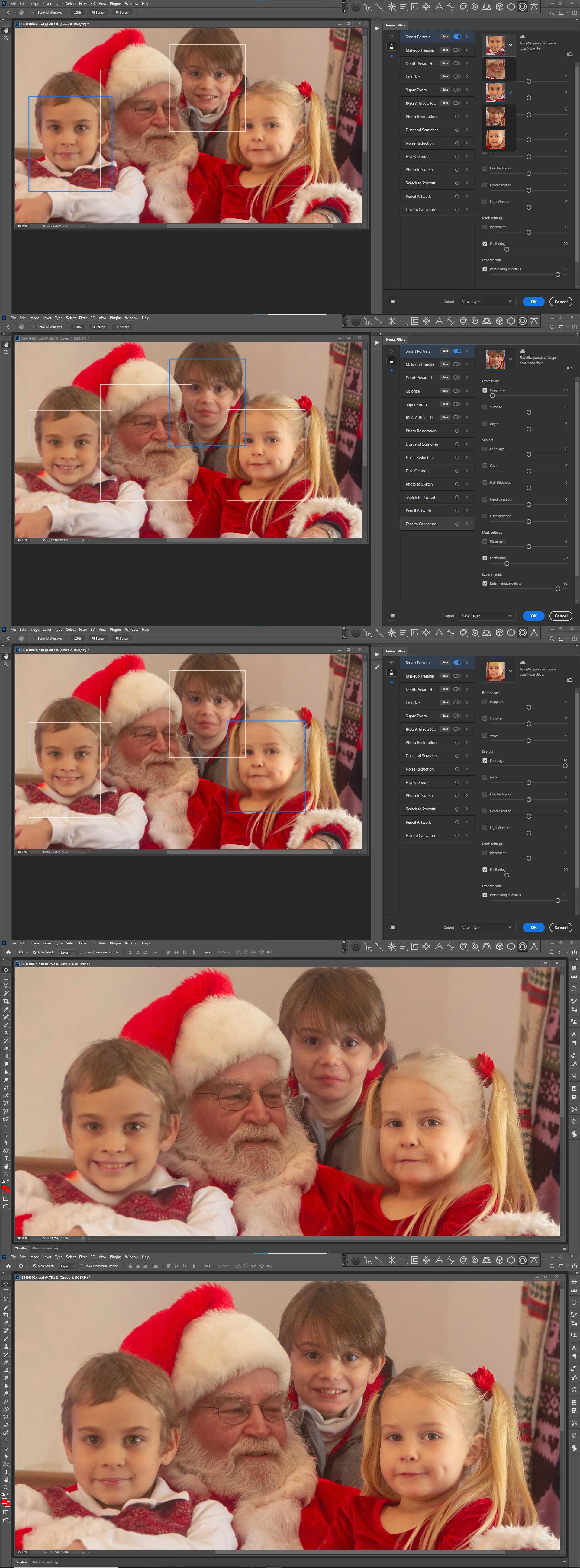
Select multiple faces in the neural function. I see and use the blue square not others. How do I move the active filter to another face?

Correct answer JJMack

Use the pull down to select the face you want to work on.
2 replies

Alex3821941079gh
Participant
August 1, 2024
How do I move the active filter to a different face when using the neural function in Photoshop? I only see and use the blue square, not the other options.
Known Participant
August 23, 2024

same problem got a photo with to persons but only one face is detected surround with a blue square but can't select the other face.. Within smart portret filter

Participant
October 26, 2024

I also have this problem. Photoshop detects faces but it edits only one. Even if I choose face with blue square it only edits the one the program selected by itself when opening neural filters as a first one with a blue square. This is like happening for two years since I'm using Photoshop Beta. Nothing changed

JJMack
Community Expert
JJMackCommunity ExpertCorrect answer
Community Expert
October 25, 2020

Use the pull down to select the face you want to work on.

JJMack
Participant
October 25, 2020
Thank you! I’m red with embarrassment. Sometimes I totally miss the
obvious.

Relieved and moving forward!

John
--
Thank you!
John