
Evelin Delchev
Participant
March 8, 2021
Question

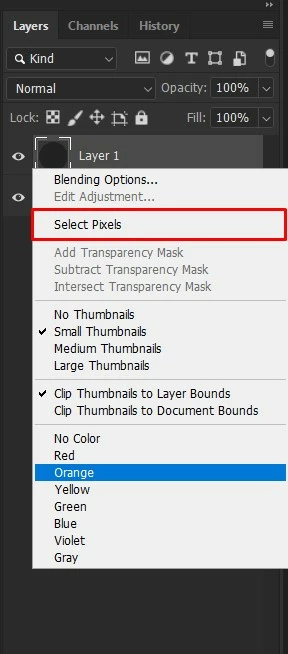
Select Pixels - How can I assign a keyboard shortcut ??

  • March 8, 2021
  • 1 reply
  • 490 views

Hi Everyone,


Except for Ctrl + Click Layer selection or Convert to an Action function.


How can I assign a hotkey to such a critically important feature of Photoshop, I cannot see this function in the key assignment panel.


Can someone please inform me about this?

This topic has been closed for replies.

1 reply

c.pfaffenbichler
Community Expert
Community Expert
March 8, 2021

What is the problem with using an Action in this case? 

Evelin Delchev
Participant
March 8, 2021

Hi C.Pfaffenbichler


Going to keys like "F2, F3, F4" with "Shift" or "Control" key combinations on the keyboard causes a lot of effort, so for a more optimal result, "Shift + S", "Shift + A" etc .. much more. it is efficient and offers a profitable approach in terms of time in the long term.


For this reason, using Action shortcuts or clicking on the object by going to the Layer panel does not give efficient results in frequent use.


Thanks for your question.

c.pfaffenbichler
Community Expert
Community Expert
March 9, 2021

Worst case you could create a Script which can be assigned a Shortcut viw Edit > Keyboard Shortcuts.