
Participant
August 14, 2018
Answered

Select Subject - Why can't I paint black on mask?

  • August 14, 2018
  • 2 replies
  • 781 views

I usually extract subjects by slowly masking out the background but I decided to try speed up the process by using Select Subject and then using Select and Mask to make refinements.

I then like to save as a selection with a mask so I can make further refinements using the brush tool.

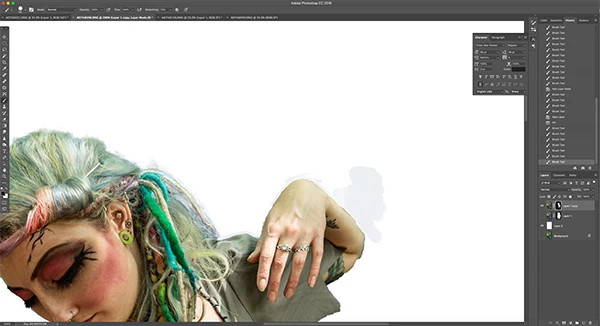
I have found in two images I worked on this week a horrible anomaly when trying to paint black with a 100% hard brush set at 100% Opacity and 100% Flow to try and sharpen the edges on the black mask. It's as if the brush is working at a lower opacity than 100% (I don't have pen pressure on).  You can see this in the image I've included.

I will probably revert back to the slow process of hand painting accurate, sharp masks with my Wacom pen but is there something I'm missing?

It's rotten and I've found it shows up on subsequent layers.

Thoughts appreciated.
This topic has been closed for replies.
Correct answer Derek Cross

This (first) online video lesson is free and demonstrates clearly how to use these new Photoshop CC 2018 tools demonstrating them on three different images: https://www.bringyourownlaptop.com/courses/adobe-photoshop-cc-advanced-training-course-tutorial/the-easiest-way-in-the-w…

2 replies

Participant
November 8, 2018

OK, so Adobe has changed something that was so simple and easy, replaced it with a slow VR tool. Why take away the original one? Was that necessary?

Participant
November 8, 2018

Oh, and by the way, if you turn on the actual mask, the brush tool works. You just have to toggle it on and off to see your result with your own background. Kind of strange, Adobe.

Derek Cross
Community Expert
Derek CrossCommunity ExpertCorrect answer
Community Expert
August 14, 2018

This (first) online video lesson is free and demonstrates clearly how to use these new Photoshop CC 2018 tools demonstrating them on three different images: https://www.bringyourownlaptop.com/courses/adobe-photoshop-cc-advanced-training-course-tutorial/the-easiest-way-in-the-w…