
roeeb73541340
Participant
August 23, 2017
Answered

selected font failed during last operation...

  • August 23, 2017
  • 2 replies
  • 6895 views

Hello

every time I load a psd I get an update font messege, and either I update or not i get this
"selected font failed during last operation.If problem persists,please disable font."

Iv'e tried disabling, or deleting something like 14 fonts, or deleting the cashe folder on appdata

NOTHING!!

uninstall and install too- same crap

rhat going on, it started ,I think' after last update. or maybe last windows 10 update

Thanks
Roee
    This topic has been closed for replies.
    Correct answer Terri Stevens

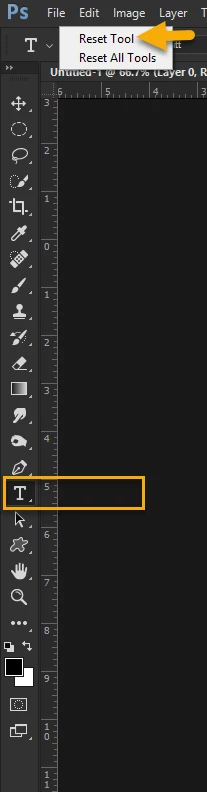
    Do you have Suitcase Fusion as a font manager? This will happen quite commonly with that program. The solution is to deactivate the problematic font and then reactivate from the Fusion interface. If you don't have a font manager press 'T' on the keyboard for the text tool to activate then in the toolbar at the top, below the menu bar, right click the 'text' tool and click on reset tool. If that doesn't work you may have some corrupt fonts present

    2 replies

    Terri Stevens
    Terri StevensCorrect answer
    Legend
    August 23, 2017

    Do you have Suitcase Fusion as a font manager? This will happen quite commonly with that program. The solution is to deactivate the problematic font and then reactivate from the Fusion interface. If you don't have a font manager press 'T' on the keyboard for the text tool to activate then in the toolbar at the top, below the menu bar, right click the 'text' tool and click on reset tool. If that doesn't work you may have some corrupt fonts present

    Inspiring
    September 13, 2017

    Thank you for your tool tip answer I was going crazy.

    You are a star

    John

    kglad
    Community Expert
    Community Expert
    August 23, 2017