
Selecting adjustment layer highlights value text box
Whenever I select an adjustment layer, photoshop automatically highlights the values in one of the text boxes in the properties pannel. This is super annoying when you want to delete the layer and you get the Invalid numeric entry error. See example below: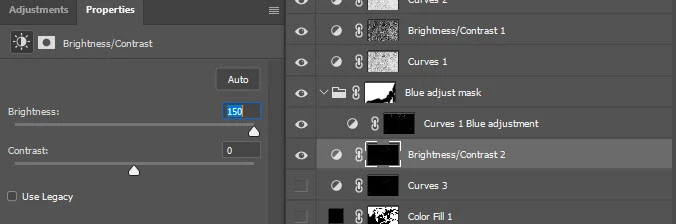
What is going on? How do I stop this automatic selection? It started a couple of versions ago and I was hoping it would resolve when updated. Yet it persists.
It does this with most adjustment layers with the exclusion of those that do not have a text box for editing values. As soon as a layer is selected it highlights a value as per the screenshot, requiring me to hit enter before delete.
Adobe Photoshop Version: 24.0.0 20221013.r.59 3a3d761 x64
Operating System: Windows 10 64-bit Version: 10 10.0.19045.2130
 AdChoices