Thanks for your replies @JJMack but I want to do it via script and strictly via script no manual no actions, just script. Actually its just a part of my script. My rest of the steps are done, just stuck on this alignment part.
If you look at the script I posted it does the select all and the two align steps to allign the current layer. All the four charter alignment id are listed in the code. all you need do is target the layer you want to align. it should look something like this
var savedActiveLayer = app.activeDocument.activeLayer; // save current adtive layer
app.activeDocument.selection.selectAll(); // select all
// Left('AdLf'); Right('AdRg'); Top('AdTp'); Bottom('AdBt'); Center Horizontal('AdCH'); Center Vertical('AdCV');
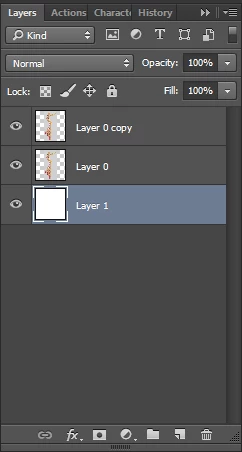
add code to target layer 0 // activeDocument.activeLayer = layers 0
align("AdLf"); // Align to selection Left Side
add code to target layer 0 copy // activeDocument.activeLayer = layers 0 copy
align("AdRg"); //Align to selection Right Side
app.activeDocument.selection.deselect(); // deselect
app.activeDocument.activeLayer = savedActiveLayer; // restore current layer
//////////////////////////////////////////////////
function align(method) {
var desc = new ActionDescriptor();
var ref = new ActionReference();
ref.putEnumerated( charIDToTypeID( "Lyr " ), charIDToTypeID( "Ordn" ), charIDToTypeID( "Trgt" ) );
desc.putReference( charIDToTypeID( "null" ), ref );
desc.putEnumerated( charIDToTypeID( "Usng" ), charIDToTypeID( "ADSt" ), charIDToTypeID( method ) );
executeAction( charIDToTypeID( "Algn" ), desc, DialogModes.NO );
};




 AdChoices