Participant
October 22, 2020
Question

Selection Fill In Script Question

  • October 22, 2020
  • 3 replies
  • 1478 views

Hello, 


I've used a script to fill in a selection area using the code below. 


activeDocument.selection.fill(fillColor);


When I zoom down to the pixel level, I noticed the edges is not the colors I specified because I think photoshop is blending the colors for a smooth transition. Is there anyway to fill so that the selected pixels are exactly the color specified?


I've attached an image below with the RGB values for each pixel. I'd like the only colors to be 


Dark Green with 0 red, 111 green, and 0 blue 

Light Green with 165 red, 241 green, and 172 blue
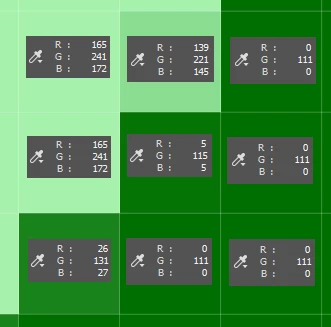


[ attachment inserted as inline image by moderator ]

This topic has been closed for replies.

3 replies

Legend
October 23, 2020
There are many inaccuracies in your words.
You write that you are using "tolerance = 0" and "contracting the selection by 3 pixels", although you give the code where "tolerance = 30" and "contract = 8". It is possible that you made mistakes in the anti-aliasing parameter.
In any case, I cannot reproduce your case.
Finding out the causes of the problem requires your file and your script, not general words. It is also advisable to indicate which version of Photoshop.
 
Participant
October 23, 2020

I'm having trouble understanding. I thought the tolerance for selection only affects which pixels are selected and not how the pixels are colored. How does the tolerance for magic wand affect the coloring? 


As for the inconsistency of the pixels to contract, I'm sorry about that. I have to change the number manually from 4, 8, and 12 each time. Sorry for that inconsistency in the question.


I'm am using Photoshop 21.2.4 with the following script and image.


/ (c) Copyright 2005.  Adobe Systems, Incorporated.  All rights reserved.

/*
@@@BUILDINFO@@@ Welcome.jsx 1.0.0.1
*/

var begDesc = "$$$/JavaScripts/Welcome/Description=Show a simple alert when Photoshop starts." // endDesc
var begName = "$$$/JavaScripts/Welcome/MenuName=Welcome" // endName

// on localized builds we pull the $$$/Strings from a .dat file, see documentation for more details
$.localize = true;


try {
 //Colors used in the script
//  Light Blue          78CAF1
//  Dark Blue           0000FF
//  Light Green         A5F1AC
//  Dark Green          006F00
var CustomerColorArray = ["78CAF1","A5F1AC"];
var WhizColorArray = ["0000FF","006F00"];

// Define the x and y coordinates for the pixel in the top left cornor
var Left = 0;
var Right = 1;
var Top = 0;
var Bottom = 1;

if(documents.length){

//Setup Counter to loop through pre-set colors

for (var counter = 0 ; counter <= 1; counter++){        
        //  Identify color to look for
        var selectColor = new SolidColor();
        selectColor.rgb.hexValue = CustomerColorArray[counter];
        
        // Identify color to fill in
        var fillColor = new SolidColor();
        fillColor.rgb.hexValue = WhizColorArray[counter];

        //  Fill in a temporary Pixel with select color
        activeDocument.selection.select([[Left,Top],[Right,Top],[Right,Bottom],[Left,Bottom]], SelectionType.REPLACE, 0, false);
        activeDocument.selection.fill(selectColor);
        activeDocument.selection.deselect();
    
        // Use magic want to find all pixels with select color
        magicWand (Left, Top, 30, false, false, false);

        //Contract the selection by x number of pixels, which is equivilent to distance away from objects
        activeDocument.selection.contract(new UnitValue (8, "px"))
        
        //Color the selection as the vacuumable color
        activeDocument.selection.fill(fillColor);
        activeDocument.selection.deselect();
        
        }
}
alert( localize( "$$$/JavaScripts/Welcome=Coloring Complete" ) );
 
function magicWand(x,y,t,a,c,s) {
    if(arguments.length < 2) return;// make sure have x,y
    if(undefined == t) var t = 32;// set defaults of optional arguments
    if(undefined == a) var a = true;
    if(undefined == c) var c = false;
     if(undefined == s) var s = false;
    var desc = new ActionDescriptor();
        var ref = new ActionReference();
        ref.putProperty( charIDToTypeID('Chnl'), charIDToTypeID('fsel') );
    desc.putReference( charIDToTypeID('null'), ref );
        var positionDesc = new ActionDescriptor();
        positionDesc.putUnitDouble( charIDToTypeID('Hrzn'), charIDToTypeID('#Rlt'), x );// in pixels
        positionDesc.putUnitDouble( charIDToTypeID('Vrtc'), charIDToTypeID('#Rlt'), y );
    desc.putObject( charIDToTypeID('T   '), charIDToTypeID('Pnt '), positionDesc );
    desc.putInteger( charIDToTypeID('Tlrn'), t);// tolerance
    desc.putBoolean( charIDToTypeID('Mrgd'), s );// sample all layers
    if(!c) desc.putBoolean( charIDToTypeID( "Cntg" ), false );//  contiguous
    desc.putBoolean( charIDToTypeID('AntA'), a );// anti-alias
    executeAction( charIDToTypeID('setd'), desc, DialogModes.NO );
};
}


catch( e ) {
	// always wrap your script with try/catch blocks so you don't stop production
	// remove comments below to see error for debugging 
	// alert( e );
}
Legend
October 23, 2020
I ran the script on your picture. Is it full size?
Where is the problem in the file?
Mark the area in the screenshot.
I have a clear color on all borders.
Unfortunately I'm using Photoshop 21.2.2. and the graphic card is not detected for me (due to the ADOBE bug). I cannot test the script when the GPU function is enabled.
 
Stephen Marsh
Community Expert
Community Expert
October 22, 2020

How is the active selection being created and can you turn anti-aliasing off?

Participant
October 23, 2020

I'm using a script to select a specific color with tolerance = 0 and then contracting the selection by 3 pixels


        // Use magic want to find all pixels with select color
        magicWand (Left, Top, 30, false, false, false);

        //Contract the selection by x number of pixels, which is equivilent to distance away from objects
        activeDocument.selection.contract(new UnitValue (8, "px"))
        
        //Color the selection as the Whiz vacuumable color
        activeDocument.selection.fill(fillColor);
        activeDocument.selection.deselect();
Tom Winkelmann
Inspiring
October 23, 2020

Post your MagicWand-Function...


Have you turned off/included anti-aliasing?

Legend
October 22, 2020
How do you create a selection?
Turn off feather and anti aliasing.