
$1949Leslie
Known Participant
April 17, 2021
Question

Selection issue Photoshop CC

  • April 17, 2021
  • 3 replies
  • 524 views

I can't figure out why I have an object (light-grey ellipse) that cannot be selected by selecting the layer and clicking CTRL, or why the object doesn't even show up in the Paths window. I can Ctrl + T to move the object or whatever, I just can't get the marching ants around it. Everything else seems to be working OK. I can select the other object (black circle) that is on the same layer. 
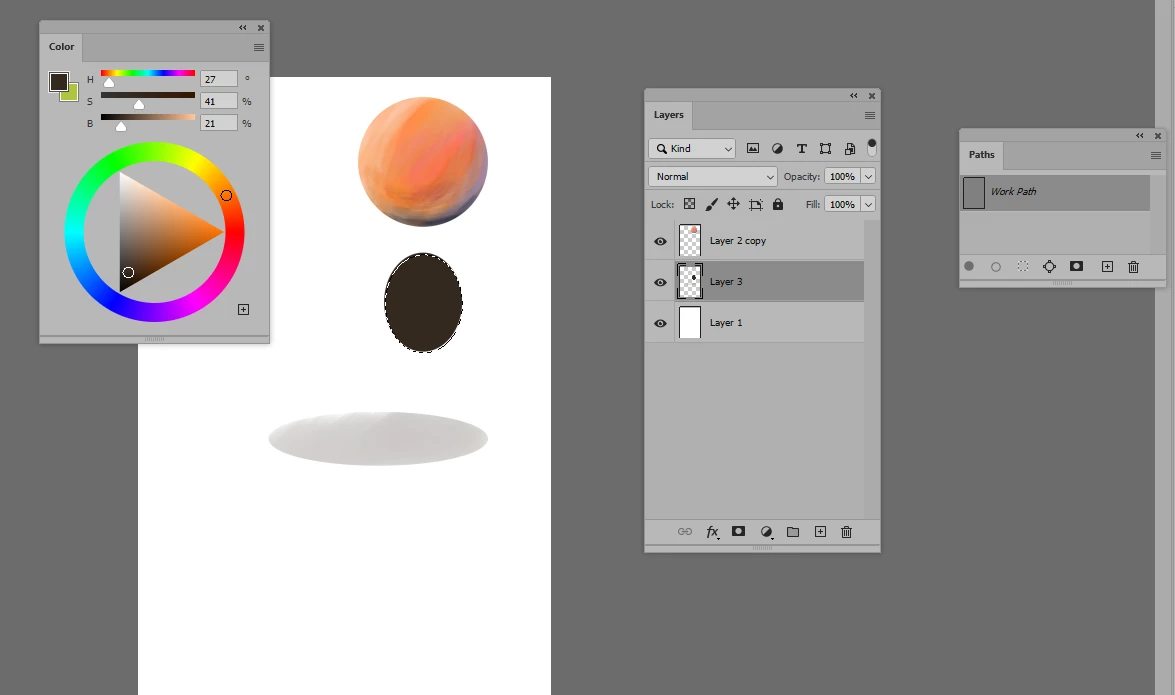
    This topic has been closed for replies.

    3 replies

    jane-e
    Community Expert
    Community Expert
    April 18, 2021


    @$1949Leslie wrote:

    I just can't get the marching ants around it.


    The marching ants only show up when 50% of the pixels are selected. Don't worry that you don't see them, as you are still able to move and transform. This is expected behavior.


    ~ Jane


    davescm
    Community Expert
    Community Expert
    April 18, 2021

    A rasterised shape will not appear in the paths panel.

    Turn the visibility of each layer off and on again to isolate which layer the grey shape is on. Then take it from there. 

    • I agree with Mylenium it looks like a semi transparent  shadow on a 3D layer that has now been fully rasterised, hence no 3D layer now showing.


    Dave

    $1949Leslie
    Known Participant
    April 18, 2021

    I had tried turning off the layers one-by-one earlier to see where the light-grey ellipse resides and it "is" on the same layer as the selectable circle. This is not a 3D workspace -- the image is a result of following a tutorial on simulating a 3D effect by painting an object with various brushes. I don't recall rasterizing the object or the layer. I created the object by dragging out an ellipse with the marquee tool and then painting in it while the marching ants were still active. The tutorial showed how to lock the transparent pixels on a layer, so from then on I used this method. I unlocked everything before trying to select the light-grey ellipse. 

    davescm
    Community Expert
    Community Expert
    April 18, 2021

    It may be a layer style that you have rasterised. Ctrl Clicking will not select it because of the low opacity. If you want to remove it select the layer in the layers panel then just drag a rectangular marquee around it and, ensuring the layer is still selected in the layers panel,  use Edit > Clear.


    Dave

    Mylenium
    Legend
    April 18, 2021

    A shadow from the 3D workspace perhaps?


    Mylenium