

procuts2
Inspiring
June 13, 2018
Answered

Selective Coloring in an Image

  • June 13, 2018
  • 1 reply
  • 552 views

Is it possible to selectively change color for a photo using Photoshop (CC, CS 6 or CS 4) or Fireworks (CS 6 or CS 4)?  I have a potential project where certain portions need brightening or other coloring changes to make subject matter more visible and vibrant.  Thanks.
This topic has been closed for replies.
Correct answer Trevor.Dennis

Absolutely, and there are several ways to go about it. 

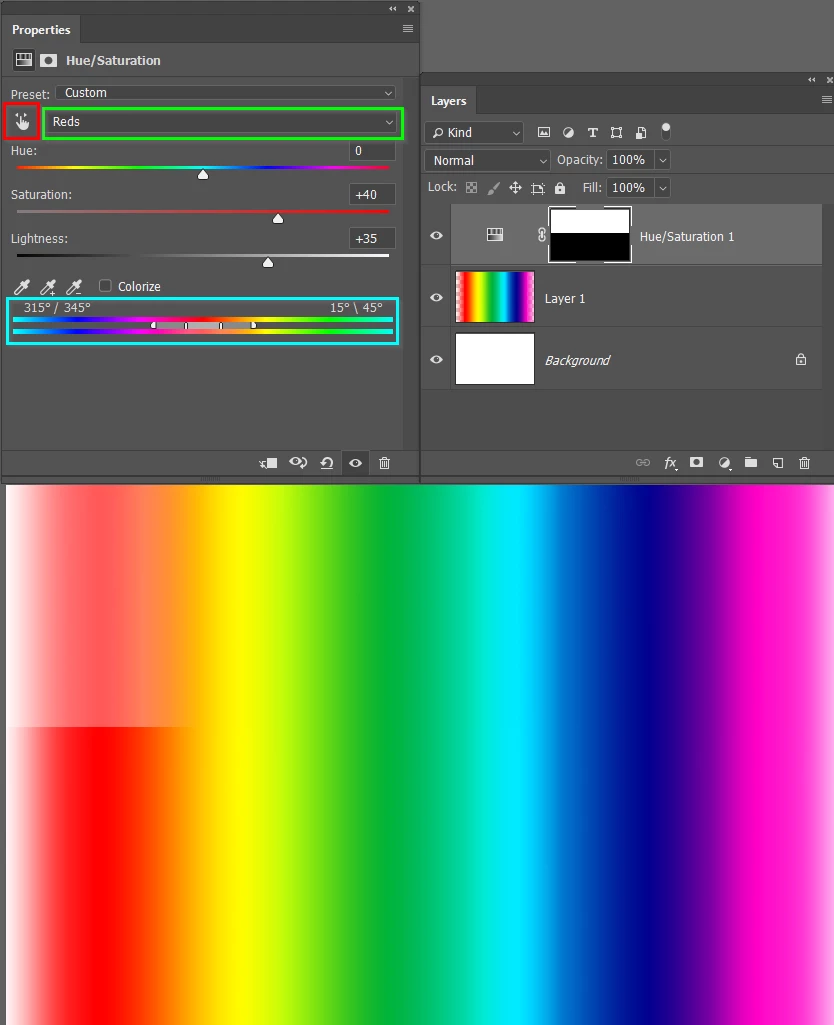
A Hue/Saturation can be set to target a specific colour or colour range via the RGB dropdown (set to Red with the green highlight below).

Or you can click on the little hand icon (red highlight) and drag directly on the image)

You can fine tune the colour range by dragging on the sliders in the Cyan highlighted area.

Note I have used a layer mask to show before and after.

1 reply

Trevor.Dennis
Community Expert
Trevor.DennisCommunity ExpertCorrect answer
Community Expert
June 13, 2018

Absolutely, and there are several ways to go about it. 

A Hue/Saturation can be set to target a specific colour or colour range via the RGB dropdown (set to Red with the green highlight below).

Or you can click on the little hand icon (red highlight) and drag directly on the image)

You can fine tune the colour range by dragging on the sliders in the Cyan highlighted area.

Note I have used a layer mask to show before and after.

procuts2
procuts2Author
Inspiring
October 18, 2018

Thank you

Kenneth Davis, Director of Post ProductionPro Cuts Editing Services[Do not share PII or websites on signatures. This could cause a ban in the future]