
K24076904
Known Participant
July 2, 2019
Answered

send javascript variable to action

  • July 2, 2019
  • 1 reply
  • 760 views

Hi,

I'm wondering if there is a way to pass javascript value to photoshop action (XML-->ATN)

<DescValueType.ALIASTYPE key="1231953952" id="1231953952" symname="StampIn" sym="In  " path="/d/work/lost_city"/>

I need to change this path="/d/work/lost_city"/>

so the path is not hard written and action can be used on any PC with different files (otherwise files is always saved to same location)

here is the javascript part

path=app.activeDocument.fullName.path 

Thanks!
This topic has been closed for replies.
Correct answer JJMack

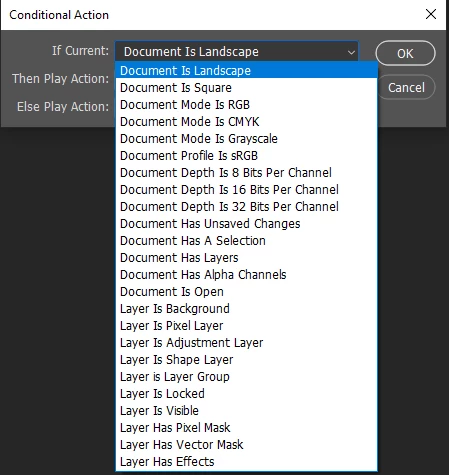
Actions are just hard coded Photoshop steps.  Actions can not use logic actions they can not have parameters passed to them.  Action can however, have conditional steps there are just a few conditions an action can test for.

You would need to use scripting to do what you want to do.

Use Xtools ActionFileToJavascript.jsx to convert your actions *.atn file into a JavaScript *.jsx then add the logic you want. You can use Photoshop DOM Javascript code to add logic into your converted action.

1 reply

JJMack
Community Expert
JJMackCommunity ExpertCorrect answer
Community Expert
July 2, 2019

Actions are just hard coded Photoshop steps.  Actions can not use logic actions they can not have parameters passed to them.  Action can however, have conditional steps there are just a few conditions an action can test for.

You would need to use scripting to do what you want to do.

Use Xtools ActionFileToJavascript.jsx to convert your actions *.atn file into a JavaScript *.jsx then add the logic you want. You can use Photoshop DOM Javascript code to add logic into your converted action.

JJMack
K24076904
K24076904Author
Known Participant
July 2, 2019

Hi  JJMack

I was trying to follow your guide and always keep failing ((

actually when I run the generated .js file - nothing happens

so it cannot replicate same steps as action does

also I tried to replace row 26

    desc1.putPath(cTID('In  '), new File("~/Desktop"));

to

   desc1.putPath(cTID('In  '), new File(app.activeDocument.fullName.path));

please guide me where I'm doing mistake

Thx!!!

here is the very simple action

    <Action key="2" name="save" expanded="false" count="1">

      <ActionItem key="TEXT" expanded="true" enabled="true" withDialog="false" dialogOptions="0" identifier="TEXT" event="save" name="Save" hasDescriptor="true">

        <ActionDescriptor key="save" count="3">

          <DescValueType.OBJECTTYPE key="1098063904" id="1098063904" symname="As" sym="As  " objectTypeString="Photoshop35Format" objectType="Pht3" count="1">

            <ActionDescriptor key="1098063904" id="1098063904" symname="As" sym="As  " count="1">

              <DescValueType.BOOLEANTYPE key="47" id="47" symname="maximizeCompatibility" sym="maximizeCompatibility" boolean="true"/>

            </ActionDescriptor>

          </DescValueType.OBJECTTYPE>

          <DescValueType.ALIASTYPE key="1231953952" id="1231953952" symname="StampIn" sym="In  " path="~/Desktop"/>

          <DescValueType.INTEGERTYPE key="1148150601" id="1148150601" symname="DocumentID" sym="DocI" integer="233"/>

        </ActionDescriptor>

      </ActionItem>

    </Action>

after convertion to JS

#target photoshop

//

// save.js

//

//

// Generated Tue Jul 02 2019 23:14:10 GMT+0300

//

cTID = function(s) { return app.charIDToTypeID(s); };

sTID = function(s) { return app.stringIDToTypeID(s); };

//

// in3des

//

//

//==================== save ==============

//

function save() {

  // Save

  function step1(enabled, withDialog) {

    if (enabled != undefined && !enabled)

      return;

    var dialogMode = (withDialog ? DialogModes.ALL : DialogModes.NO);

    var desc1 = new ActionDescriptor();

    var desc2 = new ActionDescriptor();

    desc2.putBoolean(sTID("maximizeCompatibility"), true);

    desc1.putObject(cTID('As  '), cTID('Pht3'), desc2);

    desc1.putPath(cTID('In  '), new File("~/Desktop"));

    desc1.putInteger(cTID('DocI'), 233);

    executeAction(cTID('save'), desc1, dialogMode);

  };

  step1();      // Save

};

// EOF

"save.js"

// EOF

K24076904
K24076904Author
Known Participant
July 2, 2019

got it fixed ))

easy way

just added

save();

at row 35.

Thanks!