dainaram92760468
Participant
January 23, 2020
Answered

Separação de Freqüência - Photoshop 2020

  • January 23, 2020
  • 1 reply
  • 1408 views

Hello good afternoon!! 
I downloaded Photoshop 2020 and when trying to use the frequency separation for skin treatment, I identified that there are no more scale and displacement checkboxes in the Edit-Apply image menu.


Can anybody help me? 
Is there another way now in the new photoshop?

Thank you very much in advance. Thank you! Att, Dainara


[Moving from generic Start/Help forum to the specific Program forum... Mod]
[To find a forum for your program please start at https://community.adobe.com/]
This topic has been closed for replies.
Correct answer davescm

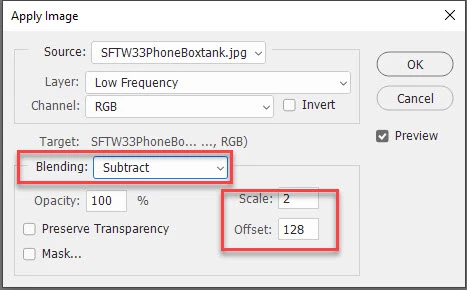
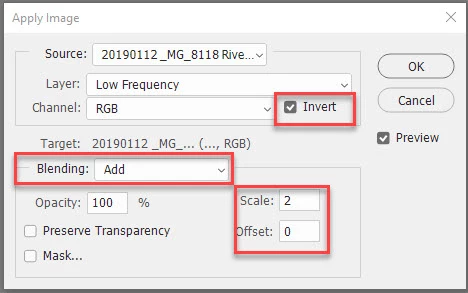
You will need to set "Blending" to Subtract for 8 bit (or Add for 16 bit) for Scale and Offset to appear


So for 8 bit images:


and for 16 bit images


In both cases the resulting high frequency layer should be set to Linear light blend mode


Dave

1 reply

davescm
Community Expert
davescmCommunity ExpertCorrect answer
Community Expert
January 23, 2020

You will need to set "Blending" to Subtract for 8 bit (or Add for 16 bit) for Scale and Offset to appear


So for 8 bit images:


and for 16 bit images


In both cases the resulting high frequency layer should be set to Linear light blend mode


Dave

dainaram92760468
Participant
January 24, 2020

Boa tarde, Dave!!!
Muito Obrigada!!
Ao adicionar a opção Subtrair, abriu as novas opções para preenchimento.
Agradeço a atenção e resposta rápida!!