I only hack at Photoshop. I do not know that much about JavaSctipt or Adobe Photoshop Scripting.
your code it looks like your code
//Get a reference to the text item so that we can add the text and format it a bit
textItemRef = artLayerRef.textItem;
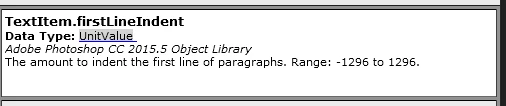
initalizes textItemRef.firstLineIndent to "0 pt"
and your statement:
textItemRef.firstLineIndent = indent;
Does not change that setting and does not throw an error where indent is 32???
I change your code a bit and through in a couple of aletrs
// Create Image with 1382 x 787 Pixel
app.preferences.rulerUnits = Units.PIXELS;
app.documents.add(1382, 787, 300, "Image Caption", NewDocumentMode.RGB);
createText("Caption", "Calibri", 8.0, 0, 0, 0, "Description Text", 5, 179, 324, 14, Justification.LEFT, 32, 0);

function createText(lname, fface, size, colR, colG, colB, content, tX, tY, wdth, hght, just, indent, rot) {

    // Add a new layer in the new document
    var artLayerRef = app.activeDocument.artLayers.add();
    artLayerRef.name = lname;
    // Specify that the layer is a text layer
    artLayerRef.kind = LayerKind.TEXT;
    artLayerRef.rotate(rot);

    //This section defines the color of the text
    textColor = new SolidColor();
    textColor.rgb.red = colR;
    textColor.rgb.green = colG;
    textColor.rgb.blue = colB;

    //Get a reference to the text item so that we can add the text and format it a bit
    textItemRef = artLayerRef.textItem;
    textItemRef.kind = TextType.PARAGRAPHTEXT;
    textItemRef.font = fface;
    textItemRef.color = textColor;
    textItemRef.size = size;


    textItemRef.position = new Array(tX, tY); //pixels from the left, pixels from the top
    textItemRef.width = wdth;
    textItemRef.height = hght;

    textItemRef.justification = just;
    //app.preferences.typeUnits = TypeUnits.POINTS;
    //app.preferences.Units = Units.POINTS;
alert("textItemRef.firstLineIndent=" + textItemRef.firstLineIndent);
    textItemRef.firstLineIndent = indent;
alert("indent=" + indent + " textItemRef.firstLineIndent=" + textItemRef.firstLineIndent);
/*
    ind = new UnitValue(indent, "pt");
    textItemRef.firstLineIndent = ind;
*/
    textItemRef.contents = content;
}
I doe not understand what for I see this so what is wrong with 32?
Your script works in CS6 Creative Cloud version 13.1.2. It does not work in CC 2014, CC 2018, CC 2019 or PS 2020. It works in CS3 also.... Report the bug to Adobe at photoshop_family
Adobe need to improve their development and testing......I read other Adobe program are also full of bugs. Its the main reason I do not install other creative cloud applications. I work around the buge the bite me in Photoshop. Adobe does not fix all reported bugs. They will fix bugs that crash Photoshop other types of bugs may not be fixed.
The easy work aroynd to to set no indent in any version of Photoshop and add the requiured spaces in front of content
textItemRef.contents = requiredspaces + content;

 AdChoices