Answered
Setting Photoshop CS5 as the default for opening all photo files?
How do I make Photoshop CS5 the default for opening all photo files?
How do I make Photoshop CS5 the default for opening all photo files?
When I have a jpg selected and I click command-i, it doesn't give the the file info window, it inverts the image. I am opening this jpg by opening Photoshop, going file-> open and picking a jpg file. If I click on the desktop and click command-i, I get the file info window, but not one pertaining to a jpg file of course, but it is the window that I have used to accomplish this task in the past. In CS5 there isn't a Get Info under File, only a File Info and it opens up a window that doesn't offer the change I am looking for. I just upgraded to CS5 and its been years since I've dealt with this issue. I really appreciate you assistance.
Close the jpeg in Photoshop! This procedure is done on an unopened (closed) file in the finder, Photoshop is not involved.
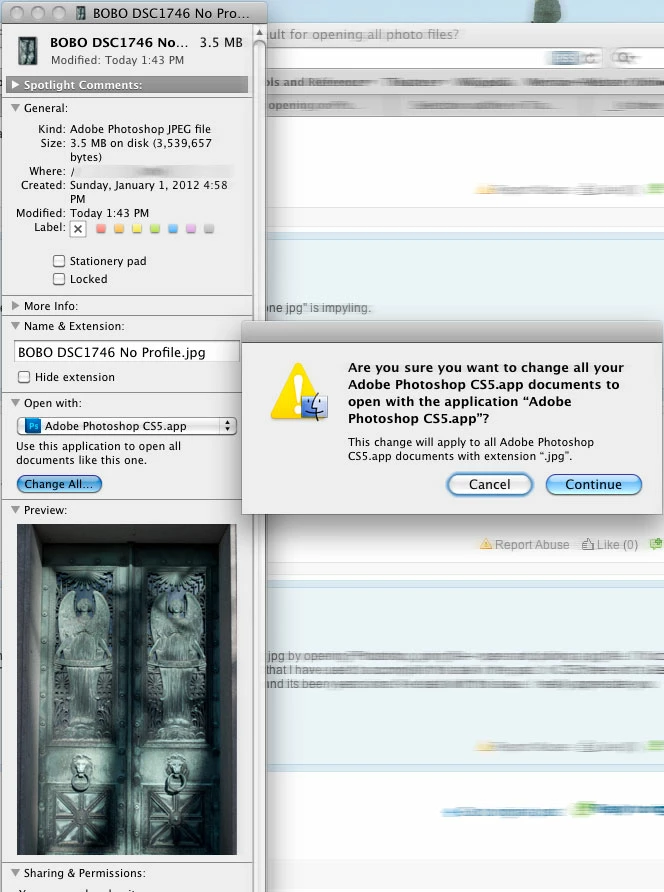
Open a FINDER window, click ONCE to select your file (NOT double click to open it)
Command I or in the Finder, File menu, select Get Info.
In the GET INFO window, change the Open With item to Photoshop
Click the CHANGE ALL button, You will get the warning "This change will apply to all Adobe Photoshop CS5.app documents with extension “.jpg”.
Click CONTINUE and from now on all jpegs double clicked in the finder will automatically open in Photoshop
Already have an account? Login
Enter your E-mail address. We'll send you an e-mail with instructions to reset your password.
 AdChoices