
Inspiring
May 22, 2019
Question

Shadow-Effect on group of layers

  • May 22, 2019
  • 1 reply
  • 390 views

Hi!

Allthough I´ve read some threads with similar topics, I´m not that satisfied with the responses. So I start another try in this forum:

There are some overlapping layers in a group and each of them needs a shadow. The group-element gets the effect because the sontents changes periodicaly.

The unwanted snag is, that photoshop treated all of them as one and the shadow is only around the "fused/melted" object.
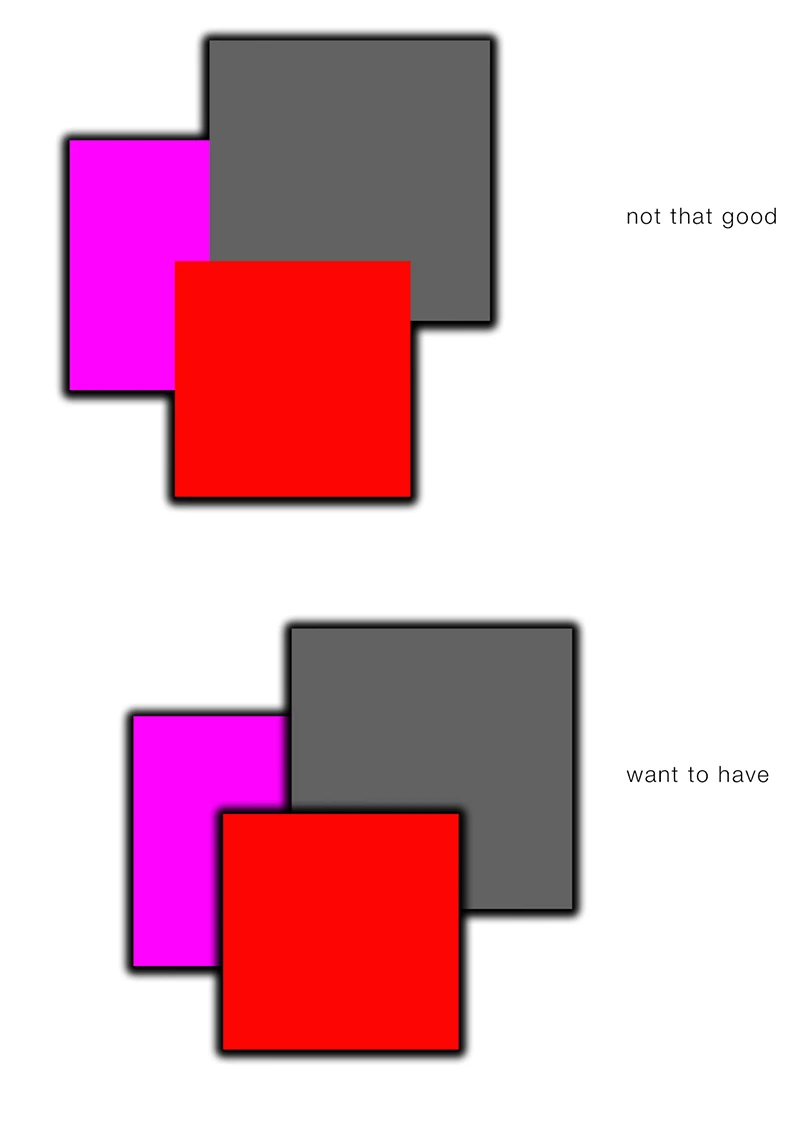
I can´t imagine there is no way to solve this problem...

Any ideas?

This topic has been closed for replies.

1 reply

davescm
Community Expert
Community Expert
May 22, 2019

Hi

You will need to put the effect on each layer so either:

Make a layer style that can be quickly added to new content as you change it.

Or

Put each content layer in a smart object and add the drop shadow to the smart object. When changing the content open the SO and change it.

Dave

cmoke73Author
Inspiring
May 22, 2019

Yes, I know those workarounds.

So, it seems there is no straighter way to handle ist...

Anyhow, thanks.