Wait Shift+C is a shortcut. Every time you use it it should select the next tool in in the tool bar in the group that the crop tool is in. So Sift+C might not select the crop tool.
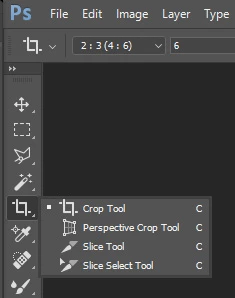
The Shift key is a Photoshop modifier key it is known as the constrain key. How it works depends on many things. On when and when it is use. Shift modifies some shortcuts. Use in the transform dialog bounding box with control points when you drag on a corner control point the transform will be constrained to the current Aspect ratio. When use with a rectangle tool the rectangle will constrain the rectangle to a square. with an ellipse tool the ellipse to a circle.
The crop tool is a powerful and strange beast and has different modes of operation. Classic and new. It can be set to a fixed aspect aspect ratio like 1:1. It can work freeform where you can drag out any aspect ratio and in that mode if you use shift the aspect ratio will be constrained to 1:1 square. The Crop tool can also resample the cropped area. As powerful as it is I do not use it I prefer to use the rectangle marquee tool and image prop to keep things simple for my little mind.
The crop tool does now work the same way in all versions of Photoshop. I do not use the crop tool.

 AdChoices